On this page
- The Myth That Won’t Die
- macOS Malware in 2026, by the Numbers
- Trojans Have Taken Over
- Adware Is No Longer the Main Threat
- Backdoors Are Surging
- Ransomware Has Arrived on Mac
- The Business Model Has Professionalised
- How Modern Mac Malware Actually Works
- Social Engineering Is the Primary Attack Vector
- Atomic Stealer (AMOS): A Case Study
- What Apple Does to Protect You
- XProtect
- Gatekeeper and Notarization
- System Integrity Protection (SIP)
- App Sandboxing
- macOS Tahoe Security Updates
- Transparency, Consent, and Control (TCC)
- Where Built-in Protection Falls Short
- Zero-Day and Signature Gaps
- Social Engineering Blindness
- No Web or Email Filtering
- No Integrated VPN
- Limited Behavioural Analysis
- Who Actually Needs Third-Party Antivirus?
- The “Insurance Policy” Framing
- Best Mac Antivirus Options in 2026
- 7 Essential Mac Security Practices
- 1. Keep macOS Updated, Always
- 2. Never Paste Commands from Websites into Terminal
- 3. Verify Downloads Before Opening
- 4. Use a Password Manager
- 5. Be Suspicious of Permission Requests
- 6. Stick to the App Store When Possible
- 7. Maintain Offline Backups
- Frequently Asked Questions
- Can Macs get ransomware?
- Is a free antivirus enough for a Mac?
- Does antivirus slow down my Mac?
- Is Apple’s built-in XProtect the same as antivirus?
- What about Mac malware from the App Store?
- Do Macs with Apple Silicon (M-series chips) need antivirus?
- The Bottom Line
“Macs don’t get viruses.” You have probably heard that line from a friend, a coworker, or maybe even from the person who sold you your MacBook. For years, it was close enough to the truth that most people never questioned it.
That era is over.
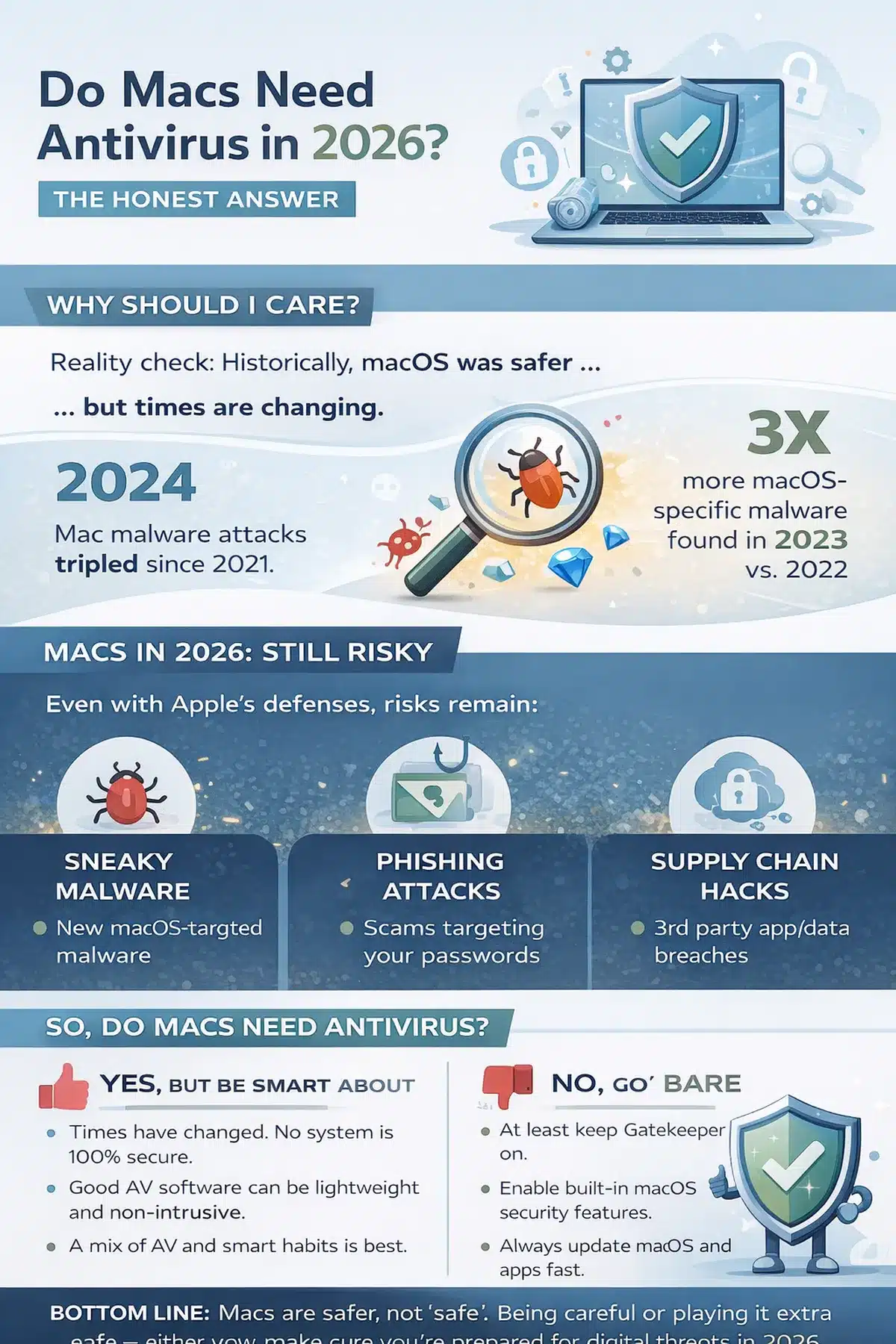
In 2025, Trojans accounted for over 50% of all macOS malware detections, a staggering leap from just 16.6% the year before. Organised criminal groups now sell Mac-specific malware on subscription plans. Ransomware designed for Apple hardware has moved from theory to reality.
So does your Mac need antivirus software in 2026? The honest answer is not a simple yes or no. It depends on who you are, what you do, and how much risk you are willing to accept. This guide gives you the data, context, and a clear decision framework to figure that out for yourself.
The Myth That Won’t Die
The idea that Macs are immune to malware dates back to the early 2000s. Apple even ran a famous ad campaign built around it, with a smug Mac standing next to a sneezing, virus-riddled PC.
Back then, the claim had some basis in reality. macOS (then called Mac OS X) was built on a Unix foundation with strong permission controls. More importantly, Macs had a tiny market share. Malware authors targeted Windows because that is where the money was.
Both of those advantages have eroded. macOS market share has grown significantly, particularly in high-value demographics like developers, designers, executives, and cryptocurrency professionals. These users hold exactly the kind of data that modern attackers want: credentials, session tokens, crypto wallets, and corporate access.
The “Macs are safe” narrative now actively harms people. It creates a false sense of security that attackers exploit by designing campaigns specifically for Mac users who believe they do not need to be careful.
macOS Malware in 2026, by the Numbers
The data from the past 18 months paints a clear picture: the Mac threat landscape has undergone a fundamental shift.
Trojans Have Taken Over
According to the Jamf Security 360: 2026 Annual Trends Report, Trojans exploded to over 50% of all macOS malware detections in 2025. That is a 3x increase from 2024, when Trojans accounted for roughly 16.6% of detections.
The dominant family? Atomic Stealer (AMOS), a sophisticated infostealer built specifically for macOS. More on that shortly.
Adware Is No Longer the Main Threat
For years, adware was the most common macOS nuisance. Annoying, but largely harmless. In 2025, adware dropped from approximately 28% of detections to just 5%. The criminal economy has moved on to far more profitable attack types.
Backdoors Are Surging
Backdoor malware, the kind that gives attackers persistent, remote access to your machine, grew by roughly 67% compared to 2024. This is not someone showing you pop-up ads. This is someone quietly sitting inside your system, watching what you do, and exfiltrating data over time.
Ransomware Has Arrived on Mac
NotLockBit (also tracked as macOS.NotLockBit) is a ransomware strain with credible file-encryption and data-exfiltration capabilities. It exfiltrates data to cloud storage before encrypting local files. While still in limited deployment, it represents a milestone: functional, targeted ransomware built for macOS is no longer theoretical.
The Business Model Has Professionalised
The most alarming shift is structural. Mac malware is no longer built by lone hobbyists. It is developed and distributed through Malware-as-a-Service (MaaS) platforms, complete with subscription pricing, technical support, and product roadmaps. AMOS subscriptions reportedly cost between $500 and $1,000 per month on platforms like Telegram.
How Modern Mac Malware Actually Works
Here is the part that surprises most Mac users: the biggest threat in 2026 is not a technical exploit that silently breaks into your system. It is you.
Social Engineering Is the Primary Attack Vector
Modern macOS malware overwhelmingly relies on tricking you into bypassing your own security. The most common methods include:
ClickFix Campaigns
These are fake technical support pages, browser update prompts, or “verification” screens that instruct you to copy a command and paste it into Terminal. The command downloads and executes malware. Because you ran the command yourself, Gatekeeper and other protections never intervene.
Malvertising
Attackers purchase search ads for popular software (Notion, Slack, Trello, Arc Browser) and point them to pixel-perfect clone websites. You think you are downloading a legitimate app. You are actually downloading a Trojanized disk image.
Fake Job and Interview Lures
Developers, designers, and crypto professionals are targeted with fake job offers that require downloading a “test project” or “interview tool.” These are particularly effective because the targets are technically sophisticated but trust the professional context.
Atomic Stealer (AMOS): A Case Study
AMOS deserves special attention because it represents the new standard for Mac malware.
What it steals:
- Keychain passwords and system credentials
- Saved passwords, cookies, autofill data, and browsing history from Chrome, Safari, Firefox, and other browsers
- Cryptocurrency wallet data (Exodus, Electrum, Atomic Wallet, Binance, and others)
- Apple Notes content
- Files from your Desktop and Documents folders
- System configuration data
How it arrives:
AMOS typically arrives as a .dmg file from a fake website or a malvertising campaign. Some variants use AppleScript URLs or ClickFix-style Terminal commands to execute.
How it evades detection:
Advanced versions check whether they are running inside a virtual machine (looking for VMware or QEMU artefacts) to avoid detection by security researchers. Some variants strip the quarantine extended attribute from the binary to bypass Gatekeeper.
Why it matters:
AMOS is not a one-off tool. It is a continuously developed product with a dedicated team, regular updates, and a subscriber base of criminals who pay monthly for access. This is industrial-scale malware targeting your Mac.
What Apple Does to Protect You
Before you conclude that Macs are hopeless, understand this: Apple’s built-in security is genuinely strong. For many users, it is sufficient. Here is what it includes.
XProtect
XProtect is Apple’s built-in, signature-based antivirus. It runs silently in the background and compares files against a database of known malware signatures using YARA rules. It triggers scans when applications are first launched, when they are modified, and when Apple pushes new security definitions.
Apple updates XProtect definitions frequently, often weekly, and these updates are delivered independently of major macOS updates.
XProtect Remediator goes further by actively cleaning up infections that have already occurred, rather than just blocking new ones.
Gatekeeper and Notarization
Gatekeeper verifies that the software comes from an identified developer and has not been tampered with since it was signed. It works alongside Apple’s Notarization service, which scans apps for malware before they are distributed. Even apps downloaded outside the Mac App Store must pass notarization to open without warnings.
System Integrity Protection (SIP)
SIP restricts what even root-level processes can do on your Mac. It protects critical system files and directories from modification, even by apps with administrator privileges. This means that even if malware gains elevated access, it cannot easily tamper with core operating system components.
App Sandboxing
Apps downloaded from the Mac App Store run in sandboxed environments that limit their access to the file system, network, and other apps. This containment strategy means a compromised app cannot freely roam your system.
macOS Tahoe Security Updates
macOS Tahoe (version 26), released in September 2025, continues to receive regular security patches. The current version (26.4.1, released April 2026) addresses vulnerabilities across WebKit, the kernel, CoreMedia, and privacy controls. Apple has also introduced Background Security Improvements, a mechanism for delivering critical fixes faster and more frequently between major system updates.
Transparency, Consent, and Control (TCC)
TCC requires apps to explicitly request permission before accessing sensitive resources like the camera, microphone, contacts, screen recording, and file system locations. This creates an additional barrier that malware must overcome, typically through social engineering.
Where Built-in Protection Falls Short
Apple’s defences form a solid baseline, but they have clear limitations that matter in 2026.
Zero-Day and Signature Gaps
XProtect relies on known malware signatures. A brand-new malware variant that Apple has not yet catalogued will not be caught until the next definition update. While Apple updates frequently, there is always a window of exposure.
Social Engineering Blindness
This is the critical weakness. None of Apple’s built-in tools can stop you from voluntarily pasting a malicious command into Terminal, dragging an unsigned app out of a .dmg file, or granting excessive permissions through TCC dialogues because a convincing fake prompt told you to.
XProtect, Gatekeeper, and SIP all assume that the user is acting in their own interest. Modern attacks exploit exactly that assumption.
No Web or Email Filtering
macOS does not include built-in web filtering, phishing protection for email clients, or real-time URL scanning. If you click a malicious link in an email or message, your Mac’s built-in tools will not warn you before you reach the page.
Safari does include some fraudulent website detection, but it is limited compared to dedicated security tools and does not extend to other browsers.
No Integrated VPN
Public Wi-Fi remains a common attack surface. macOS does not include a built-in VPN. If you regularly work from coffee shops, airports, or hotel networks, you are exposed to network-level threats that Apple’s security stack does not address.
Limited Behavioural Analysis
While XProtect Remediator includes some behavioural components, Apple’s built-in tools are primarily signature-based. Dedicated third-party security tools offer more sophisticated behavioural and heuristic analysis that can catch novel threats based on suspicious activity patterns rather than known signatures alone.
Who Actually Needs Third-Party Antivirus?
Rather than giving you a blanket recommendation, here is a decision framework based on how you actually use your Mac.
| User Profile | Risk Level | Third-Party Antivirus? | Why |
|---|---|---|---|
| Casual user (web, email, streaming, App Store apps only) | Low | Optional | Built-in protections are generally sufficient if you keep macOS updated and stick to the App Store |
| Power user (downloads from multiple sources, uses beta software, experiments with tools) | Moderate | Recommended | The cost of a data breach far exceeds the cost of security software; you need a layered defense |
| Business/professional user (handles client data, financial records, confidential documents) | High | Strongly recommended | The cost of a data breach far exceeds the cost of security software; you need a layered defence |
| Developer or crypto professional | High | Strongly recommended | The cost of a data breach far exceeds the cost of security software; you need a layered defence |
| Shared or family Mac | Moderate-High | Recommended | You cannot control the security awareness of every user on the machine |
The “Insurance Policy” Framing
Think of third-party antivirus the way you think about car insurance. You might be an excellent driver who never speeds. But you share the road with everyone else, and accidents happen. A lightweight security tool adds a second layer of defence for the scenarios that Apple’s built-in tools were not designed to catch.
Best Mac Antivirus Options in 2026
If you decide you want additional protection, here are the top-rated options based on independent lab testing and expert reviews in 2026.
| Product | Best For | Key Strengths | Considerations |
|---|---|---|---|
| Intego Mac Internet Security X9 | Overall best for Mac | Built specifically for macOS; excellent detection rates; minimal system impact | Mac-only; no cross-platform coverage |
| Norton 360 Deluxe | All-round security suite | VPN included; password manager; dark web monitoring; strong lab scores | Higher resource usage than Mac-native options |
| Bitdefender Antivirus for Mac | Best value | Combines security with system optimisation tools; designed for macOS | Fewer Mac-specific features than Intego |
| MacKeeper | Mac-native experience | Combines security with system optimization tools; designed for macOS | Historical reputation issues (now resolved) |
| Avast Security for Mac | Best free option | Solid free tier with real-time protection; easy to use | Free version includes ads; upsells to premium |
What to look for:
- Independent lab test results from AV-Test or AV-Comparatives
- Lightweight background operation (low CPU and memory usage)
- Real-time behavioural monitoring, not just signature-based scanning
- Phishing and web protection included
- A transparent privacy policy (security tools require deep system access)
7 Essential Mac Security Practices
Regardless of whether you install third-party software, these practices dramatically reduce your risk.
1. Keep macOS Updated, Always
Apple patches critical vulnerabilities frequently. Delaying updates leaves you exposed to threats that have already been solved. Enable automatic updates in System Settings > General > Software Update.
2. Never Paste Commands from Websites into Terminal
This is the single most important habit to build in 2026. If any website, pop-up, or “support page” asks you to open Terminal and paste a command, assume it is malicious. Legitimate software never requires this for installation.
3. Verify Downloads Before Opening
Before opening any .dmg or .pkg file, confirm you downloaded it from the developer’s official website. Do not trust search ads. Type the URL directly or use a bookmarked link.
4. Use a Password Manager
Use Apple’s built-in Passwords app (introduced in macOS Sequoia) or a dedicated manager like 1Password or Bitwarden. Never reuse passwords across services. Enable two-factor authentication everywhere it is available.
5. Be Suspicious of Permission Requests
When macOS asks whether an app can access your camera, microphone, files, or screen, pause and consider whether that request makes sense. A calculator app should not need screen recording access.
6. Stick to the App Store When Possible
App Store apps go through Apple’s review process and run in sandboxed environments. They are not perfectly safe, but they are significantly lower risk than software downloaded from the open web.
7. Maintain Offline Backups
Time Machine is excellent, but for maximum protection against ransomware, keep at least one backup that is physically disconnected from your Mac and your network. If ransomware encrypts your files and your backup drive is connected, the backup gets encrypted too.
Frequently Asked Questions
Can Macs get ransomware?
Yes. NotLockBit is a functional macOS ransomware strain with file-encryption and data-exfiltration capabilities. While widespread Mac ransomware attacks are still rare compared to Windows, the threat is real and growing. Maintaining offline backups is the best insurance.
Is a free antivirus enough for a Mac?
For many users, yes. Free options like Avast Security for Mac provide real-time protection and catch common threats. However, free versions typically lack features like phishing protection, VPN, and advanced behavioural analysis. If you handle sensitive data, a paid solution is a better fit.
Does antivirus slow down my Mac?
Modern Mac antivirus software has minimal performance impact during normal use. Mac-native options like Intego are specifically optimised for macOS and are virtually unnoticeable in daily operation. Avoid older or poorly optimised tools that run aggressive background scans.
Is Apple’s built-in XProtect the same as antivirus?
XProtect functions as a basic antivirus, using signature-based detection to block known malware. However, it lacks many features found in dedicated security software: real-time web protection, email scanning, VPN, behavioural analysis for unknown threats, and phishing detection. Think of XProtect as a strong foundation, not a complete solution.
What about Mac malware from the App Store?
It is rare but not impossible. Apple’s review process catches the vast majority of malicious submissions, but some slip through, particularly apps that behave normally during review and activate malicious behaviour later. App Store apps are still significantly safer than software from unknown web sources.
Do Macs with Apple Silicon (M-series chips) need antivirus?
Apple Silicon provides hardware-level security features, including Secure Enclave for credential protection and improved memory isolation. These make certain types of attacks harder, but they do not protect against social engineering, phishing, or malware that you voluntarily install. The chip does not change the antivirus calculus.
The Bottom Line
Macs are not immune to malware. That was never entirely true, and in 2026, it is demonstrably false. The threat landscape has shifted from annoying adware to professional, organized data-theft operations that specifically target Mac users.
Apple’s built-in security is strong, and for cautious users who stick to the App Store, keep macOS updated, and never paste commands from random websites into Terminal, it may be sufficient.
But “sufficient” is not the same as “optimal.” If you handle sensitive data, download software from multiple sources, work in a high-target industry, or simply want peace of mind, a lightweight third-party antivirus adds a meaningful layer of protection for a modest cost.
The question is not really “Do Macs need antivirus?” The better question is: “Given what I do on my Mac, can I afford to rely on a single layer of defence?”
For most people in 2026, the answer is no.

Sumit
ContributorHi, I'm Sumit, Being an introvert I have always been obsessed with technology-computers and reading dozens of posts to learn, find answers out of my curiosity. I love to write as I explore more.