On this page
- Every MacBook Ranked: Quick-Pick Table
- Full Specs Comparison: 2026 MacBook Lineup
- MacBook Air 13-inch (M5) – The One to Buy
- What it does well
- What it does not do
- Who should buy it
- MacBook Air 15-inch (M5) – The Bigger Screen Pick
- When the 15-inch is the right call-rm\year-every-model-ranked-from-best-to-skip
- When to stick with the 13-inch
- MacBook Pro 14-inch (M5 Pro) – The Professional Sweet Spot
- Why the M5 Pro matters
- The display difference alone might justify the upgrade
- Ports and connectivity
- Who should buy it
- MacBook Neo – The Budget Entry Point
- What you get
- What you give up (and this list matters)
- Who should buy it
- Who should skip it
- MacBook Pro 16-inch (M5 Pro) – The Desktop Replacement
- When the 16-inch makes sense
- The trade-off
- MacBook Pro 14-inch (M5) – The Odd One Out
- The case for it
- The case against it
- Who should buy it
- MacBook Pro M5 Max (14-inch and 16-inch) – The Ceiling
- When the Max makes sense
- When the Max does not make sense
- The Smart Money: Previous-Gen MacBooks at a Discount
- MacBook Air M4 (2025)
- MacBook Pro M4 Pro (2024)
- Which MacBook Should You Actually Buy? A Decision Flowchart
- RAM and Storage: How to Configure Without Overspending
- RAM (Unified Memory)
- Storage
- MacBook Air vs. MacBook Pro: The Core Differences That Matter
- 1. Silence vs. Sustained Power
- 2. The Display Gap
- 3. Port Selection
- Frequently Asked Questions
- Is the MacBook Neo worth it, or should I save up for the Air?
- Should I wait for the next MacBook update?
- Is 16 GB RAM really enough in 2026?
- Can I game on a MacBook?
- MacBook or iPad Pro with a keyboard?
- Where should I buy a MacBook?
- The Bottom Line
You do not need to read this entire article. Find your answer in the next 10 seconds, then scroll to the section that matters to you.
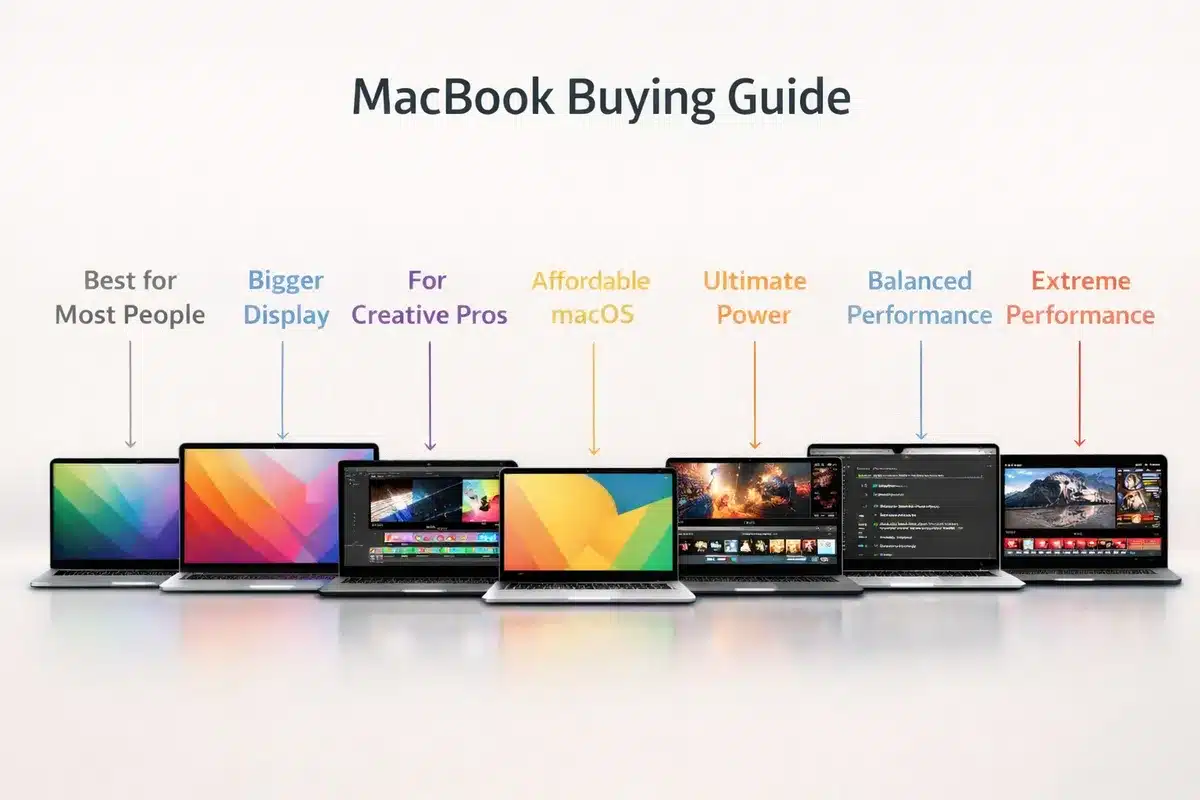
For most people: Buy the 13-inch MacBook Air M5 ($1,099). It is the best laptop Apple has ever made for the money. Fast, silent, light, 18-hour battery, 512 GB storage, and powerful enough for everything short of professional video editing and 3D rendering.
On a tight budget: The MacBook Neo ($599) gets you into macOS for less than an iPad Pro. It has real limitations, but for students and casual users, it works.
For professional creative work: The 14-inch MacBook Pro with M5 Pro ($2,199) is the sweet spot. You get active cooling, a 120Hz XDR display, Thunderbolt 5, and enough horsepower for 4K video editing, large codebases, and music production.
Now, the full breakdown.
Every MacBook Ranked: Quick-Pick Table
Skim this table to find your match in seconds. The ranking reflects overall value, not raw power.
| Rank | Model | Price (Starting) | Best For | Our Verdict |
|---|---|---|---|---|
| 1 | MacBook Air 13″ (M5) | $1,099 | Students, professionals, everyday users | Best MacBook for 90% of people |
| 2 | MacBook Air 15″ (M5) | $1,299 | Same as above, but you want a bigger screen | Best if you skip an external monitor |
| 3 | Niche: the Air is better value for most | $2,199 | Video editors, developers, creative pros | The professional sweet spot |
| 4 | MacBook Neo | $599 | Students, casual browsing, tight budgets | Best entry into macOS |
| 5 | MacBook Pro 16″ (M5 Pro) | $2,699 | Pros who need maximum screen real estate | The portable workstation |
| 6 | MacBook Pro 14″ (M5) | $1,699 | Users who want Pro features without Pro pricing | Niche: the Air is a better value for most |
| 7 | MacBook Pro 14″ (M5 Max) | $3,599 | Heavy 3D rendering, 8K video, ML training | Overkill for 95% of buyers |
| 8 | MacBook Pro 16″ (M5 Max) | $3,899 | Maximum sustained performance, no compromises | Only if your work demands it |
Still selling (discounted):
| Model | Typical Price Now | Worth It? |
|---|---|---|
| MacBook Air 13″ (M4, 2025) | ~$799-$899 | Yes, excellent value if you find one |
| MacBook Pro 14″ (M4, 2024) | ~$1,250-$1,300 refurb | Yes, still very capable |
| MacBook Pro 14″ (M4 Pro, 2024) | ~$1,550-$1,800 refurb | Great deal for professional use |
Full Specs Comparison: 2026 MacBook Lineup
Here is every key spec in one place. Save this table.
| Spec | MacBook Neo | Air 13″ (M5) | Air 15″ (M5) | Pro 14″ (M5) | Pro 14″ (M5 Pro) | Pro 16″ (M5 Pro) | Pro 14″ (M5 Max) | Pro 16″ (M5 Max) |
|---|---|---|---|---|---|---|---|---|
| Price | $599 | $1,099 | $1,299 | $1,699 | $2,199 | $2,699 | $3,599 | $3,899 |
| Chip | A18 Pro | M5 | M5 | M5 | M5 Pro | M5 Pro | M5 Max | M5 Max |
| CPU Cores | 6 | 10 | 10 | 10 | Up to 18 | Up to 18 | 18 | 18 |
| GPU Cores | 5 | 10 | 10 | 10 | Up to 20 | Up to 20 | Up to 40 | Up to 40 |
| RAM | 8 GB | 16 GB | 16 GB | 16 GB | 24 GB+ | 24 GB+ | 36 GB+ | 36 GB+ |
| Base Storage | 256 GB | 512 GB | 512 GB | 1 TB | 1 TB | 1 TB | 2 TB | 2 TB |
| Display | 13″ Liquid Retina | 13.6″ Liquid Retina | 15.3″ Liquid Retina | 14.2″ XDR | 14.2″ XDR | 16.2″ XDR | 14.2″ XDR | 16.2″ XDR |
| Refresh Rate | 60 Hz | 60 Hz | 60 Hz | 120 Hz ProMotion | 120 Hz ProMotion | 120 Hz ProMotion | 120 Hz ProMotion | 120 Hz ProMotion |
| Brightness | 500 nits | 500 nits | 500 nits | 1,000 nits (XDR) | 1,000 nits (XDR) | 1,000 nits (XDR) | 1,000 nits (XDR) | 1,000 nits (XDR) |
| Cooling | Fanless | Fanless | Fanless | Active (fans) | Active (fans) | Active (fans) | Active (fans) | Active (fans) |
| Weight | ~2.5 lbs | ~2.7 lbs | ~3.3 lbs | ~3.4 lbs | ~3.4 lbs | ~4.7 lbs | ~3.4 lbs | ~4.7 lbs |
| Battery | ~50 Wh | ~53.8 Wh | ~66.5 Wh | ~72.4 Wh | ~72.4 Wh | ~100 Wh | ~72.4 Wh | ~100 Wh |
| Ports | 1x USB-C (10Gbps), 1x USB-C (2.0) | 2x Thunderbolt 4, MagSafe | 2x Thunderbolt 4, MagSafe | 3x Thunderbolt 5, HDMI, SDXC, MagSafe | 3x Thunderbolt 5, HDMI, SDXC, MagSafe | 3x Thunderbolt 5, HDMI, SDXC, MagSafe | 3x Thunderbolt 5, HDMI, SDXC, MagSafe | 3x Thunderbolt 5, HDMI, SDXC, MagSafe |
| Wi-Fi | Wi-Fi 6E | Wi-Fi 7 | Wi-Fi 7 | Wi-Fi 7 | Wi-Fi 7 | Wi-Fi 7 | Wi-Fi 7 | Wi-Fi 7 |
| Nano-Texture Option | No | No | No | Yes | Yes | Yes | Yes | Yes |
MacBook Air 13-inch (M5) – The One to Buy
Starting at $1,099 | Released March 2026
This is the MacBook that should be the default recommendation for almost everyone. If someone asks, “Which MacBook should I get?” and you know nothing else about them, the answer is this one.
The M5 chip handles everyday productivity, web development, photo editing in Lightroom, music production in Logic Pro, and even light video editing in Final Cut Pro without breaking a sweat. The fanless design means absolute silence, always. The 512 GB base storage (doubled from the M4 generation) means you are not immediately scrambling for an external drive.
What it does well
- Performance: The M5’s 10-core CPU and 10-core GPU tear through day-to-day tasks. Compiling code, working in Figma with 40 tabs open, editing RAW photos; none of this comes close to stressing it.
- Battery life: 18 hours rated. In real-world mixed use, expect 12-14 hours consistently. You can leave the charger at home for a full workday.
- Portability: 2.7 lbs and 0.44 inches thin. This is a laptop you genuinely forget is in your bag.
- Connectivity: Wi-Fi 7 and Bluetooth 6 via Apple’s new N1 chip. Future-proofed for faster wireless networking.
- Build: The same premium aluminium unibody that costs $2,000+ on the Pro side.
What it does not do
- No active cooling. Under sustained heavy loads (30+ minutes of continuous 4K export, for instance), the M5 will thermally throttle. You will finish the job, just slower than a MacBook Pro would.
- The display is 60 Hz. If you have used a 120 Hz ProMotion display, scrolling on the Air feels noticeably less smooth. It is not a dealbreaker, but it is noticeable.
- Only two Thunderbolt 4 ports (both on the left side). No HDMI, no SD card slot.
- Single external display support natively (workarounds exist, but they are clunky).
Who should buy it
Students, writers, web developers, business professionals, casual photo editors, and anyone who values portability and silence over bleeding-edge sustained performance. That is most people.
MacBook Air 15-inch (M5) – The Bigger Screen Pick
Starting at $1,299 | Released March 2026
Identical internals to the 13-inch Air. The only meaningful differences are a 15.3-inch display, a larger ~66.5 Wh battery, louder speakers with a wider soundstage, and a weight of 3.3 lbs instead of 2.7 lbs.
When the 15-inch is the right call-rm_year-every-model-ranked-from-best-to-skip
- You work without an external monitor most of the time. The extra 1.7 inches of screen diagonal sounds small on paper but translates to roughly 25% more usable screen area. For side-by-side windows, spreadsheets, or long documents, it makes a meaningful difference.
- You watch a lot of video content on the laptop itself.
- You do not commute with the laptop daily. At 3.3 lbs, it is still light, but the 13-inch is noticeably easier to carry.
When to stick with the 13-inch
- Portability is your top priority.
- You use an external monitor at your desk anyway.
- You want to save $200.
MacBook Pro 14-inch (M5 Pro) – The Professional Sweet Spot
Starting at $2,199 | Released March 2026
This is where the MacBook lineup shifts from “great for most people” to “built for people who need sustained professional performance.” The M5 Pro is the chip that justifies the Pro name.
Why the M5 Pro matters
The M5 Pro features up to an 18-core CPU and 20-core GPU with what Apple calls “Fusion Architecture.” In practical terms:
- Video editing: Timeline scrubbing in DaVinci Resolve with multiple 4K streams is smooth. Exporting a 10-minute 4K project with color grading finishes roughly 40% faster than on the base M5.
- Software development: Compiling large Xcode projects or building Docker containers with many layers is where the extra cores pay for themselves.
- Music production: Logic Pro sessions with 100+ tracks and heavy plug-in chains run without glitches.
The display difference alone might justify the upgrade
The Liquid Retina XDR panel on the MacBook Pro is in a different league from the Air’s Liquid Retina display:
| Feature | MacBook Air Display | MacBook Pro Display |
|---|---|---|
| Panel Technology | Liquid Retina (IPS) | Liquid Retina XDR (mini-LED) |
| Refresh Rate | 60 Hz | 120 Hz ProMotion (adaptive) |
| Peak Brightness (SDR) | 500 nits | 1,000 nits |
| Peak Brightness (HDR) | N/A | 1,600 nits |
| Contrast Ratio | Standard IPS | 1,000,000:1 |
| Color Gamut | P3 Wide Colour | P3 Wide Color |
| Nano-Texture Option | No | Yes (+$150) |
If you work with colour-accurate content, HDR video, or simply spend 8+ hours a day staring at a screen, the ProMotion display is worth the price of admission by itself.
Ports and connectivity
Three Thunderbolt 5 ports (up to 120 Gb/s), HDMI 2.1, SDXC card slot, MagSafe 3, and a headphone jack. You can connect multiple external displays, an external SSD at blistering speeds, and a camera card simultaneously without any dongles.
Who should buy it
Video editors, photographers, software engineers working on large projects, music producers, and anyone whose work involves sustained, CPU/GPU-intensive tasks for hours at a time. If you are asking “do I need the Pro?”, you probably do not, and the Air is the better buy. The people who need the Pro usually know they need it.
MacBook Neo – The Budget Entry Point
Starting at $599 ($499 with education pricing) | Released March 2026
The MacBook Neo is Apple’s most affordable laptop ever. It exists to answer one question: “Can I get a real Mac for under $700?” The answer is yes, with caveats.
What you get
- A full macOS experience on a 13-inch Liquid Retina display.
- The Apple A18 Pro chip (the same silicon in the iPhone 16 Pro). It handles web browsing, document editing, email, streaming, and light app usage smoothly.
- An all-aluminium design that feels like a proper MacBook, not a cheap knockoff.
- macOS Tahoe with Apple Intelligence support.
What you give up (and this list matters)
The Neo makes significant compromises to hit its price point. Understand these before buying:
- 8 GB RAM. In 2026, this is tight. It handles everyday browsing and productivity fine, but push it with many browser tabs, background apps, or any creative software and you will notice slowdowns.
- No backlit keyboard. Working in dim environments is harder.
- No MagSafe. Charges via one of its USB-C ports, and one of those two ports is USB 2.0 (not a typo, 480 Mbps in 2026).
- No Thunderbolt. External drives and displays are limited to USB 10 Gbps on the faster port.
- sRGB display only. No P3 wide colour gamut, no True Tone. Not suitable for colour-accurate work.
- No Force Touch trackpad. Uses a traditional mechanical trackpad instead of Apple’s haptic one.
- Touch ID only on the 512 GB model. The base 256 GB config has no biometric login.
- No Centre Stage webcam. Basic 1080p FaceTime camera.
- No Wi-Fi 7. Limited to Wi-Fi 6E.
Who should buy it
Students who need a laptop for essays, research, and lectures. Parents buying a first laptop for a teenager. Anyone whose daily computing is browser-based and who values the macOS ecosystem (iMessage, AirDrop, Handoff) but cannot justify $1,099 for an Air.
Who should skip it
Anyone doing creative work, anyone who keeps 15+ browser tabs open routinely, and anyone who plans to keep this laptop for more than 3-4 years. The 8 GB RAM ceiling will age poorly.
MacBook Pro 16-inch (M5 Pro) – The Desktop Replacement
Starting at $2,699 | Released March 2026
Same M5 Pro chip as the 14-inch Pro, but with a massive 16.2-inch XDR display and a ~100 Wh battery (the largest Apple is legally allowed to put in a carry-on-approved laptop).
When the 16-inch makes sense
- You use the laptop as your primary and only computer, with no external monitor.
- You edit video on the go and need maximum timeline real estate.
- You want the best speakers in any laptop (and the 16-inch MacBook Pro’s six-speaker system is genuinely excellent).
- Battery endurance for demanding workflows matters: the 100 Wh cell keeps the M5 Pro running for significantly longer under load than the 14-inch’s 72.4 Wh cell.
The trade-off
At 4.7 lbs, this is not a laptop you casually toss in a messenger bag. It is a desktop replacement that happens to close shut and has a battery. If portability matters to you even slightly, the 14-inch Pro offers identical performance in a much more manageable form factor.
MacBook Pro 14-inch (M5) – The Odd One Out
Starting at $1,699 | Released October 2025
The base M5 MacBook Pro sits in a strange position in the lineup. It has the Pro’s excellent XDR display, active cooling system, and expanded port selection, but uses the same M5 chip found in the $1,099 MacBook Air.
The case for it
- You want the 120 Hz ProMotion XDR display but do not need M5 Pro-level performance.
- You need the extra ports (three Thunderbolt 5, HDMI, SD card slot) for your workflow.
- You occasionally push sustained workloads that would throttle the fanless Air.
The case against it
- For $600 more than the Air, you get the same chip. The performance advantage comes only from the active cooling, allowing the M5 to sustain its peak speeds longer.
- For $500 more ($2,199), you could jump to the M5 Pro with meaningfully more CPU and GPU power, plus 24 GB of RAM instead of 16 GB.
- It is squeezed from both sides. The Air is a better value below it, and the M5 Pro is a better investment above it.
Who should buy it
A narrow audience: people who specifically need the Pro’s display quality and port selection but whose workloads fit the base M5 chip perfectly. If that sounds like you, it is a fine machine. If you are debating between this and the Air, get the Air. If you are debating between this and the M5 Pro, stretch for the Pro.
MacBook Pro M5 Max (14-inch and 16-inch) – The Ceiling
14-inch starts at $3,599 | 16-inch starts at $3,899 | Released March 2026
The M5 Max is the most powerful chip Apple puts in a laptop. The numbers are serious: up to an 18-core CPU, 40-core GPU, 128 GB of unified memory, and 614 GB/s memory bandwidth. Fully configured, a 16-inch M5 Max can exceed $7,000.
When the Max makes sense
- 8K video editing with multiple ProRes streams simultaneously.
- 3D rendering and simulation (Blender, Cinema 4D, Houdini) where GPU cores directly translate to render time savings.
- Machine learning model training on-device with large datasets that require 64 GB+ of unified memory.
- Scientific computing workloads that can leverage the massive memory bandwidth.
When the Max does not make sense
Genuinely, for most professional users, the M5 Pro is more than enough. The M5 Max draws more power, generates more heat (louder fans under sustained load), and costs $1,400+ more than the M5 Pro configuration. Unless your workflow has a specific, measurable bottleneck that the Max’s extra GPU cores or memory bandwidth would solve, the Pro is the smarter purchase.
The Smart Money: Previous-Gen MacBooks at a Discount
Apple’s M4-generation machines (released 2024-2025) are still excellent computers that will receive macOS updates for years to come. If budget matters, these are worth serious consideration:
MacBook Air M4 (2025)
- Typical street price: $799-$899 (down from $999 at launch)
- What you get: M5-class performance for most tasks, 16 GB RAM, 256 GB storage.
- The catch: 256 GB base storage (half the M5 Air’s 512 GB), Wi-Fi 6E instead of Wi-Fi 7.
- Verdict: If you can live with the smaller SSD (or supplement with cloud/external storage), this is the best value in the entire MacBook lineup right now.
MacBook Pro M4 Pro (2024)
- Typical refurbished price: $1,550-$1,800 (down from $1,999-$2,499 at launch)
- What you get: The M4 Pro is still a powerhouse. It handles professional video editing, large codebases, and creative work without issue.
- Where to buy: Apple Certified Refurbished (full warranty, essentially new condition), Amazon Renewed, Back Market.
- Verdict: If you find one with 24 GB+ RAM at a steep discount, it is arguably the best deal in the “pro” tier.
Which MacBook Should You Actually Buy? A Decision Flowchart
Walk through these questions in order. Stop at the first “yes.”
1. Is your budget under $700?
Yes: MacBook Neo ($599). It is your only option, and it is a decent one for basic tasks.
2. Do you do professional video editing, 3D rendering, or ML training daily?
Yes: MacBook Pro M5 Pro (14-inch at $2,199 or 16-inch at $2,699, depending on screen preference). Skip the M5 Max unless you have tested your specific workflow and confirmed the Pro is not enough.
3. Do you need the best possible display and extra ports, but your workloads are moderate?
Yes: MacBook Pro 14-inch M5 ($1,699). But seriously consider stretching to the M5 Pro.
4. Do you want the biggest screen in a non-Pro machine?
Yes: MacBook Air 15-inch M5 ($1,299).
5. None of the above?
MacBook Air 13-inch M5 ($1,099). This is the default answer for a reason.
RAM and Storage: How to Configure Without Overspending
Apple charges premium prices for memory and storage upgrades, and you cannot upgrade either after purchase. Here is how to think about it:
RAM (Unified Memory)
| Your Usage | Recommended RAM |
|---|---|
| Web browsing, email, documents, streaming | 16 GB (base) |
| Software development, photo editing, moderate multitasking | 16-24 GB |
| Video editing, 3D work, large datasets | 24-36 GB |
| Heavy ML/AI work, 8K video, massive 3D scenes | 64 GB+ |
The 16 GB base on the Air and base Pro models is genuinely sufficient for the first two categories in 2026. Apple’s unified memory architecture is more efficient than traditional RAM, so 16 GB on a Mac goes further than 16 GB on a Windows machine in most scenarios.
Do not pay $200 for a RAM upgrade “just in case.” Pay for it if your current or near-future workflow actually demands it.
Storage
- 256 GB (Neo only): Workable if you rely heavily on cloud storage (iCloud, Google Drive) and do not store large local files. It will feel tight within a year otherwise.
- 512 GB (Air base, Pro base): The sweet spot for most users. Enough for apps, documents, a reasonable photo library, and some projects.
- 1 TB: Recommended if you work with video files, large codebases, or maintain a local music/photo library.
- 2 TB+: Only if your profession demands it. Apple’s upgrade pricing here is steep; consider external Thunderbolt SSDs as a more cost-effective alternative.
MacBook Air vs. MacBook Pro: The Core Differences That Matter
Forget the spec sheets for a moment. Here are the three differences that actually affect your daily experience:
1. Silence vs. Sustained Power
The MacBook Air has no fan. It is always silent. The MacBook Pro has fans that spin up under heavy workloads. For most tasks, both machines feel identical in speed. The difference appears only under sustained heavy loads (video exports, code compilation, 3D renders). The Pro maintains peak performance; the Air throttles down to stay cool.
If your “heavy” tasks last under 10-15 minutes at a time, the Air handles them fine. If you run demanding workloads for 30+ minutes continuously, the Pro’s cooling system matters.
2. The Display Gap
The Pro’s Liquid Retina XDR with 120 Hz ProMotion is, objectively, a significantly better screen. Deeper blacks (mini-LED local dimming), higher brightness (2x in SDR, 3x+ in HDR), smoother scrolling and animations, and the optional nano-texture finish. If screen quality is important to your work or enjoyment, this alone can justify the price jump.
3. Port Selection
The Air gives you two Thunderbolt 4 ports and MagSafe. That is it. The Pro gives you three Thunderbolt 5 ports, HDMI 2.1, an SDXC card slot, and MagSafe. If you regularly connect external displays, cameras, and drives, the Pro eliminates dongle dependency.
Frequently Asked Questions
Is the MacBook Neo worth it, or should I save up for the Air?
If your budget genuinely caps at $600-$700, the Neo is a solid machine for basic tasks. But if you can stretch to $1,099 (or find a discounted M4 Air for ~$800), the jump in RAM (16 GB vs. 8 GB), display quality, port speeds, and overall longevity is enormous. The Air will last you 5-6 years comfortably; the Neo’s 8 GB RAM will start feeling constrained in 2-3 years.
Should I wait for the next MacBook update?
Apple refreshes the MacBook Air roughly once a year (usually March) and the MacBook Pro in late fall. If a refresh is less than two months away, wait. Otherwise, buy now. The performance jumps between Apple Silicon generations have been meaningful but not transformative; any current M5 machine will be excellent for years.
Is 16 GB RAM really enough in 2026?
For general productivity, web development, photo editing, and even moderate video editing, yes. Apple’s unified memory architecture shares RAM between the CPU and GPU efficiently, so 16 GB on a Mac performs closer to 20-24 GB on a comparable Windows machine. Upgrade to 24 GB if you run virtual machines, work with RAW video, or routinely push professional creative apps.
Can I game on a MacBook?
You can, but you should not buy a MacBook primarily for gaming. Apple Silicon handles many titles well (the Mac-native library has grown significantly with the Game Porting Toolkit), but game library availability, driver optimisation, and pricing still favour Windows gaming PCs and consoles. If gaming is a hobby alongside productivity work, the MacBook Pro handles it respectably. If gaming is the primary use case, look elsewhere.
MacBook or iPad Pro with a keyboard?
Different tools for different jobs. The iPad Pro excels at drawing, note-taking, media consumption, and specific app workflows (Procreate, LumaFusion). The MacBook excels at anything requiring a traditional desktop OS: file management, multi-window workflows, terminal access, and professional software. If you need to ask, you probably need the MacBook.
Where should I buy a MacBook?
- Apple Store / apple.com: Full price, but you get trade-in options and financing.
- Apple Education Store: Up to $300 off if you are a student or educator.
- Apple Certified Refurbished: Like-new condition, full warranty, 15-35% off. The best value for previous-gen models.
- Amazon / Best Buy: Frequently offer $50-$200 off current models, especially during sales events.
- Back Market / Reebelo: For used or refurbished older models at steeper discounts. Check the warranty terms.
The Bottom Line
The 2026 MacBook lineup is the clearest it has ever been. Apple now covers every price point from $599 to over $7,000, and the tiers are well-defined:
- Under $700: MacBook Neo. Basic, but it works.
- $1,099-$1,299: MacBook Air M5. The right choice for the vast majority of buyers.
- $1,699-$2,699: MacBook Pro M5/M5 Pro. For professionals whose work earns back the investment.
- $3,599+: MacBook Pro M5 Max. For specialists with extreme workloads.
Do not overthink it. Match your actual daily workflow to the tier above, buy the base configuration unless you have a specific reason to upgrade RAM or storage, and enjoy a laptop that will genuinely last 5+ years.

Sumit
ContributorHi, I'm Sumit, Being an introvert I have always been obsessed with technology-computers and reading dozens of posts to learn, find answers out of my curiosity. I love to write as I explore more.