On this page
- Android 17 stable: what shipped and what is still coming
- What Is Android 17?
- Gemini Intelligence: Android Becomes Agentic
- Multi-Step Task Automation
- Gemini in Chrome
- Create My Widget
- Rambler: Voice-to-Text That Actually Thinks
- Gemini Autofill
- App Bubbles: Multitasking Reimagined
- Digital Wellbeing: Pause Point
- Security and Privacy: A Serious Overhaul
- OTP Protection (3-Hour Delay)
- Selective Contacts Picker
- Theft Protection (Default On)
- Live Threat Detection and Anti-Spoofing
- OS Integrity Verification
- Encrypted Client Hello (ECH)
- Creator Tools: A First-Class Media Production Platform
- Screen Reactions
- Instagram Enhancements (Google and Meta Partnership)
- Edits App: Smart Enhance and Sound Separation
- Adobe Premiere Comes to Android
- Material 3 Expressive: A New Visual Language
- Liquid Glass Aesthetic
- Expanded Personalization
- Expressive Motion
- Quick Share: Cross-Platform File Sharing
- Easier iPhone-to-Android Switching
- Android Auto: A Smarter Drive
- Beyond Phones: Wear OS, Android XR, and Googlebook
- Android 17: Supported Devices
- Release Timeline
- What Android 17 Gets Right
- Frequently Asked Questions
Google officially unveiled Android 17 on May 12, 2026, at The Android Show: I/O Edition, and the company is calling it the biggest Android update in the platform’s history. That is not just marketing language; this release represents a fundamental architectural shift. Android is no longer just an operating system; it is now, in Google’s own words, an intelligence system built around Gemini.
This guide breaks down every confirmed feature in Android 17, from the headline AI overhaul to the quieter but equally important privacy upgrades, so you know exactly what is coming to your device.
Update, August 29, 2026: Android 17 stable started rolling out to Pixel 6 and newer on June 16, 2026, and the August 2026 Pixel update (security patch 2026-08-05) is the third stable build. Gemini Intelligence, the headline feature, was not in the first stable release; Google says it arrives on qualifying devices later in summer 2026. The section below lists what shipped and what is still pending. The feature explanations further down are unchanged.
Android 17 stable: what shipped and what is still coming
| Feature | Status on Pixel (August 2026) |
|---|---|
| App Bubbles (phones, foldables, tablets) | Shipped in the June 16 stable build |
| Screen Reactions | Shipped |
| Lock screen widgets (Hub mode, swipe left on the lock screen) | Shipped |
| Selective Contacts Picker | Shipped |
| Location privacy: one time precise location, persistent indicator | Shipped |
| Theft Protection on by default, Find Hub biometric lock | Shipped |
| Expanded dark theme with per app exclusions | Shipped |
| Independent Assistant volume | Shipped |
| Per app memory limits | Shipped |
| Parental controls on non Pixel phones | Shipped |
| Material 3 Expressive, Quick Share with AirDrop | Shipped |
| Gemini Intelligence (multi step tasks, Create My Widget, Gemini Autofill) | Not yet; Google says later in summer 2026 on qualifying devices |
| Foldable gaming mode with virtual gamepad | Not yet; “coming months” |
| Rambler dictation in Gboard | Rolling out through the Gboard app, not tied to the OS build |
If you are on a Pixel 6 or newer and have not seen the update, open Settings, System, Software updates. Samsung is shipping Android 17 as One UI 9; the Galaxy S26 beta ran from mid May and the stable build is expected on S23 and newer through late 2026.
What Is Android 17?
Android 17 is the seventeenth major version of the Android operating system, officially announced on May 12, 2026. The beta program launched in February 2026, and the stable rollout began for Google Pixel devices on June 16, 2026, with Samsung’s One UI 9 beta (based on Android 17) beginning for the Galaxy S26 series around the same time.
The core thesis of Android 17 is Gemini Intelligence, a system-level AI layer that enables your phone to understand context, take action across multiple apps, and complete complex tasks on your behalf. Think of it less as “Google Assistant got smarter” and more as a genuine operating system co-pilot.
Gemini Intelligence: Android Becomes Agentic
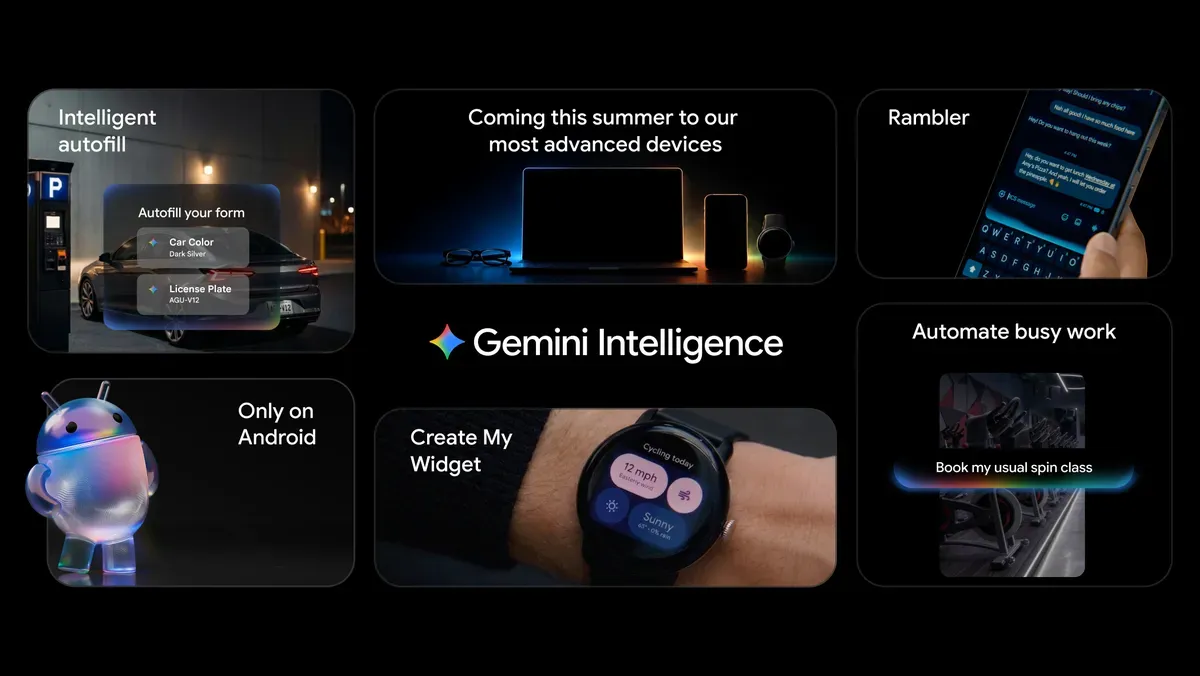
The centerpiece of Android 17 is Gemini Intelligence, a suite of deeply integrated AI capabilities that can act as an agent, completing multi-step tasks autonomously across apps. This is a meaningful distinction from previous AI assistants, which were primarily reactive and single-app.
Multi-Step Task Automation
Gemini can now plan and execute multi-app workflows with minimal input. You prompt it once; it does the rest.
Real examples from the announcement:
- Take a photo of a travel brochure, ask Gemini to find and book a trip for four people on Expedia, and it handles the entire search-to-checkout flow.
- Pull a grocery list from Google Keep and have Gemini build a shopping cart in your preferred delivery app.
- Let Gemini scan a Gmail-attached course syllabus, find the required textbooks, and add them to a bookstore cart.
Crucially, Gemini runs these tasks in the background, sends you progress notifications, and requires your final confirmation before any purchase or sensitive action. You are always in the loop; you just skip the tedious manual navigation.
Gemini in Chrome
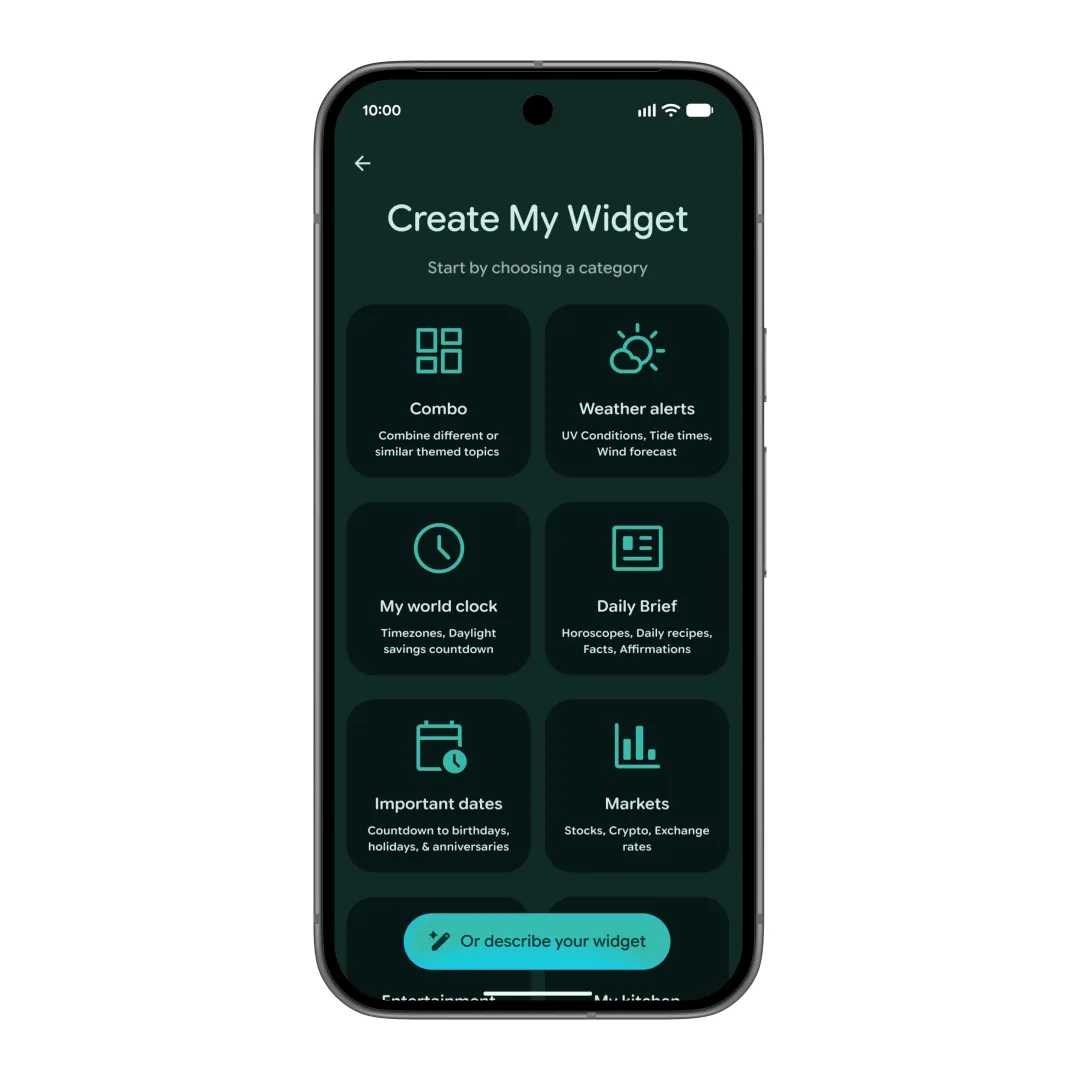
Chrome on Android gains auto-browsing capabilities powered by Gemini. The browser can now research topics, summarize pages, compare products, and complete transactional tasks like booking a parking spot or reserving a restaurant table, all without you manually opening multiple tabs. If you rely heavily on Chrome, pairing this with the right Chrome extensions on Android can make your browsing setup even more powerful.
Create My Widget
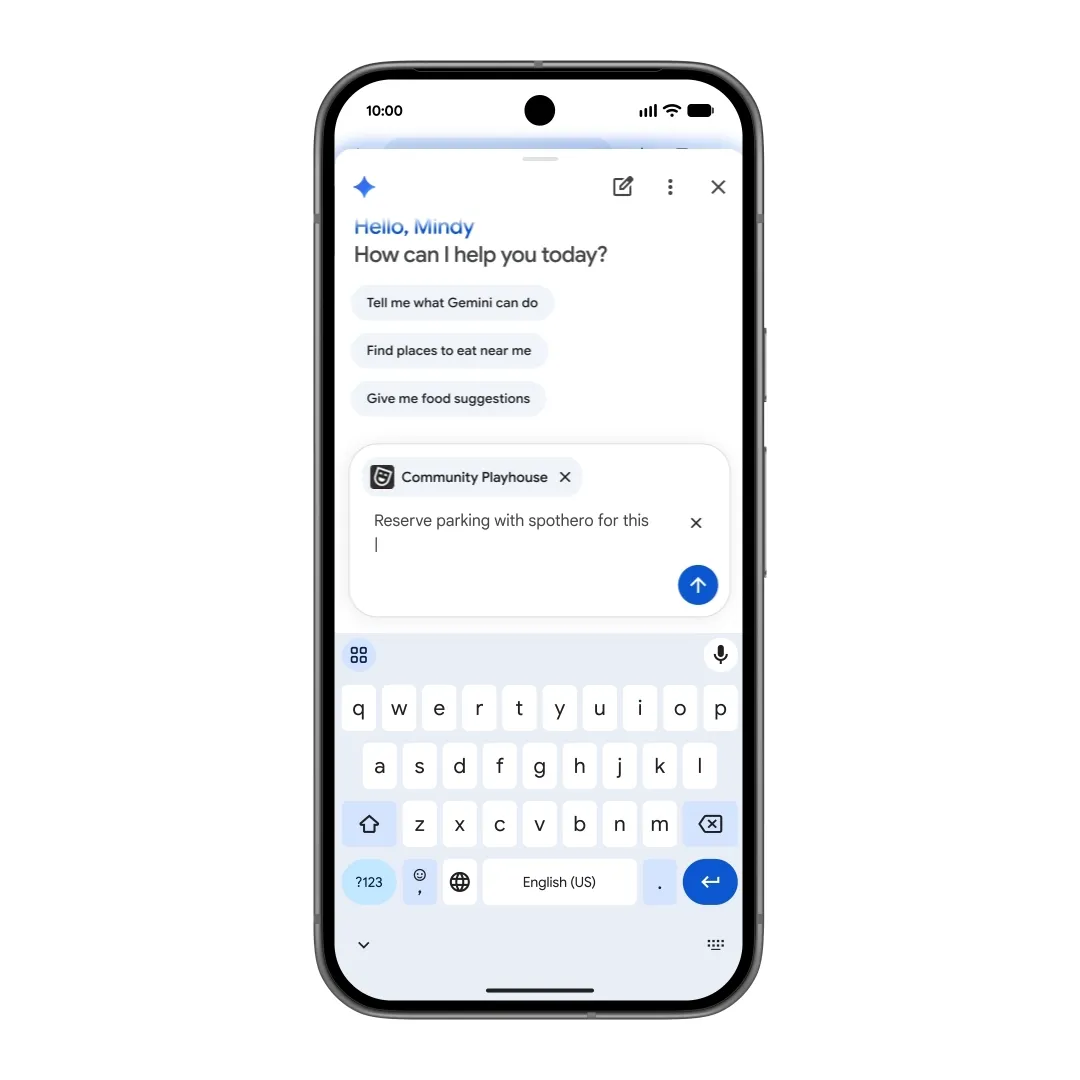
This is one of the most immediately visible Gemini features. You can now describe a custom home screen widget in plain language and Gemini will build it for you, pulling live data from Gmail, Google Calendar, Google Keep, and other connected sources.
Examples include a dynamic travel countdown widget, a recipe suggester that checks your fridge based on a note you took, or a unified work dashboard that surfaces your next meeting, unread priority emails, and your current location-aware commute time. The same functionality extends to Wear OS watch face tiles, so your smartwatch can display a truly personalized data surface.
Prefer to build widgets by hand? Our Android homescreen setups list 16 full KWGT and KLWP builds you can copy.
Rambler: Voice-to-Text That Actually Thinks
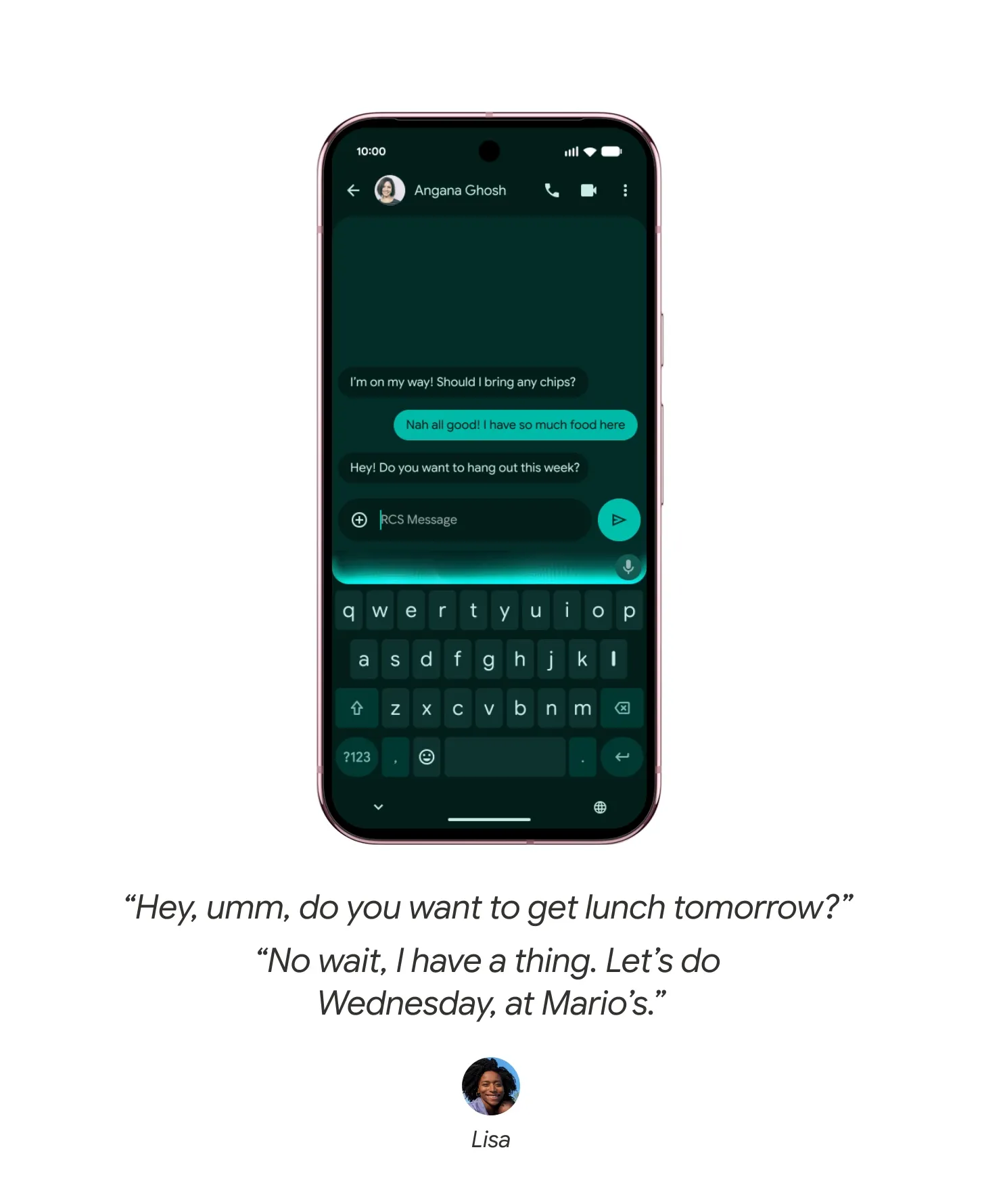
Rambler is a new AI-powered dictation engine built into Gboard, and it solves the biggest frustration with mobile voice input: the gap between how you speak and what you mean.
Rambler filters out filler words (“um,” “like,” “you know”), handles self-corrections intelligently (“Send this to Priya, wait, no, send it to Ananya”), and manages multilingual switching mid-sentence. The result is polished, coherent text from natural, rambling speech.
Gemini Autofill
Gemini now taps into your broader personal context across Gmail, Google Photos, and other apps to fill out complex forms more accurately. Rather than relying on static saved information, it can surface the right data for the right context, saving time on everything from travel booking forms to account creation flows.
App Bubbles: Multitasking Reimagined
Android 17 introduces system-wide App Bubbles, a feature that lets you minimize any app into a floating, interactive bubble on your screen, similar in spirit to Facebook Messenger’s chat head concept but applied universally.
Instead of closing an app when you need to check something else, you collapse it into a small bubble that hovers on screen. Tap the bubble and it expands back instantly, right where you left off. No re-navigation, no lost state. This makes juggling multiple apps, say a game and a chat, far more fluid; and speaking of games, the best Android adventure games benefit directly from this kind of quick-switch capability.
On tablets and foldable devices, bubbles are organized in a Bubble Bar anchored to the taskbar, giving these larger-screen devices a genuinely desktop-like multitasking experience. You can have several apps in floating windows, each accessible with a single tap.
Digital Wellbeing: Pause Point
Android 17 takes a thoughtful approach to screen time with a new Digital Wellbeing feature called Pause Point.
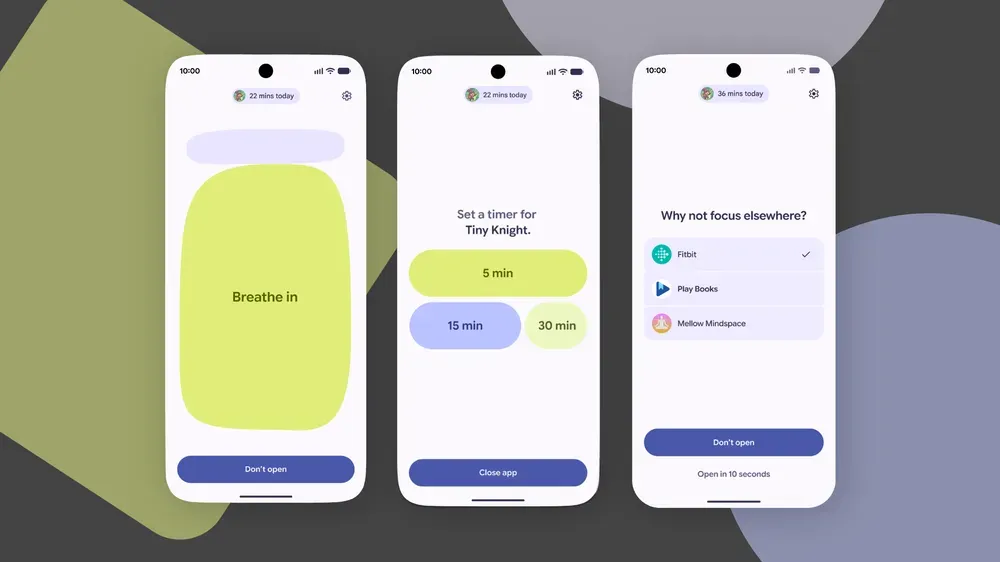
When you open an app you have flagged as distracting, the system inserts a 10-second pause screen before the app loads. During that window, you are asked why you are opening the app. The pause screen may suggest alternatives like a breathing exercise, a look at your favorite photos, or switching to an audiobook.
For users who are serious about the habit, Pause Point can be locked so that disabling it requires a full phone restart, making impulsive deactivation a deliberate friction point rather than a two-tap escape.
This is more nuanced than simple screen time limits. It works on the psychology of intentional behavior rather than blunt restrictions. While you are at it, tweaking your Android settings to improve battery life is another great way to keep your phone healthy and your habits in check.
Security and Privacy: A Serious Overhaul
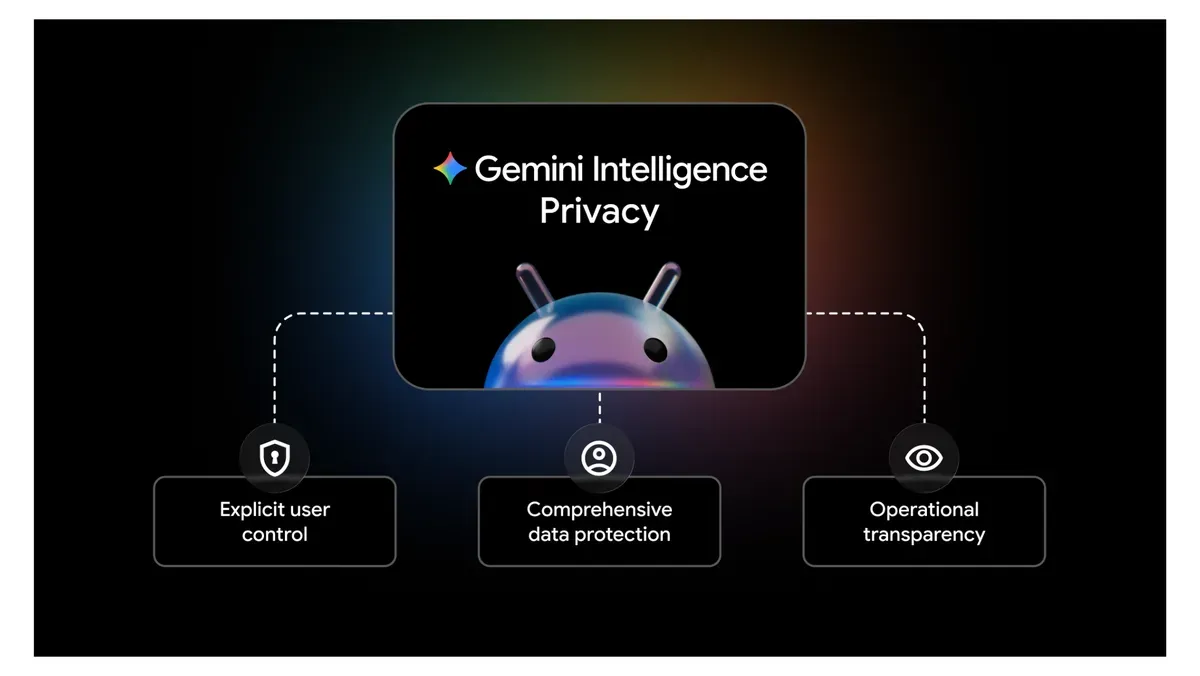
Android 17 ships the most comprehensive security update in several Android generations.
OTP Protection (3-Hour Delay)
One of the most practically useful security changes: Android 17 now mandates a three-hour delay before any app that is not your default SMS handler or the direct OTP recipient can access one-time password SMS messages. This directly blocks a common SIM-swap and hijacking attack vector where malware silently reads OTPs.
Selective Contacts Picker
Apps can no longer silently request broad access to your entire contacts list. Android 17 introduces a new system-level Contacts Picker that presents a standardized interface, letting you grant apps access to only the specific contacts you choose. The old READ_CONTACTS permission model is replaced by this granular, per-selection approach.
Theft Protection (Default On)
Theft Detection Lock and Remote Lock are now enabled by default globally on new and freshly reset Android 17 devices. Lost devices can be locked behind biometric authentication from the Mark as Lost mode, and Quick Settings tiles are hidden on the lock screen so a thief cannot toggle airplane mode to prevent tracking.
Live Threat Detection and Anti-Spoofing
Android 17 continuously scans for suspicious app behaviors at the OS level. Specifically, it monitors for misuse of accessibility overlays, a common technique used by banking malware to record what you type on top of legitimate apps.
A new anti-spoofing call protection layer can flag or outright block calls from entities impersonating your bank or telecom operator, a growing fraud vector in many markets.
OS Integrity Verification
The system now includes platform-level verification to detect and block malicious, unofficial versions of Android, targeting regions where modified firmware is used to pre-install spyware before a device is sold. For power users who want deeper control over their device’s software layer, learning the essential ADB commands every Android user should know pairs well with this security-first mindset.
Encrypted Client Hello (ECH)
On the network privacy side, Android 17 implements ECH (Encrypted Client Hello) in its TLS handshake implementation. This encrypts the domain name portion of HTTPS connection requests, preventing network observers like ISPs and public Wi-Fi operators from seeing which sites you are visiting even if the content itself is already encrypted.
Creator Tools: A First-Class Media Production Platform
Google is positioning Android as a serious content creation platform with Android 17, not just a consumption device.
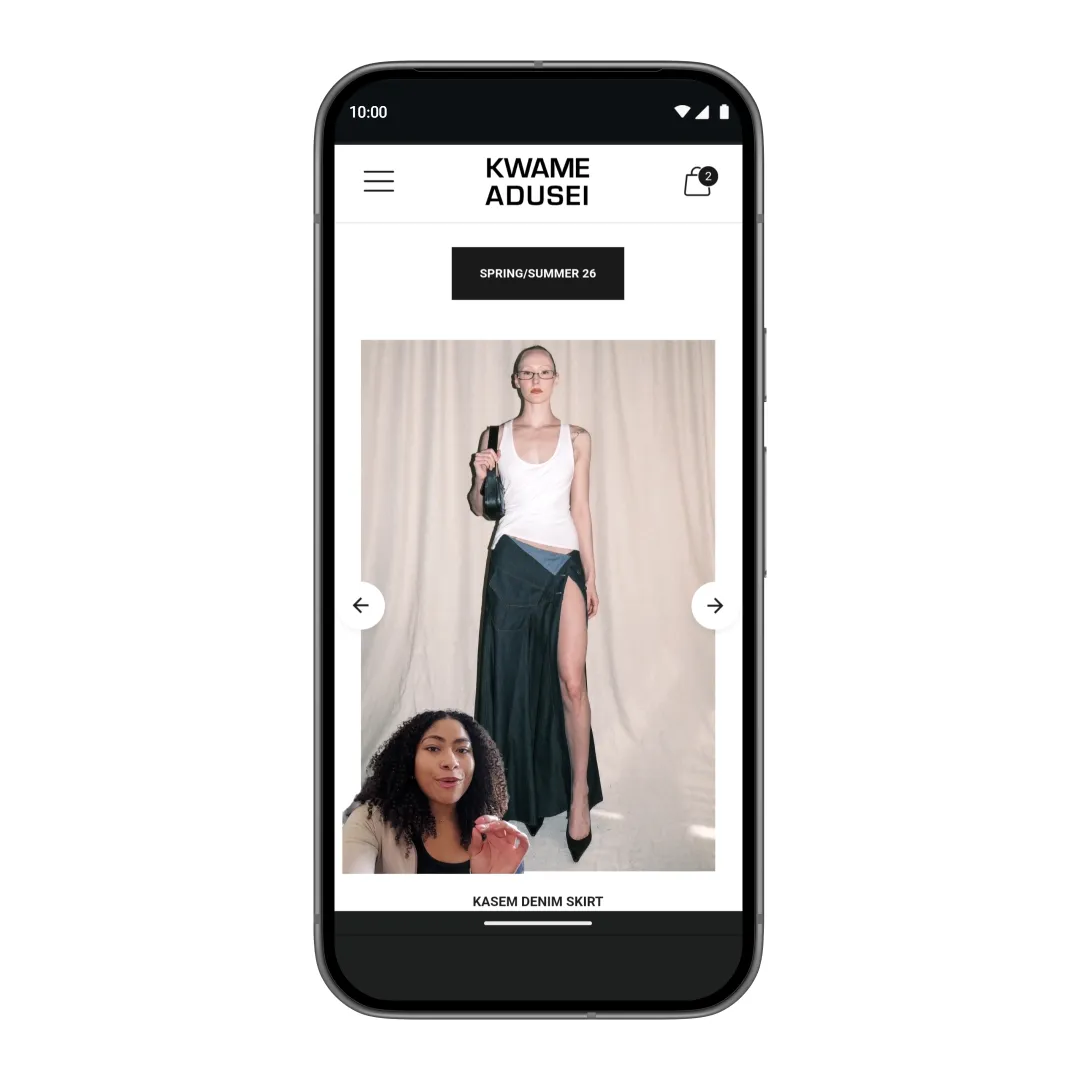
Screen Reactions
Screen Reactions is a new system-level feature that lets you record your front camera reaction over your screen content in real time. Think reaction videos, but built directly into the OS, no third-party apps, no green screens, no complex editing workflow. You capture both simultaneously and the output is compositor-ready.
Instagram Enhancements (Google and Meta Partnership)
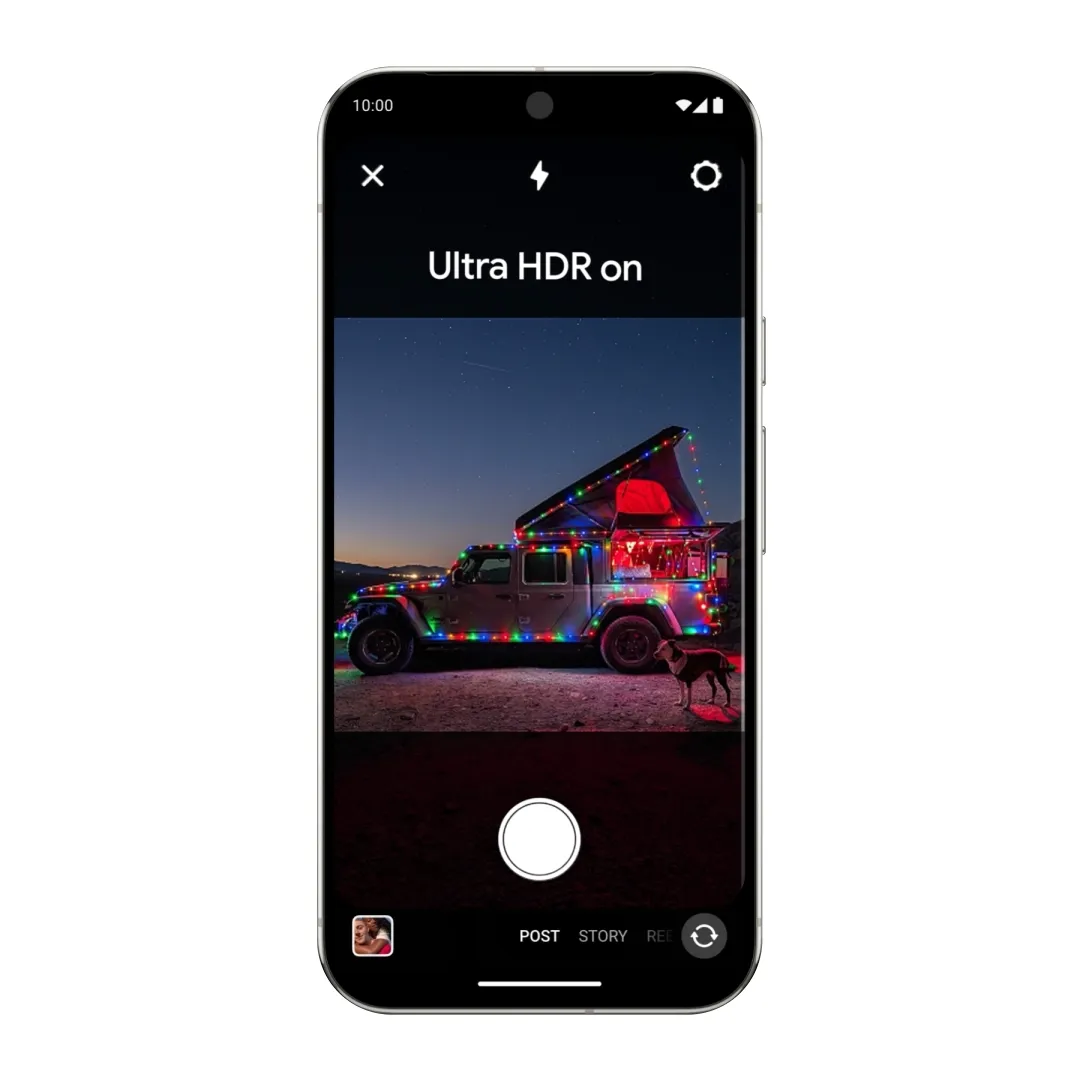
Google worked directly with Meta to optimize the full capture-to-upload pipeline for Instagram Stories and Reels. Improvements include:
- Ultra HDR capture and playback, so content looks richer before and after upload
- Night Sight integration inside Instagram, bringing Google’s low-light computational photography to the app
- Video stabilization improvements for handheld shooting
Edits App: Smart Enhance and Sound Separation
The Edits app gains two notable AI-powered tools:
- Smart Enhance: Upscales footage to higher resolutions using AI, useful for older clips or lower-resolution captures
- Sound Separation: Isolates individual audio tracks in a recording, letting you reduce background noise, remove ambient sound, or clean up dialogue without a desktop editing suite

Adobe Premiere Comes to Android
Adobe Premiere is launching on Android, and it brings exclusive templates and effects plus full support for the APV (Advanced Professional Video) format. APV is a royalty-free, open-source codec developed by Samsung that supports resolutions up to 8K, HDR10/10+, and 10-bit to 16-bit color depth. It maintains perceptually lossless quality across multiple rounds of editing, unlike consumer formats like HEVC that degrade with each re-encode.
Material 3 Expressive: A New Visual Language
Android 17 evolves the Material You design system into Material 3 Expressive, a more opinionated and visually cohesive design language.
Liquid Glass Aesthetic
The OS adopts a pronounced frosted glass or “Liquid Glass” visual treatment across system surfaces: the notification shade, Quick Settings panel, volume sliders, and power menu. These surfaces use Gaussian blur to show content behind them, creating spatial depth and visual continuity.
Expanded Personalization
The Wallpaper & Style menu adds new preset color palette variations: Neutral, Soft, Bright, and Bold, alongside a custom color picker that gives you finer control over Material You’s dynamic theming engine. If you want wallpapers that actually do justice to these new color systems, check out our collection of stock wallpapers from flagship devices.
Expressive Motion
A new Expressive Motion system integrated into Jetpack Compose replaces standard linear animations with spring-physics-based motion. UI elements spring, settle, and respond in ways that feel physically grounded rather than mechanically timed. The result is an interface that feels notably more responsive and premium.
Quick Share: Cross-Platform File Sharing
Quick Share receives a significant ecosystem expansion in Android 17.
The feature now supports AirDrop compatibility on certain devices, starting with Pixel and expanding to Samsung, OPPO, OnePlus, Vivo, Xiaomi, and HONOR. For iOS devices that do not support AirDrop interop, Android can generate a QR code that triggers an instant cloud-based file transfer, no cables, no app installs required on the iPhone side.
Easier iPhone-to-Android Switching
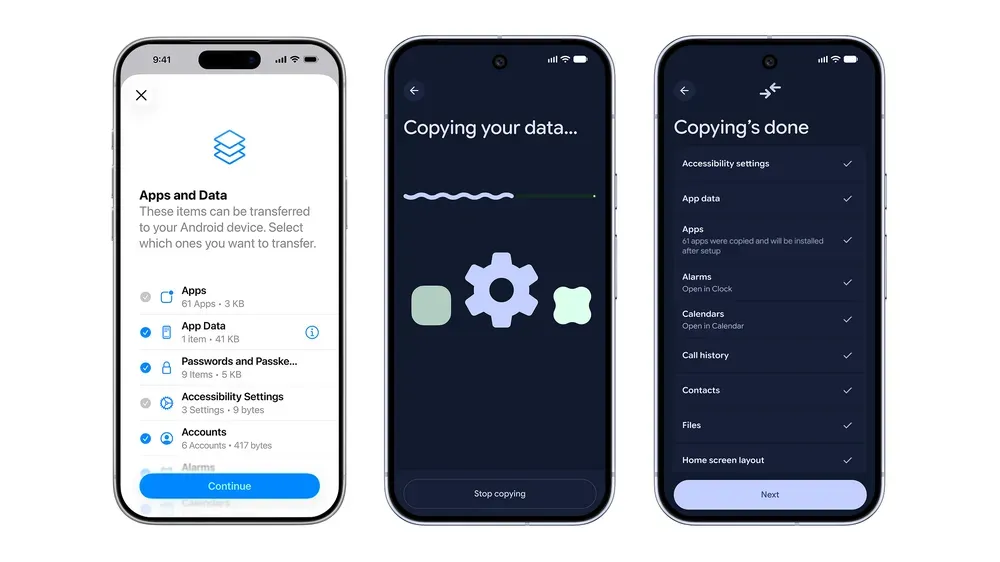
Google has overhauled the migration process for users switching from iPhone to Android. The new wireless flow can transfer passwords, photos, messages, apps, contacts, home screen layouts, and even eSIM data without requiring a cable or a manual backup-and-restore process.
Android Auto: A Smarter Drive
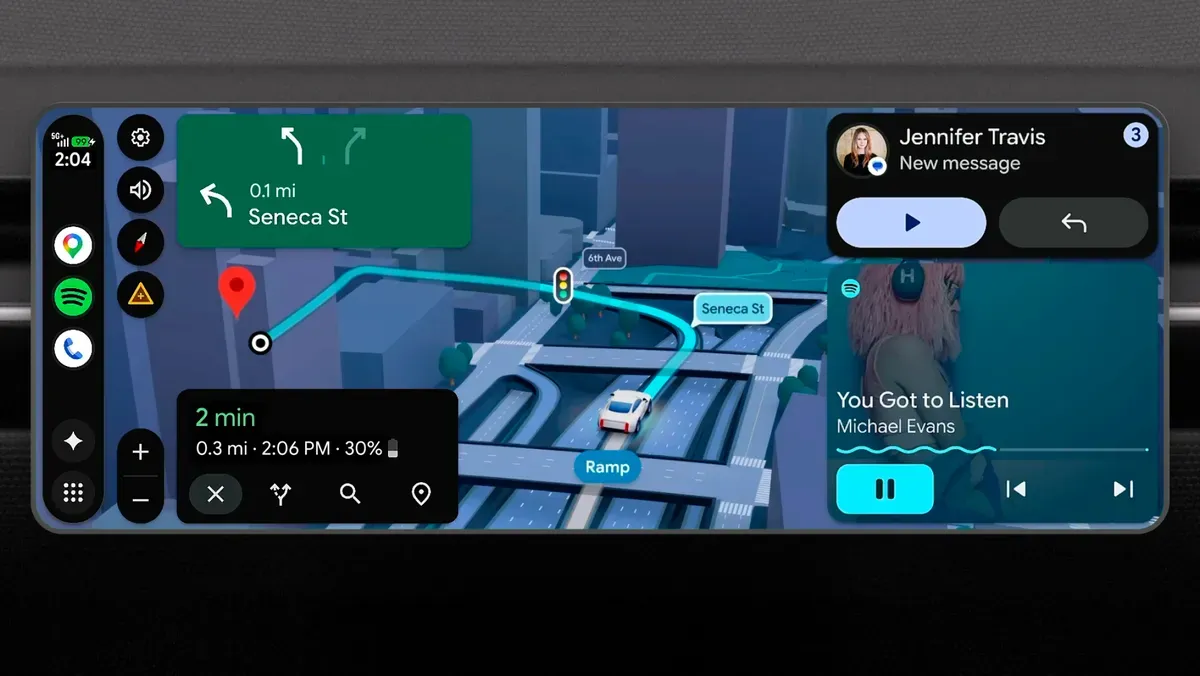
Android Auto in Android 17 is deeply integrated with Gemini Intelligence. Key additions include:
- Magic Cue: Automatic context-aware text replies while driving, so Gemini can send a “running 10 minutes late” message to your next calendar participant without you composing it
- Voice-ordered food: DoorDash integration allows hands-free meal ordering via voice while parked
- YouTube video playback: Official YouTube video playback while the vehicle is parked
- 3D Google Maps view: A redesigned, three-dimensional map perspective for navigation
- Material 3 Expressive design: The new UI language lands in Android Auto, modernizing its visual presentation
Beyond Phones: Wear OS, Android XR, and Googlebook
Android 17’s Gemini Intelligence layer extends beyond smartphones.
Wear OS gains the Create My Widget capability, letting you build custom watch face tiles from natural language prompts. Health Connect now distinguishes between data from apps and data from verified Wear OS hardware sensors, improving the accuracy and trustworthiness of health data.
Android XR introduces an Engagement Mode that helps apps respond intelligently to user interactions and changes in display state on extended reality devices. Full Gemini Intelligence integration is slated for later in 2026.
Googlebook, a new category of premium AI-first laptops announced alongside Android 17, is designed to run Gemini Intelligence natively. A notable exclusive feature is the Magic Pointer: hovering your cursor over any content on screen prompts a contextual AI action suggestion, bringing the agentic capabilities of Android 17 to the laptop form factor.
Android 17: Supported Devices
| Manufacturer | Supported Models |
|---|---|
| Google Pixel | Pixel 6 / 6 Pro / 6a, Pixel 7 / 7 Pro / 7a, Pixel 8 / 8 Pro / 8a, Pixel 9 series (all), Pixel 10 series (all), Pixel Fold, Pixel Tablet |
| Samsung | Galaxy S23 and newer (S23, S24, S25, S26), Z Fold5 / Fold6 / Fold7, Z Flip5 / Flip6 / Flip7 |
| Other OEMs | Rollout schedule varies; OPPO, OnePlus, Xiaomi, Vivo expected in late 2026 |
Note: Galaxy S22 series, S21 series, Pixel 5 and older are not expected to receive the Android 17 update.
Release Timeline
| Milestone | Status | Date |
|---|---|---|
| Beta program launch | Complete | February 2026 |
| Platform stability (Beta 3) | Complete | Late March 2026 |
| Official announcement | Complete | May 12, 2026 (The Android Show: I/O Edition) |
| Stable Pixel rollout | Complete | June 16, 2026 (Pixel 6 and newer) |
| Samsung One UI 9 beta | Complete | Mid May 2026 (Galaxy S26) |
| August 2026 Pixel update | Complete | August 2026 (security patch 2026-08-05) |
| Gemini Intelligence rollout | Upcoming | Later in summer 2026, qualifying devices first |
| Broad OEM rollout | Upcoming | Late 2026 |
What Android 17 Gets Right
Most major Android releases iterate on the same general surface: notification tweaks, settings reorganization, performance improvements, and a few headline AI features that land quietly and are forgotten by the next update cycle.
Android 17 is different because the AI integration is infrastructural, not cosmetic. Gemini Intelligence is baked into the permission model, the notification system, the autofill framework, and the widget API. This means every developer building on Android 17 can hook into the same intelligence layer, rather than building isolated, disconnected AI features. Gemini’s ability to interact with top paid Android apps like booking, productivity, and shopping tools is where this agentic promise will be truly tested.
The security improvements, specifically OTP protection and the Contacts Picker, close genuinely dangerous gaps that existed in prior versions. The creator tools show Google understands that the most-used camera on Earth is the one in your pocket, and professional workflows are increasingly happening there too.
The one area to watch will be how much of Gemini Intelligence requires a cloud connection versus what runs on-device. Google has not been fully explicit on the on-device versus cloud split for all agentic features, and that will matter significantly for users with variable connectivity or strong privacy expectations.
Frequently Asked Questions
When will Android 17 be available for my device?
Pixel 6 and newer have had the stable build since June 16, 2026; check Settings, System, Software updates if it has not appeared. Samsung Galaxy S23 and newer get One UI 9 (Android 17) through late 2026. Check your manufacturer’s update page for specifics.
Can I try Android 17 right now?
Yes. On a Pixel 6 or newer it is a normal system update. If you want the next release early, android.com/beta now serves the Android 17 QPR betas.
Will Gemini Intelligence work without internet?
Google has not published a full breakdown of on-device versus cloud features. On-device Gemini Nano handles some tasks locally, but complex multi-app agentic tasks likely require a connection.
Is App Bubbles available on all Android 17 devices?
App Bubbles is a system feature in Android 17 and should be available on all devices running the final release, though OEM skins may implement it differently.
What happens to Google Assistant after Android 17?
Google has been gradually transitioning users to Gemini. Android 17 continues that shift; Gemini Intelligence is the primary AI layer going forward. Google Assistant is effectively being subsumed.

Amit loves new tech and apps that make life easier, he writes about apps, games and useful websites on TheTechBasket.