On this page
- Official links
- How to download your UP Police salary slip
- Open the Employee Salary Details page
- Enter your linked mobile number
- Tap Generate OTP and enter it
- Solve the captcha and tap Show Data
- Read and save your salary details
- What a UP Police pay slip looks like
- What each column in the salary table means
- OTP not coming or no data shown
- Old UP Police pay slip page
- FAQs
- Do I need a login or password for the UP Police salary slip?
- Can I get the slip with my PNO number?
- Is the salary slip available on Manav Sampada?
- Can retired UP Police staff see pension details here?
- Is there an official app for the UP Police salary slip?
UP Police employees download their salary slip (vetan parchi) from Koshvani, the Uttar Pradesh finance department portal, at koshvani.up.nic.in. You enter the mobile number linked to your salary record, type the OTP and a small sum captcha, and your monthly salary details appear. No login, PNO password or app is needed.
The official UP Police website points to the same page: its "Generate Your Pay Slip" link opens the Koshvani Employee Salary Details form. Some guides send police staff to other portals. Use the official link below.
Official links
| What | Official link |
|---|---|
| Salary slip (Employee Salary Details) | koshvani.up.nic.in/KoshReports/EmpSalDetail.aspx |
| UP Police website (Generate Your Pay Slip link) | uppolice.gov.in |
| Koshvani support (NIC) | Phone 0522-2286626, email fsd[at]nic[dot]in |
How to download your UP Police salary slip
1. Open the Employee Salary Details page
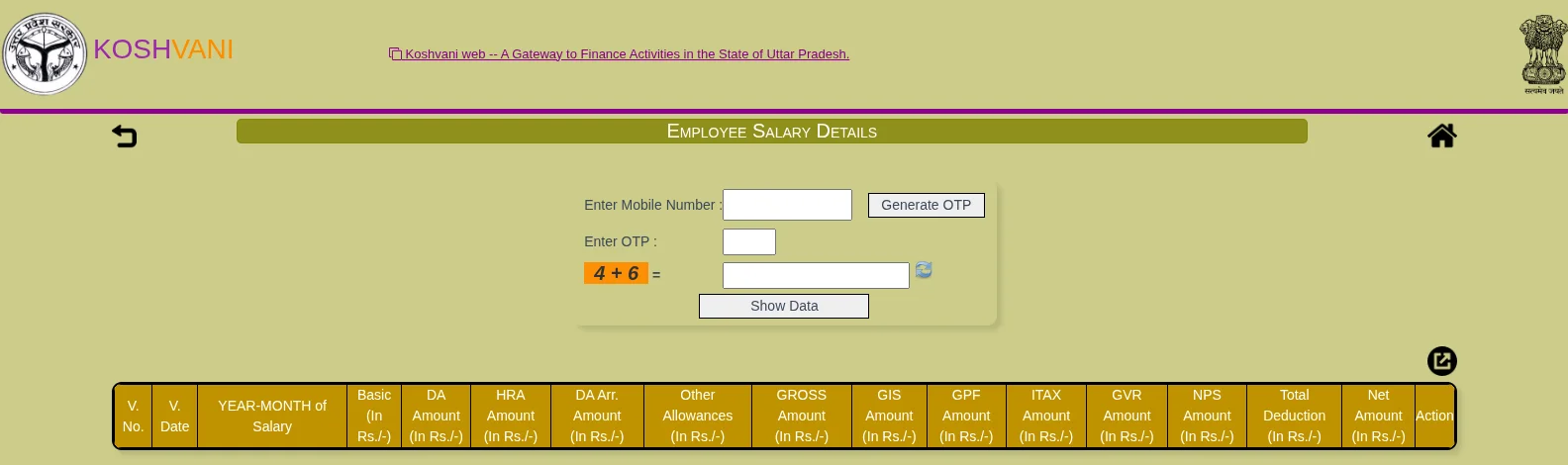
Open the Koshvani salary page in Chrome or any browser. You can also open uppolice.gov.in and tap Generate Your Pay Slip in the employee section. Both open the same form.
2. Enter your linked mobile number
Type the mobile number that is linked to your salary record in the Enter Mobile Number box. This is the number your office registered in payroll, not always the number you use today.
3. Tap Generate OTP and enter it
Tap Generate OTP. A 6-digit OTP comes by SMS to that number. Type it in the Enter OTP box.
4. Solve the captcha and tap Show Data
The captcha is a small sum, such as "6 + 7". Type the answer, then tap Show Data. Use the refresh icon next to it if the sum is hard to read.
5. Read and save your salary details
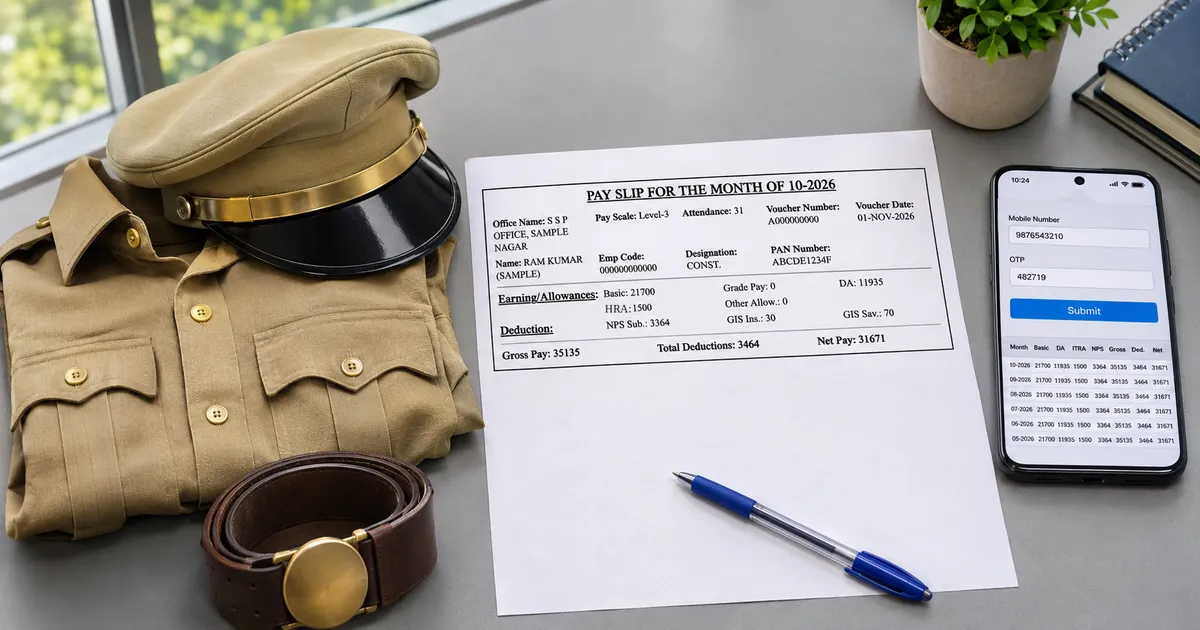
A table lists your salary by year and month. Use the export icon above the table to save it, or use your browser menu and pick Print, then Save as PDF. On a phone, open the saved file in a PDF reader app.
What a UP Police pay slip looks like
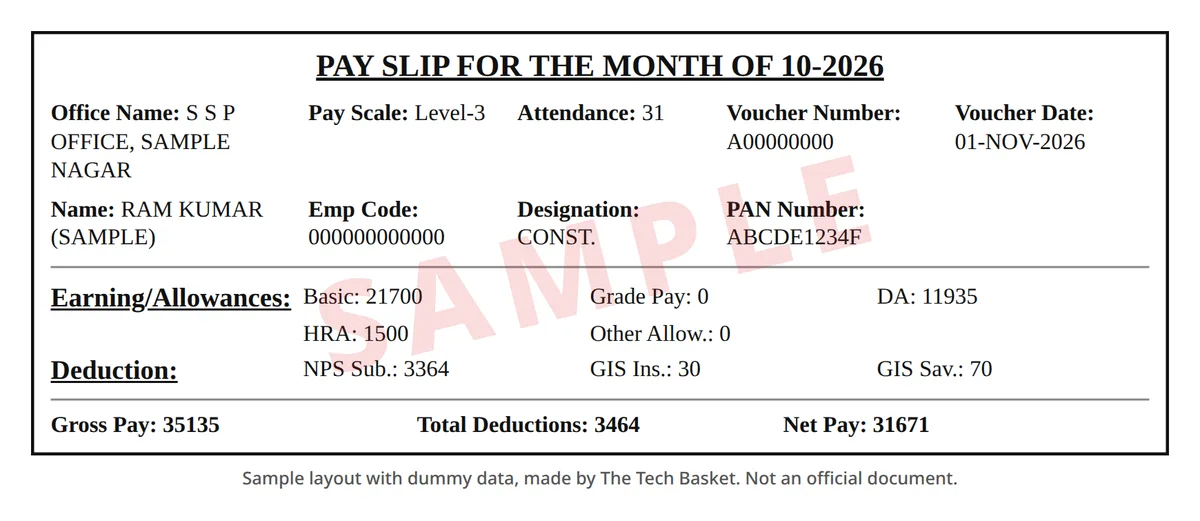
The printed monthly pay slip is a single bordered box. The title gives the month, then come office, pay level, attendance, the treasury voucher, and your name, employee code, designation and PAN. Below that are earnings, deductions, and one line with gross pay, total deductions and net pay.
| Slip field | What it tells you |
|---|---|
| Office Name | The office (DDO) that draws your salary, such as the SSP or SP office of your district |
| Pay Scale | Your pay level under the 7th Pay Commission, for example Level-3 for a constable |
| Attendance | Days paid in that month |
| Voucher Number and Date | The treasury voucher of the salary bill, same as V. No. on Koshvani |
| Emp Code | Your employee code in the payroll system |
| Earning/Allowances | Basic, grade pay, DA, HRA and other allowances |
| Deduction | NPS or GPF, GIS and any society or loan deduction |
| Gross Pay, Total Deductions, Net Pay | Total earnings, total cut, and the amount sent to your bank |
The old UP Police nominal roll slip (P SLIP) was a wide table with PNo, rank, unit, bank and many short allowance codes. That page now needs a staff login. Slips printed in 2025 use the box format above.
What each column in the salary table means
| Column | Meaning |
|---|---|
| V. No. and V. Date | Treasury voucher number and date of the salary bill |
| YEAR-MONTH of Salary | The month the salary is for |
| Basic | Basic pay for your pay level |
| DA Amount | Dearness allowance |
| HRA Amount | House rent allowance |
| DA Arr. Amount | DA arrears paid that month |
| Other Allowances | All other allowances added together |
| GROSS Amount | Total pay before deductions |
| GIS Amount | Group insurance scheme deduction |
| GPF Amount | General provident fund deduction (old pension staff) |
| ITAX Amount | Income tax deducted at source |
| GVR Amount | Government recovery, such as an advance being paid back |
| NPS Amount | National pension system deduction (staff who joined after April 2005) |
| Total Deduction | All deductions added together |
| Net Amount | Pay credited to your bank account |
OTP not coming or no data shown
Koshvani shows salary details only for a mobile number linked to your employee record. Its own notice says to get the number updated through your office DDO if it is not linked.
- Check that you typed the number registered at the time of joining or last payroll update.
- Ask your unit's accounts clerk or DDO to link or change your mobile number in the salary record.
- After the update, try again after the next salary bill is passed.
- If the page itself does not load, try again later or call the NIC number in the table above.
Old UP Police pay slip page
The old pay slip page on the UP Police nominal roll server, where you typed your PNO number, now opens a staff login instead. Older apps and guides that used it no longer work. The Koshvani page above is the working route.
FAQs
Do I need a login or password for the UP Police salary slip?
No. Koshvani's Employee Salary Details page needs only the linked mobile number, an OTP and a captcha.
Can I get the slip with my PNO number?
Not on Koshvani. It looks up your record by mobile number. Your PNO stays useful for nominal roll and Manav Sampada work on the official UP Police site.
Is the salary slip available on Manav Sampada?
Manav Sampada (ehrms.upsdc.gov.in) holds service records, leave and transfers. The official UP Police site links the pay slip to Koshvani, so use that for salary details.
Can retired UP Police staff see pension details here?
This page is for salary. Pensioners use the pensioner section of the Koshvani portal.
Is there an official app for the UP Police salary slip?
No official app is listed on the UP Police website. Use the Koshvani page in your phone browser.

Team Tech Basket is made up of many writers, videographers, photographers, and more. We're passionate about all things Tech! This team also publish the submitted content.