On this page
- What Vorssaint is
- The paid apps Vorssaint replaces
- Where the paid app still wins
- What Vorssaint costs your Mac
- Install only what you use
- Features worth installing first
- Volume mixer
- System monitor
- App switcher, window layout and Dock Preview
- Keep awake
- Uninstaller and cleaner
- AI agent limits in the Dynamic Island
- Permissions and privacy
- Known issues
- Who should skip Vorssaint
- How to install Vorssaint
- A sensible starter setup
- Verdict
- FAQs
- Is Vorssaint free?
- Is Vorssaint safe to install?
- Does Vorssaint work on Intel Macs?
- How much RAM does Vorssaint use?
- Can Vorssaint replace CleanMyMac?
- Does Vorssaint hide menu bar icons like Bartender?
Vorssaint is a free, open-source menu bar app for Apple Silicon Macs that bundles a per-app volume mixer, system monitor, app switcher, window snapping, clipboard history, screenshot tool, uninstaller and about forty more utilities behind one icon. It fully replaces most of the paid single-purpose apps people stack in their menu bar, but not all of them, and it is not as light as its "one icon" pitch suggests.
This review maps every major Vorssaint feature to the paid app it competes with, prices them, and measures what Vorssaint itself costs a Mac in memory and CPU.
What Vorssaint is
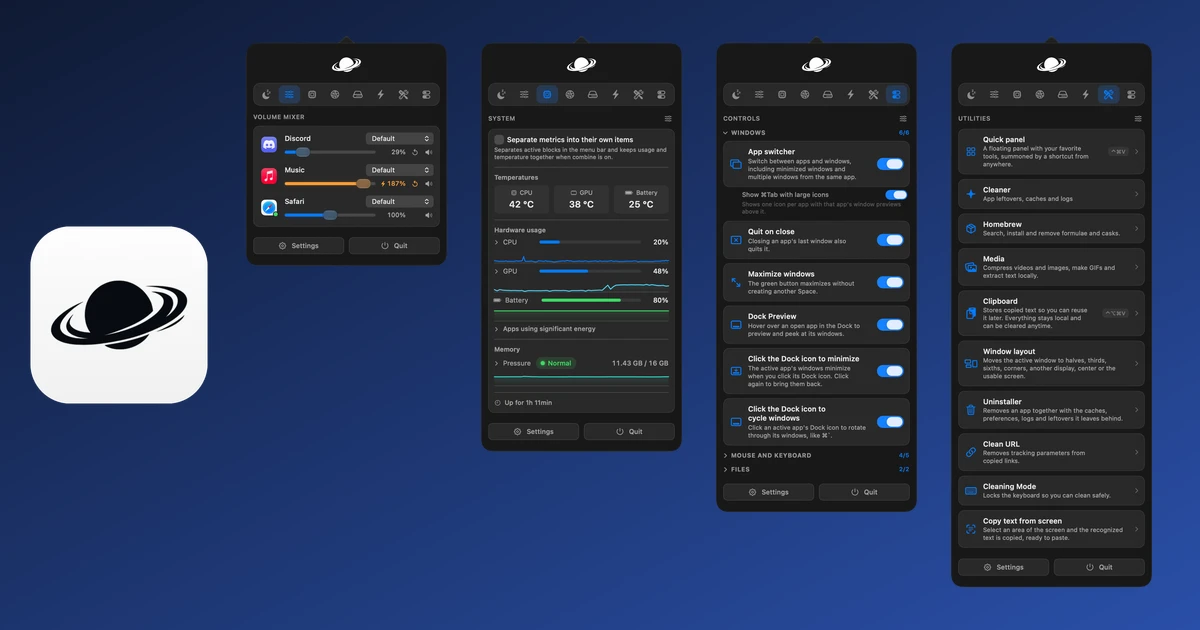
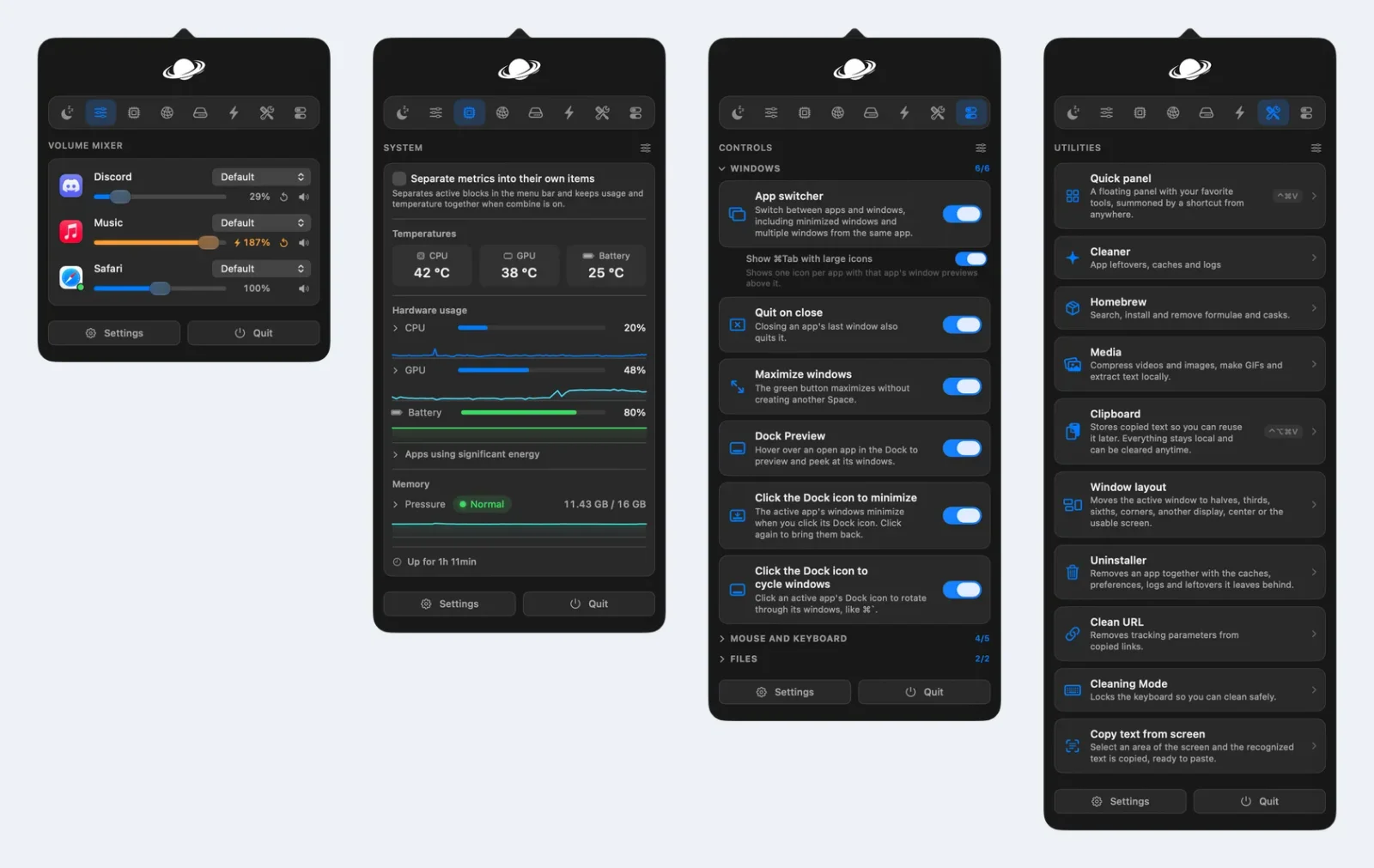
Vorssaint (the GitHub project is called vorssaint-utils) is a Swift and SwiftUI app that lives in the macOS menu bar. One click opens a panel with tabs for keep awake, sound, system, network, energy and utilities. Settings holds the rest: window management, mouse and keyboard tweaks, a Dynamic Island for the notch, capture tools and app management.
The numbers behind it, checked on GitHub on November 21, 2026:
| Detail | Value |
|---|---|
| Latest version | 3.4.4 (November 11, 2026) |
| Licence | GPL-3.0-or-later |
| First public release | June 12, 2026 |
| GitHub stars | About 35,600 |
| Downloads across all releases | About 1.33 million |
| Recent release downloads | 180,000 to 200,000 each |
| Requirements | Apple Silicon Mac, macOS 14 Sonoma or newer |
| Price | Free, with an optional Buy Me a Coffee tip |
The release pace is fast. Version 3.4.2, 3.4.3 and 3.4.4 shipped within three weeks of each other, and the app checks GitHub for updates on its own (you can turn that off).
The paid apps Vorssaint replaces
Here is each Vorssaint feature next to the app Mac users usually buy for that job, with the price on the developer's own site as of November 21, 2026.
| Vorssaint feature | Paid app it replaces | Price | Free alternative | Verdict |
|---|---|---|---|---|
| Per-app volume mixer | SoundSource | $49 one-time | None as complete | Replace |
| System monitor | iStat Menus 7 | $11.99 one-time | Stats | Replace |
| Fan control (beta) | Macs Fan Control Pro | $14.95 one-time | Macs Fan Control (free) | Close |
| App switcher | AltTab Pro | $9.99 one-time | AltTab (free) | Replace |
| Dock window previews | DockDoor | Free | DockDoor | Replace |
| Window snapping | Magnet | $4.99 one-time | Rectangle | Replace |
| Clipboard history | Paste | $29.99 a year | Maccy | Close |
| Text snippets | TextExpander | $60 a year | None as complete | Close |
| Screenshots and recording | CleanShot X | $35 one-time | macOS Screenshot app | Close |
| Cleaner | CleanMyMac | $39.95 a year | None as complete | Replace |
| Uninstaller | AppCleaner | Free | AppCleaner | Replace |
| Keep awake | Amphetamine | Free | Amphetamine | Replace |
| External display control | BetterDisplay Pro | $21.99 one-time | Lunar (free tier) | Close |
| File shelf | Yoink | $8.99 one-time | Dropover (free tier) | Replace |
| Mouse buttons and scrolling | BetterTouchTool | $15 one-time | Mos, LinearMouse | Close |
| Dynamic Island for the notch | NotchNook | $19 lifetime | None as complete | Close |
| Launcher and command bar | Raycast | Free (Pro $8 a month, billed yearly) | Raycast free | Close |
| Camera preview | Hand Mirror | Free (Plus $6.99) | Hand Mirror | Replace |
| Menu bar icon hiding | Bartender 7 | $25 one-time | Ice | Keep (Vorssaint has no equivalent) |
Verdict key: Replace means Vorssaint does the job well enough to uninstall the paid app. Close means it covers the everyday use but the paid app still does more. Keep means the paid app is clearly better for people who rely on that job.
Add up the paid picks Vorssaint can stand in for, leaving out Bartender, and the bill is about $191 in one-time purchases plus $130 a year in subscriptions (Paste, TextExpander and CleanMyMac). Count only the rows marked Replace and it is still $85 one-time plus $40 a year.
The honest catch: several of these jobs already have good free apps (AltTab, Rectangle, Stats, Maccy, Amphetamine, AppCleaner, DockDoor). Vorssaint's real saving is SoundSource, iStat Menus and CleanMyMac money, plus not having to install, update and grant permissions to a dozen separate apps.
Where the paid app still wins
- CleanShot X has cloud history, a more polished annotation editor and years of edge cases fixed. Vorssaint's screenshot and recording tools are good (scrolling capture, redaction, auto zoom, GIF export, expiring share links), but they are newer.
- Raycast has thousands of extensions and AI. Vorssaint's Command Bar searches apps, windows, files, clipboard, snippets and app menus, does maths and unit conversion, and runs saved scripts. That covers launching, not Raycast's extension store.
- Paste syncs clipboard history across Mac, iPhone and iPad through iCloud. Vorssaint's clipboard history stays on one Mac.
- TextExpander shares snippet libraries across a team. Vorssaint snippets are personal, with date, time and clipboard variables.
- Bartender and Ice hide menu bar icons. Vorssaint does not, and it is the most requested missing feature on its tracker (issue #481, 43 reactions).
What Vorssaint costs your Mac
A bundle only makes sense if it is lighter than the apps it replaces. I measured the installed 3.4.4 build on a MacBook with an Apple M6 chip, 32 GB of memory and macOS 27.2.1, with 31 of its feature switches turned on (system monitor, volume mixer, app switcher, window layout, Dock Preview, keep awake, screenshot, uninstaller, cleaner, Homebrew manager, mouse tweaks and others). Clipboard history, the Dynamic Island and Fan Control were off.
| Measurement | Result | How |
|---|---|---|
| App size on disk | 86 MB | du -sh /Applications/Vorssaint.app |
| Memory footprint | 122 MB | macOS footprint tool, after 40 minutes running |
| Resident memory (RSS) | About 490 MB | ps, includes shared system frameworks |
| CPU at idle | 0 to 0.6%, average 0.3% | ps sampled every 5 seconds for 30 seconds |
The footprint figure is the one that matters. It is what Activity Monitor shows in its Memory column and what the app actually costs your Mac. The larger RSS number counts system frameworks that every app shares, so it overstates the real cost.
That is a fair price for what was running. Do not expect a big memory win over a few small native utilities, though. The practical gain is fewer login items, fewer update prompts, one permissions list and one settings export.
Install only what you use
The feature that makes Vorssaint work as a bundle is the Features hub in Settings. Every feature has an Uninstall button. An uninstalled feature stops loading, disappears from the panel and Settings, and stops asking for permissions. Reinstalling it brings its old settings back.
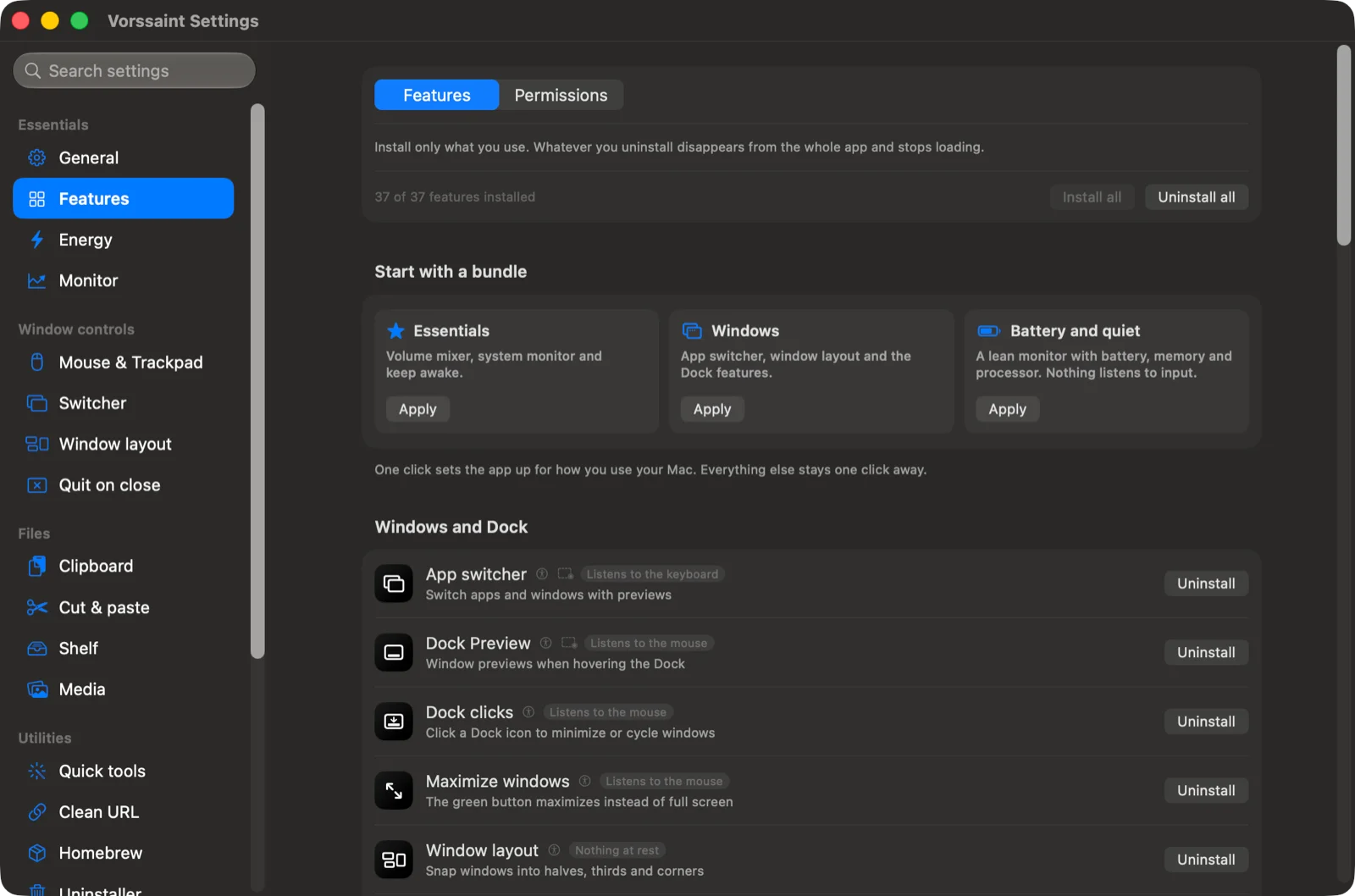
Each feature also shows a label such as Listens to the keyboard, Listens to the mouse or Nothing at rest, so you know which ones run in the background.
Three presets get you started:
- Essentials: volume mixer, system monitor and keep awake.
- Windows: app switcher, window layout and the Dock features.
- Battery and quiet: a lean monitor for battery, memory and processor, with nothing listening to input.
Features worth installing first
Volume mixer
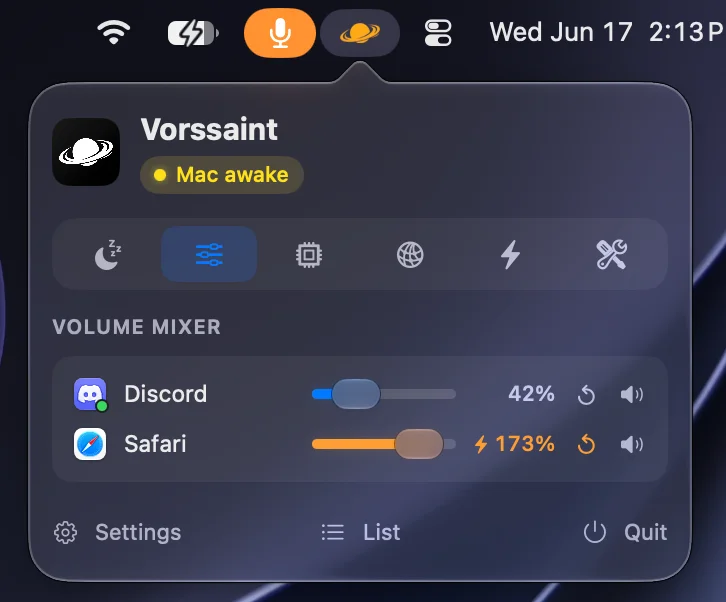
Per-app volume with no audio driver to install. You can boost a quiet app past 100%, send one app to speakers while a call stays on your headset, and switch outputs with a shortcut. The paid alternative, SoundSource, costs $49.
System monitor
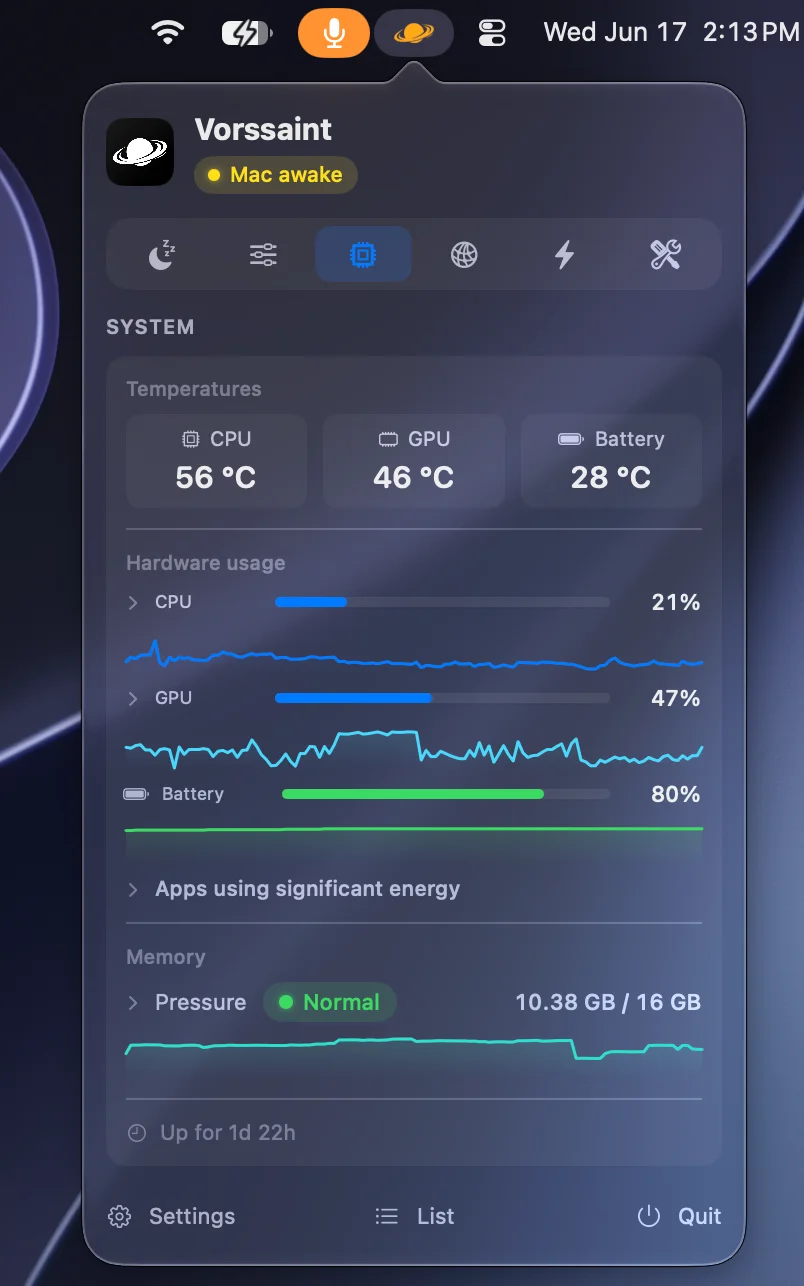
CPU, GPU, memory pressure, temperatures, battery health and power draw, with history graphs and a list of apps using significant energy. You can put any reading in the menu bar and set alerts for sustained CPU load, heat, memory pressure, low disk or low battery. Pair it with our guide on how to speed up your MacBook when the graphs show a problem.
App switcher, window layout and Dock Preview
A Command-Tab replacement with live window previews and search, window snapping by shortcut, screen edge or modifier-drag, and window previews when you hover a Dock icon. Together they replace three separate apps. A simpler switcher mode works without the Screen Recording permission.
Keep awake
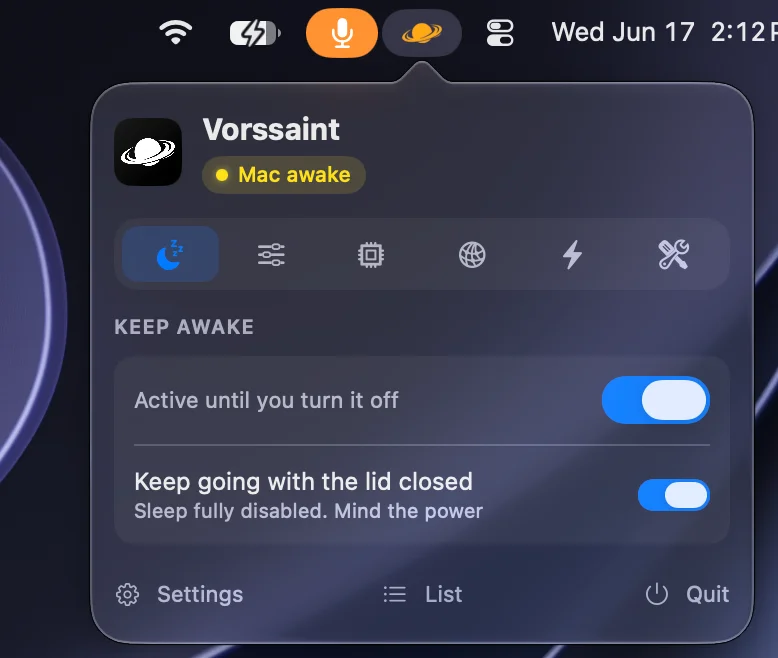
Keep the Mac awake on a timer, while chosen apps run, while on power or with an external display, or with the lid closed. Closed-lid mode uses pmset disablesleep. Vorssaint can install a sudoers rule limited to that one command so it does not ask for your password every time. Say no and it still works, with a password prompt each time.
Uninstaller and cleaner
The uninstaller finds an app's caches, preferences and helpers and shows them before moving everything to the Trash. With Full Disk Access it also reaches protected folders. The cleaner removes caches, logs and leftovers on demand or on a schedule. If you were weighing a paid cleaner, read do Macs need antivirus first, since macOS already covers much of what those suites sell.
AI agent limits in the Dynamic Island
The newest and most unusual feature. With the Dynamic Island installed, Vorssaint shows Claude Code, Codex, OpenCode and GitHub Copilot usage: plan limits and when they reset, tokens, models and a notice when a long task finishes. It asks each tool's own command-line program for the numbers and never reads your sign-in.
Permissions and privacy
A tool that controls windows, audio, the clipboard and the screen needs serious access to your Mac. Vorssaint handles this better than most single-purpose apps.
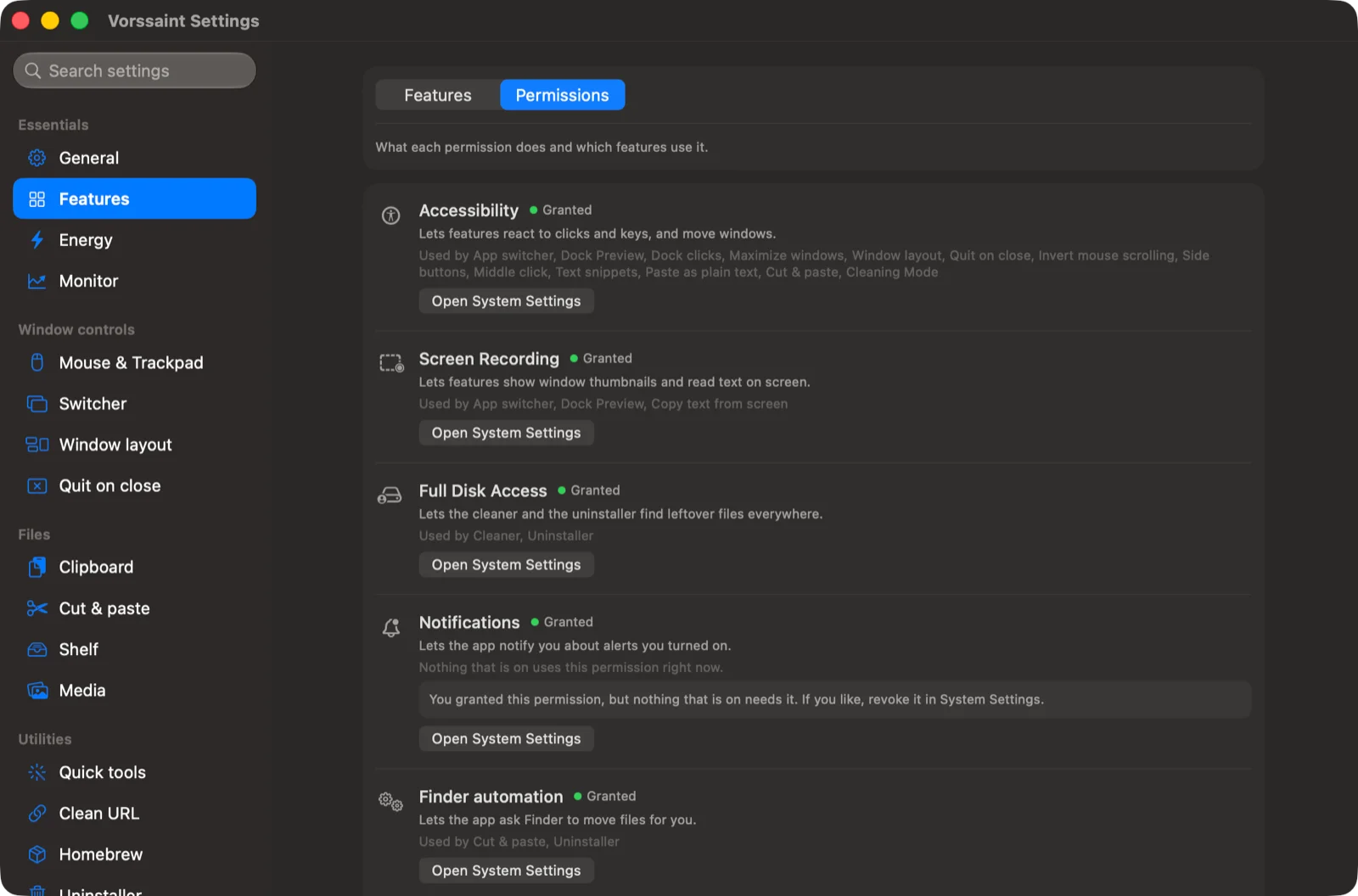
| Permission | Used by | If you say no |
|---|---|---|
| Accessibility | App switcher, Dock Preview, window layout, snippets, mouse tweaks, Cleaning Mode | Those features stay off |
| Screen Recording | Window previews, copy text from screen, screenshots | Simpler switcher without thumbnails |
| Full Disk Access | Deeper uninstaller and cleaner scans | Scans only reachable folders |
| Microphone, Camera | Mic tools, camera preview, recording | Those features stay off |
| Administrator (one time) | Closed-lid keep awake | Password prompt each time |
Two things stand out. First, every permission is optional and the app only asks for the ones your installed features need. Second, the Permissions tab warns when you granted something that nothing uses any more, with a shortcut to revoke it in System Settings.
On privacy, the project's own privacy notes state:
- No account, no analytics, no crash reports and no device identifiers.
- Network use is limited to visible features: the update check (can be turned off), the Cloudflare speed test when you start one, Homebrew actions, the app update checker, optional online lyrics, temporary screenshot and recording links you create, feedback you send, and the AI agents price list.
- Settings stay on your Mac. You can export them or keep them in a dotfiles folder.
Known issues
Vorssaint moves fast, and its tracker shows it. On November 21, 2026 it had 1,106 open issues. The ones a new user should know about:
- Fan Control can spin the CPU. Issue #2046 (open) reports the Fan Control tab re-rendering after the panel closes, holding about 60% CPU. Fan Control is beta, so leave it uninstalled unless you need it.
- Battery drain after some updates. Issue #3047 (open, filed on 3.4.1) reports heavy battery drain on an M5 MacBook Pro. If your battery life drops after an update, uninstall features one at a time to find the cause.
- Crash when scrolling the Features list. Issue #2311 (open, 11 reactions) on 3.4.0.
- A freeze tied to Dock Preview was fixed in September (issue #971, closed).
Because every feature can be uninstalled on its own, the usual fix for a misbehaving feature is to remove it until an update lands.
Who should skip Vorssaint
- Intel Mac owners. It needs Apple Silicon. Intel support was requested (issue #523) and closed without being added.
- Anyone on macOS 13 Ventura or older. Sonoma is the minimum.
- People who need menu bar icon hiding. Keep Ice or Bartender.
- People happy with one paid app for one job. If you already own CleanShot X or iStat Menus and use their deep features, Vorssaint will feel like a step sideways.
- Battery-sensitive laptop users who will not tune it. Install a preset, not everything.
How to install Vorssaint
With Homebrew:
brew install --cask vorssaintOr download the disk image from the GitHub releases page and drag Vorssaint into Applications. Builds are signed with an Apple Developer ID and notarized, so macOS opens them normally. You never need to strip the quarantine flag or turn off Gatekeeper to run it. Any guide telling you to do that is giving bad advice.
To remove it later, brew uninstall --cask vorssaint, or run ./Tools/uninstall.sh from the source folder to also delete its settings and permissions.
A sensible starter setup
- Apply the Essentials preset.
- Add App switcher and Window layout if you juggle many windows.
- Add Uninstaller and Clean URL.
- Grant only the permissions those features ask for.
- Live with it for a week, then uninstall the paid apps it covers.
Start small and add a feature only when you miss it. Our list of Mac hidden features covers what macOS already does without any app, and recording your screen without third-party apps is worth reading before you rely on a capture tool.
Verdict
Vorssaint
The best free toolkit for Apple Silicon Macs. Replaces half a dozen paid utilities outright and costs about 120 MB of memory. Install features one at a time, and keep the paid app where you need its depth.
- Volume mixer, system monitor, app switcher and window layout match paid apps
- Install only what you use, with per-feature permissions
- No account, no telemetry, no subscription
- 122 MB footprint and near-zero idle CPU with 31 features on
- Screenshot, clipboard and Command Bar are good but not best in class
- Very fast release pace means occasional regressions
- No Intel Mac support
- No menu bar icon hiding
- Fan Control beta can spike CPU
FAQs
Is Vorssaint free?
Yes. Vorssaint is free and open source under GPL-3.0-or-later, with no paid tier, account or subscription. The developer accepts optional tips.
Is Vorssaint safe to install?
Official builds are signed with an Apple Developer ID and notarized by Apple, the source code is public, and the app sends no analytics. Download it only from the official GitHub releases page or Homebrew, because forks must use a different name and icon.
Does Vorssaint work on Intel Macs?
No. It requires an Apple Silicon Mac (M1 or newer) running macOS 14 Sonoma or later.
How much RAM does Vorssaint use?
On an M6 MacBook with 31 feature switches on, its memory footprint was 122 MB with under 1% CPU at idle. Uninstalled features do not load, so a smaller setup uses less.
Can Vorssaint replace CleanMyMac?
For uninstalling apps and clearing caches and logs, yes. It does not include malware scanning, which macOS already handles with XProtect.
Does Vorssaint hide menu bar icons like Bartender?
No. Icon hiding is the most requested missing feature on its GitHub tracker, so keep Ice or Bartender for that.

Sumit
ContributorHi, I'm Sumit, Being an introvert I have always been obsessed with technology-computers and reading dozens of posts to learn, find answers out of my curiosity. I love to write as I explore more.