Google has released Google AI Edge Foresight, a free meeting assistant for the Mac that does all of its AI work on your computer. It listens to your calls, turns your quick shorthand into full notes, and answers questions using your own documents. Nothing goes to the cloud: the audio, the transcript, your files and your notes stay on the Mac, and the app keeps working with Wi-Fi switched off.
Foresight comes from Google's AI Edge team, the group behind Google's on-device AI tools, and it doubles as a showcase for EmbeddingGemma 2, a new open model Google released on October 6, 2026. If you have looked at cloud note-takers like Granola or Otter but did not want your meetings on someone else's server, this is the app to watch.
What Google AI Edge Foresight does
Foresight has three jobs, and Google's product page lays them out clearly.
1. It writes your notes for you
During a meeting, you type short bullets the way you would on a sticky note ("pricing", "launch date?", "send deck"). Foresight transcribes the meeting in the background and expands each bullet into a proper note using what was actually said. You get the shorthand on one side and the enhanced notes on the other.
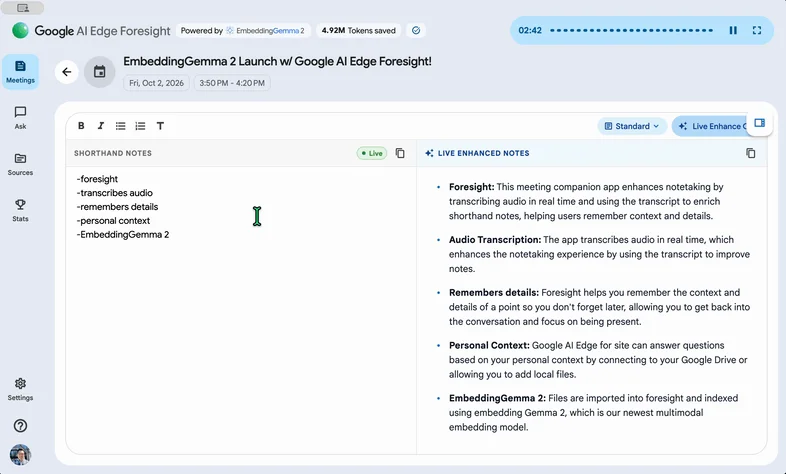
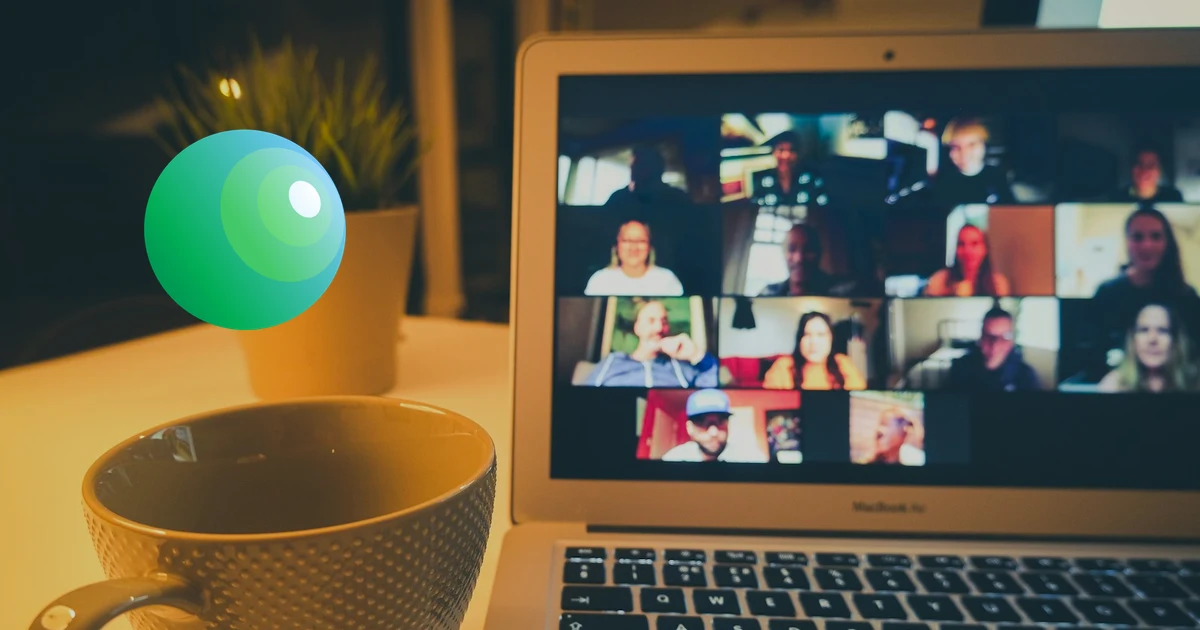
Because it captures both your microphone and your Mac's system audio, it does not need a plugin or a bot joining the call. Google says it runs "alongside Google Meet, Zoom, or offline conversations", so it works the same in a video call and in a meeting room.
2. It learns your work files
You point Foresight at your project folders, reference documents, diagrams, calendar and Google Drive. It indexes them on the Mac so it can find the right file later without you organising anything.
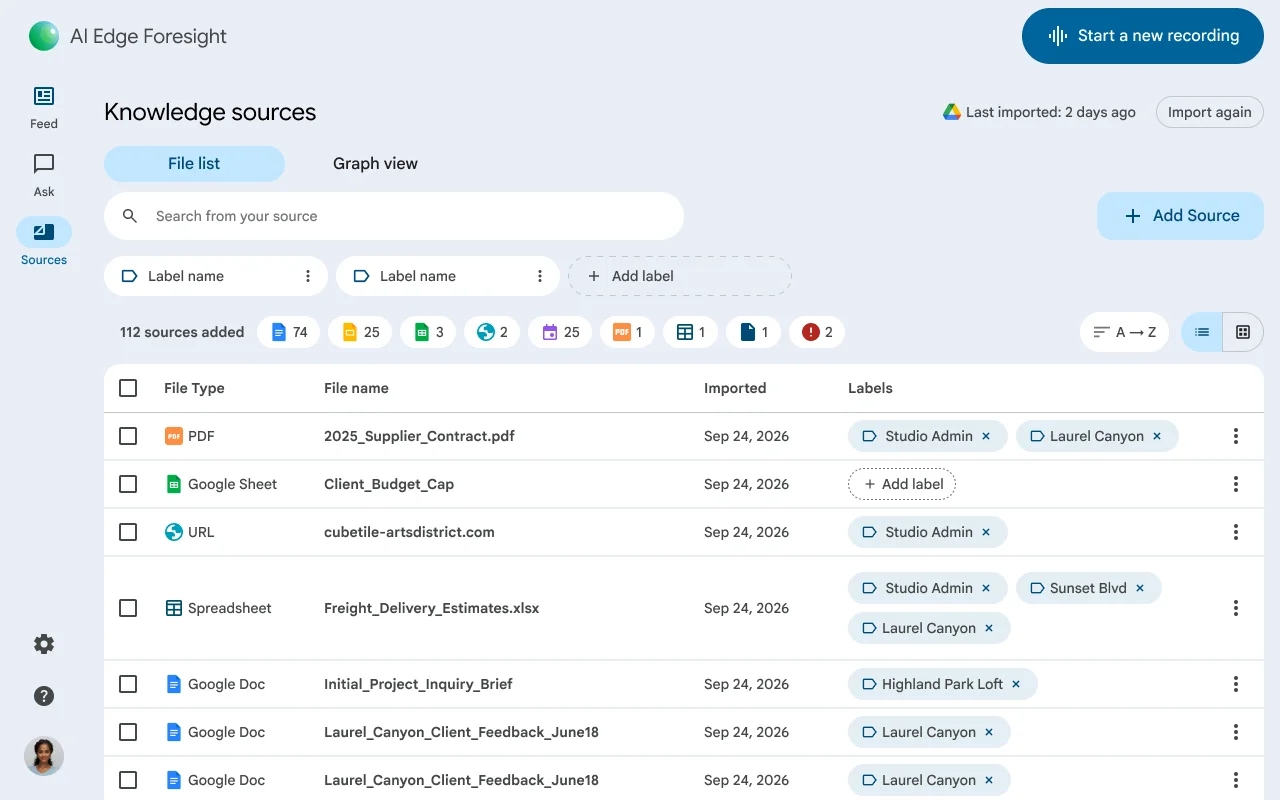
Supported sources, per Google:
- PDFs
- Google Docs and Google Drive files
- Microsoft Office files (Word, Excel, PowerPoint formats)
- Plain text and Markdown
- Web bookmarks
- Calendar details and diagrams
You can tag sources with your own labels, filter by them, and search across thousands of pages. Google claims those searches come back "in milliseconds without cloud indexing".
3. It answers questions, even mid-meeting
The Ask tab is a chat box over your meetings and files. Ask "what did we agree on the budget?" and it answers with citations to the source file or meeting.
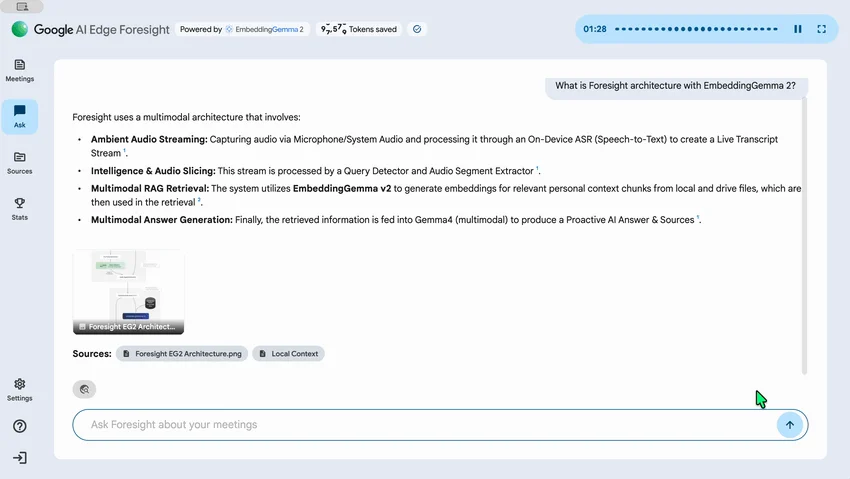
The more interesting part is Live Assistance. With it turned on, Foresight listens for questions raised during the call and shows a context card with the answer and its source before you have to say "let me circle back on that". That is the feature Google is leaning on most: less prep, fewer follow-up emails.
How it works without the internet
Two Gemma models do the work, both running on your Mac:
| Part | Model | Job |
|---|---|---|
| Search and retrieval | EmbeddingGemma 2 (740M parameters) | Turns your files, images, audio and the live transcript into searchable vectors |
| Answers and notes | Gemma 4 | Writes the enhanced notes and the chat answers from what EmbeddingGemma 2 finds |
| Transcription | On-device speech-to-text | Converts mic and system audio into a live transcript |
This setup is called RAG (retrieval-augmented generation): first find the relevant pieces of your own data, then let the language model answer using only those pieces. Normally both halves run in a data centre. Here both run locally, which is why Google says you can use Foresight "on airplanes, or work in air-gapped secure facilities".
If you want to try Gemma 4 on its own, our guide to running Gemma 4 on your own hardware covers the model sizes and what each one needs.
Privacy: what stays on your Mac
Google's FAQ is direct about this: "All AI inference runs 100% locally on your device." In practice that means:
- Meeting audio and transcripts are processed on the Mac, not uploaded.
- Your knowledge sources and their index stay on the Mac.
- Your notes are stored locally.
Connecting Google Drive still needs a sign-in and a connection to pull the files in. After that, the indexing and the answers happen offline. As with any meeting recorder, tell the other people on the call that you are transcribing it. Recording laws differ by country and state, and an on-device tool does not change that.
System requirements and download
| Details | |
|---|---|
| Platform | macOS only |
| Chip | Optimised for Apple Silicon (M-series). Google does not list Intel Mac support |
| Price | Free |
| Internet | Not needed after setup |
| Windows, Android, iPhone | Not available |
Google says Foresight keeps "a light footprint with low battery drain" thanks to quantized (compressed) Gemma models. It has not published a minimum macOS version or RAM figure, so an 8GB MacBook Air is untested territory. For reference, Google measured the full multimodal EmbeddingGemma 2 at about 567MB of RAM on a phone, and Gemma 4 needs more on top of that, so our own estimate is that a 16GB Mac is the comfortable target.
To install it, open the Google AI Edge Foresight page, click Download for macOS, open the .dmg file and drag Foresight into Applications. Allow microphone and audio recording access when macOS asks, or Foresight cannot hear your calls.
Should you use it?
Foresight is a good fit if you:
- Sit in back-to-back meetings and lose track of who promised what
- Handle confidential material (client work, legal, health, unreleased products) that cannot go to a cloud AI service
- Already keep your work in Google Drive, PDFs and Office files
- Work on flights or in places with poor internet
Skip it, for now, if you use Windows or an Intel Mac, or if you want a shared team workspace. Foresight is a personal, single-device tool. It also comes from Google's developer site rather than the App Store, and Google has not said how long it will maintain it, so treat it as an early release and keep important notes backed up.
For more ways to run AI without sending your data out, see how to run a local LLM on Android, and our list of free AI coding agents if you build software.
FAQs
Is Google AI Edge Foresight free?
Does Foresight work offline?
Does Foresight send my meetings to Google?
Does Foresight work with Zoom and Google Meet?
Is there a Windows version of Foresight?
What is EmbeddingGemma 2?

Sumit
ContributorHi, I'm Sumit, Being an introvert I have always been obsessed with technology-computers and reading dozens of posts to learn, find answers out of my curiosity. I love to write as I explore more.