On this page
Adobe Lightroom is the default photo editor for a lot of photographers. It is also a subscription. On Adobe's US site, the Lightroom plan is US$11.99 a month on an annual plan billed monthly, with 1TB of cloud storage. The Photography plan, which adds Photoshop, is US$19.99 a month. Stop paying and you lose the full editor.
People switch for a few reasons. The monthly cost adds up over years. You never own the software. Many photographers do not need 1TB of cloud storage or Adobe's AI credits. And on phones, the free Lightroom app keeps its best tools, including editing RAW files from a real camera, behind Premium.
This list covers 9 free photo editors for Android, iPhone, Windows, Mac, Linux and the browser. For each one we note the price, whether it opens RAW files (the unprocessed files your camera can save), whether it has a library or catalog to organise photos, and whether it shows ads or needs an account. Every detail comes from the official website or app store listing. We have not run our own tests.
Last checked: September 26, 2026. Prices are official US prices or US store prices. They can differ by country and by account.
- Best free phone editor: Snapseed by Google is free with no subscriptions, purchases, ads or watermarks, and opens many RAW formats.
- Closest to Lightroom Classic: darktable is a free, open source RAW editor with a photo database and lighttable for Windows, Mac and Linux.
- Best for organising a big library: digiKam handles collections of 100,000+ photos, with face tagging and RAW editing.
- Best RAW quality tools: RawTherapee focuses on detailed RAW processing, with no catalog.
- Best free Photoshop-style editors: Affinity (now free), GIMP and Photopea in a browser.
- Staying with Adobe: the free Lightroom mobile app still edits phone photos, but camera RAW editing needs Premium.
All 9 Lightroom alternatives at a glance
Search by app, platform or feature.
Tap any name in the table to jump to its full entry below.
| App | Price | One-time vs subscription | Platforms | RAW support | Library or catalog | Ads | Account needed |
|---|---|---|---|---|---|---|---|
| Adobe Lightroom (for comparison) | US$11.99 a month (annual plan) | Subscription | Windows, Mac, Android, iPhone, iPad, web | Yes | Yes, cloud library | No | Adobe account |
| Snapseed | Free | Free | Android, iPhone | Yes, many formats (DNG, ARW, RAF, NEF, CR3, ORF, PEF) | No | No | No |
| darktable | Free | Free and open source | Windows, Mac, Linux | Yes | Yes, database and lighttable | No | No |
| RawTherapee | Free | Free and open source | Windows, Mac, Linux | Yes | No, file browser only | No | No |
| digiKam | Free | Free and open source | Windows, Mac, Linux | Yes | Yes, database with face tagging | No | No |
| Lightroom mobile (free) | Free, Premium from $7.99 a month | Subscription (optional) | Android, iPhone, iPad | Phone photos and DNG only; camera RAW needs Premium | Yes, in-app library | No | Adobe account |
| VSCO | Free Starter, Plus from $2.49 a month (annual) | Subscription (optional) | Android, iPhone | Not stated for Starter | No | Yes, on Starter | VSCO account |
| Photopea | Free, Premium optional | Subscription (optional) | Any web browser | Yes (DNG, CR2, CR3, NEF, ARW, RW2, RAF, ORF, FFF) | No | Yes | No |
| GIMP | Free | Free and open source | Windows, Mac, Linux | Through a RAW plugin | No | No | No |
| Affinity | Free | Free | Windows, Mac | Yes, Develop Studio | No | No | Canva account |
Free RAW editors for Windows, Mac and Linux
darktable
darktable is the most complete free answer to Lightroom Classic. It keeps your photos in a database, lets you browse them on a zoomable lighttable, and develops RAW files without ever changing the original. It also has pro colour management and GPU acceleration.
The current version is 5.6.1, with installers for Windows (including ARM), Mac (Apple Silicon and Intel) and Linux. There is no account, no ads and no fee.
What you lose vs Lightroom: cloud sync, a phone app and Adobe's polish. darktable has a steep learning curve.
- Replaces
- Lightroom Classic library and Develop
- Runs on
- Windows, Mac (macOS 13.5+), Linux
- Licence
- Free and open source (GPL 3.0)
- Skip if
- You want to edit on your phone
- Price
- Free
RawTherapee
RawTherapee is built for getting the most out of RAW files. It uses a 32-bit, non-destructive processing engine and offers advanced demosaicing (the step that turns sensor data into a colour image), pixel-shift support, dark frame subtraction and flat field correction.
Version 5.13 came out on July 26, 2026. It has a file browser, but not a database or catalog like Lightroom.
What you lose vs Lightroom: photo management, keywords and collections. Pair it with digiKam if you need those.
- Replaces
- Lightroom Develop module
- Runs on
- Windows, Mac, Linux
- Licence
- Free and open source (GPLv3)
- Skip if
- You need a catalog to organise thousands of photos
- Price
- Free
digiKam
digiKam is a photo manager first. It handles libraries of more than 100,000 images, supports several collections on local, removable or network drives, and can store its database locally or on a server. It detects and tags faces so you can find photos of a person fast.
It also edits. You get RAW processing, colour correction, cropping, retouching and batch processing. Version 9.1.0 was released on June 7, 2026.
What you lose vs Lightroom: a single, smooth edit workflow. digiKam's editing tools are simpler than Lightroom's Develop panel.
- Replaces
- Lightroom Library module
- Runs on
- Windows, Mac, Linux
- Licence
- Free and open source (KDE project)
- Skip if
- You only edit a few photos at a time
- Price
- Free
Free photo editors for Android and iPhone
Snapseed
- Android
- iPhone and iPad
Snapseed is a full photo editor from Google, and the Play listing promises 30+ tools with no subscriptions, purchases, ads or watermarks. Editing is non-destructive, so you can undo any change later.
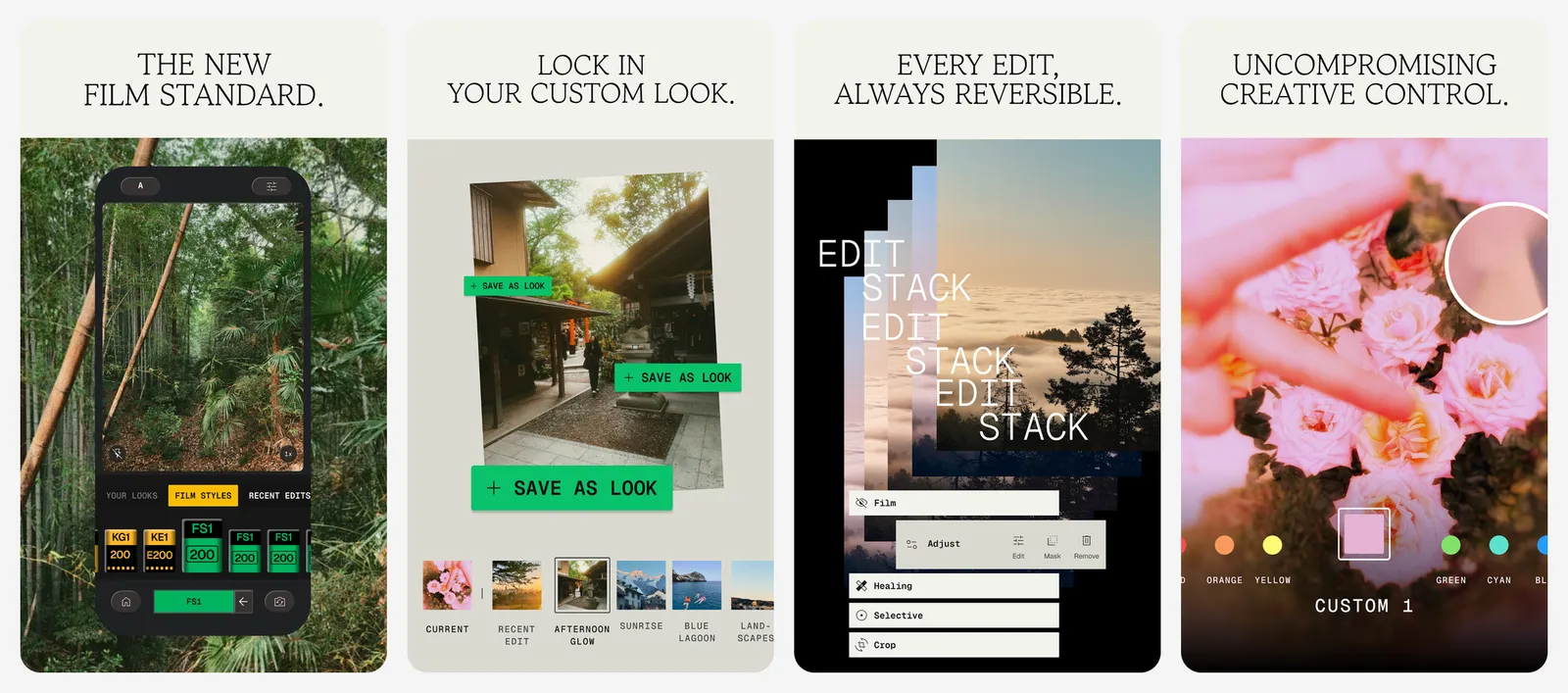
A recent update widened RAW support to many more formats, including DNG, ARW, RAF, NEF, CR3, ORF and PEF. New tools include smart masking, batch editing, film styles and a built-in camera. The app was updated on September 24, 2026.
What you lose vs Lightroom: a photo library, cloud sync and a desktop version.
- Replaces
- Lightroom mobile Premium
- Runs on
- Android, iPhone
- Licence
- Free, no subscriptions, purchases, ads or watermarks
- Skip if
- You want your edits synced to a desktop
- Price
- Free
Lightroom mobile (free)
- Android
- iPhone and iPad
If you like Lightroom but not the bill, the free mobile app may be enough. Adobe says you can use all capture, organisation and sharing features for free, plus most editing tools: exposure, colour, curves, presets and more.
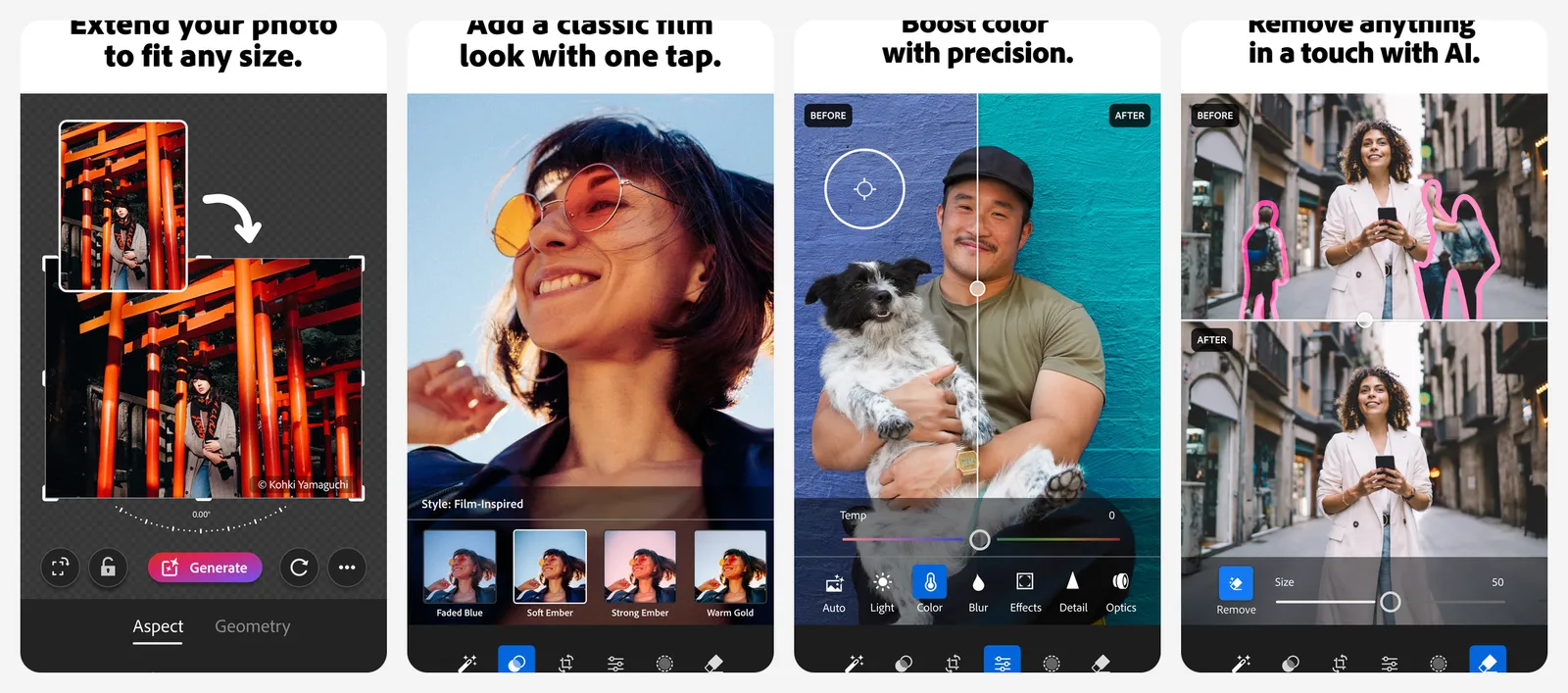
The limits are real, though. Adobe's help pages list masking, healing, geometry, batch editing, cloud sync and editing RAW files from a dedicated camera as Premium features. JPG, HEIC and DNG photos from your phone camera stay free to edit. You need a free Adobe account. On the US App Store, Premium with 100GB storage is $7.99 a month or $49.99 a year.
What you lose vs Lightroom: camera RAW editing, masks, healing and sync to desktop.
- Replaces
- The paid Lightroom plan, for phone photos
- Runs on
- Android, iPhone, iPad
- Licence
- Free app, optional Premium subscription
- Skip if
- You shoot RAW on a dedicated camera
- Price
- Free (Premium from $7.99 a month or $49.99 a year in-app)
VSCO
- Android
- iPhone and iPad
VSCO is known for its film-style presets. The free Starter plan includes a standard mobile editor, 15 presets, a public profile and 10GB of gallery storage. You need a VSCO account to edit.
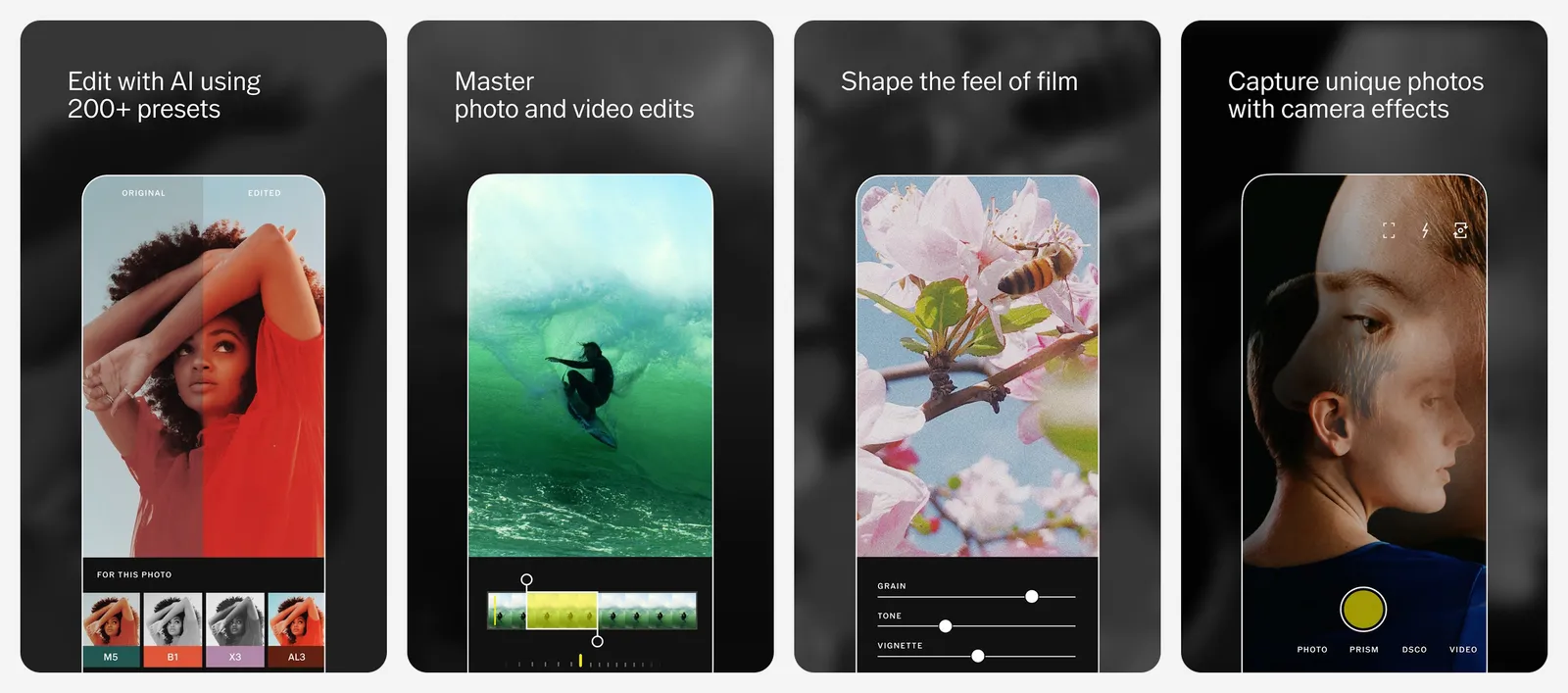
Plus unlocks 200+ presets, video editing and an ad-free experience, which means Starter shows ads. Desktop and web editing is part of Pro. VSCO does not clearly state whether Starter can edit RAW files, and RAW capture sits in the VSCO Capture camera tools.
What you lose vs Lightroom: fine control, a real library and a free desktop editor.
- Replaces
- Lightroom presets on mobile
- Runs on
- Android, iPhone
- Licence
- Free Starter plan, optional membership
- Skip if
- You want detailed RAW editing for free
- Price
- Free Starter (Plus $2.49 a month annual or $7.99 monthly; Pro $4.99 a month annual)
Free Photoshop-style editors that also open RAW
Affinity
Affinity used to be three one-time apps. After Canva bought Serif, it became one free app for photo editing, vector design and page layout. It is also on our list of buy once software, because it replaced paid licences with a free download.
For photographers, its Develop Studio handles RAW files. The September 2026 update (version 3.3) added more colour, sharpening and detail controls, plus RAW presets you can reuse across batches, panoramas and HDR merges. You sign in with a Canva account. Only Canva's AI tools inside Affinity cost money.
What you lose vs Lightroom: a catalog to organise your whole photo library, and a phone app.
- Replaces
- Lightroom plus Photoshop in the Photography plan
- Runs on
- Windows, Mac
- Licence
- Free, no watermark or time limit; Canva AI features need a Canva paid plan
- Skip if
- You need it on iPad or phone today
- Price
- Free
GIMP
GIMP is the long-running free alternative to Photoshop, with layers, masks, retouching tools and third-party plugins. Version 3.2.6 came out on September 10, 2026.
GIMP is not a RAW developer on its own. It hands RAW files to darktable or RawTherapee if one of them is installed, then you finish the edit in GIMP. That makes it a good partner to either app, not a Lightroom replacement by itself.
What you lose vs Lightroom: a library, presets for batches of photos and a quick RAW workflow.
- Replaces
- Photoshop in the Photography plan
- Runs on
- Windows, Mac, Linux
- Licence
- Free and open source (GPLv3)
- Skip if
- You mainly batch-edit RAW photos
- Price
- Free
Photopea
Photopea runs in a browser on almost any device, including a phone or a Chromebook. Files are processed on your device, with no uploads. It opens PSD files and 40+ other formats, including RAW files from most camera brands (DNG, CR2, CR3, NEF, ARW, RW2, RAF, ORF and FFF), where you can adjust exposure, colour balance, highlights and shadows.
You do not need an account. The free version shows ads, and a Premium account removes them. Photopea does not list the Premium price on its public pages.
What you lose vs Lightroom: a photo library and batch editing of whole shoots.
- Replaces
- Lightroom web and Photoshop
- Runs on
- Any modern web browser
- Licence
- Free with ads, optional Premium account
- Skip if
- Ads bother you and you will not pay
- Price
- Free (Premium removes ads)
For a wider look at phone editors, see our list of the best photo editing apps. If you mostly want one-tap fixes, our guide to the best AI photo editors covers those. And if the real problem is storage rather than editing, our Google Photos alternatives cover where to keep a large library.
Who should still pay for Adobe Lightroom
Lightroom is still worth the money for some photographers:
- People who edit on phone, tablet and desktop and want every edit synced through the cloud without thinking about it.
- Working photographers who rely on Lightroom Classic, its presets ecosystem and client-friendly exports every week.
- Anyone who needs Photoshop too, since the Photography plan bundles both for US$19.99 a month.
- Heavy users of Adobe's AI tools, such as Generative Remove, AI masking and AI noise reduction.
For everyone else, Snapseed on the phone and darktable or digiKam on the computer cover most of the same work for free.
What is the best free alternative to Lightroom?
How much does Adobe Lightroom cost?
Is Lightroom mobile free?
Which free photo editors support RAW files?
Is there a free Lightroom alternative with a photo catalog?
Is Affinity really free?

Sumit
ContributorHi, I'm Sumit, Being an introvert I have always been obsessed with technology-computers and reading dozens of posts to learn, find answers out of my curiosity. I love to write as I explore more.