On this page
- All 8 Grammarly alternatives at a glance
- Free grammar checkers for your browser and email
- LanguageTool: Best Free Grammarly Alternative Overall
- QuillBot: Best Free Grammarly Alternative for Rewording
- Sapling: Best Free Grammarly Alternative for Work Email
- Wordtune: Best Free Grammarly Alternative for Unlimited Grammar Checks
- Grammar checkers already built into your apps
- Google Docs: Best Free Grammar Checker You Already Have
- Microsoft Word and Edge: Best Free Grammar Checker for Office Users
- Free tools for clearer and better writing
- ProWritingAid: Best Free Grammarly Alternative for Writers
- Hemingway Editor: Best Free Grammarly Alternative for Readability
- Which free Grammarly alternative should you pick?
- Who should still pay for Grammarly
The best free Grammarly alternative for most people is LanguageTool. It checks grammar and style in 30+ languages and works in Chrome, Firefox, Google Docs, Word and email. If you mainly want to reword sentences, QuillBot is the best free pick, and the spelling and grammar checks already built into Google Docs and Word cost nothing at all.
Grammarly still has a free plan, but it is thin. Grammarly Free fixes spelling and grammar, shows your tone and gives 100 AI prompts a month. Full-sentence rewrites, tone changes, fluency help, plagiarism checks and AI-text detection are all paid. Grammarly Pro is listed at $12 a month on Grammarly's plans page. Through the US App Store it costs $29.99 a month or $139.99 a year. Grammarly is also now part of Superhuman, the company's new name since October 2025, which has left some users unsure what changes next.
This list covers 8 free alternatives for the browser, Google Docs, Word, Mac, Windows and phone. For each one we note what the free plan includes, its limits, the languages it supports and what the paid plan costs. Every detail comes from the official website or app store listing. We have not run our own accuracy tests.
All 8 Grammarly alternatives at a glance
Search by tool, platform or price. Tap any name to jump to its full entry.
| Tool | Free plan | Main free limit | Paid plan | Works in | Languages |
|---|---|---|---|---|---|
| LanguageTool | Yes (Basic) | Shorter texts per check, 3 rephrases a day | Premium, price shown at checkout | Chrome, Edge, Firefox, Opera, Google Docs, Word, Gmail, Outlook, Mac, Windows, iPhone | 30+ |
| QuillBot | Yes | 2 of 10+ paraphrase modes | $19.99 a month or $99.99 a year (US App Store) | Web, Android, iPhone | Not stated |
| Google Docs | Yes | Grammar in 6 languages | None needed | Google Docs | English, Spanish, French, German, Portuguese, Italian |
| Word and Edge | Yes, with a free Microsoft account | Basic checks only | Microsoft 365 for refinements | Word for the web, Word, Outlook, Edge | 20+ |
| ProWritingAid | Yes | 500 words at a time | $10 a month billed yearly, or $399 lifetime | Web, Google Docs, Microsoft Office, desktop, browser | English only |
| Wordtune | Yes (Basic) | 10 rewrites a day | From $4.89 a month billed yearly | Chrome, Edge, iPhone | Not stated |
| Hemingway Editor | Free online tools | No AI rewrites | Plus from $8.33 a month, desktop $19.99 | Web, Mac, Windows | Not stated |
| Sapling | Yes | 2,000 characters per check | $12 a month billed yearly | Chrome, Google Docs, Word, Outlook | Not stated |
Free grammar checkers for your browser and email
1. LanguageTool: Best Free Grammarly Alternative Overall
Multilingual grammar checker
LanguageTool is the closest free match to Grammarly, and it beats it on languages. It checks grammar, spelling and style in more than 30 languages, which makes it the pick for anyone who writes in English and another language.
It also runs in more places than most rivals. There are add-ons for Chrome, Edge, Firefox and Opera, for Gmail, Outlook (beta), Apple Mail and Thunderbird, and for Google Docs, Word, Apple Pages and LibreOffice. Desktop apps exist for Mac and Windows, plus an iPhone app. The apps need a free account. LanguageTool says the browser add-on does not save your texts.
The free Basic plan has limits. Premium checks up to 150,000 characters per text field, while the free plan's limit is much lower (2,000 characters in LanguageTool's comparison table). Free users also get 3 sentence rephrases a day, and Premium adds more than 20,000 extra grammar, punctuation and style checks across seven languages. LanguageTool's pricing page shows Premium prices in your local currency at checkout.
What you lose vs Grammarly: generous AI rewriting on the free plan.
- Replaces
- Grammarly Free and most of Grammarly Pro's grammar checks
- Runs on
- Chrome, Edge, Firefox, Opera, Google Docs, Word, Pages, LibreOffice, Gmail, Outlook (beta), Apple Mail, Thunderbird, Mac, Windows, iPhone
- Licence
- Free Basic plan, optional Premium
- Skip if
- You need AI rewrites of whole paragraphs for free
- Price
- Free (Premium price shown at checkout)
2. QuillBot: Best Free Grammarly Alternative for Rewording
- Android
- iPhone and iPad
Paraphraser plus grammar checker
QuillBot is best known for paraphrasing, and that is where it beats Grammarly's free plan. Its App Store listing says the free version includes the Grammar Checker, 2 paraphraser modes, the Translator and the AI Detector at no cost.
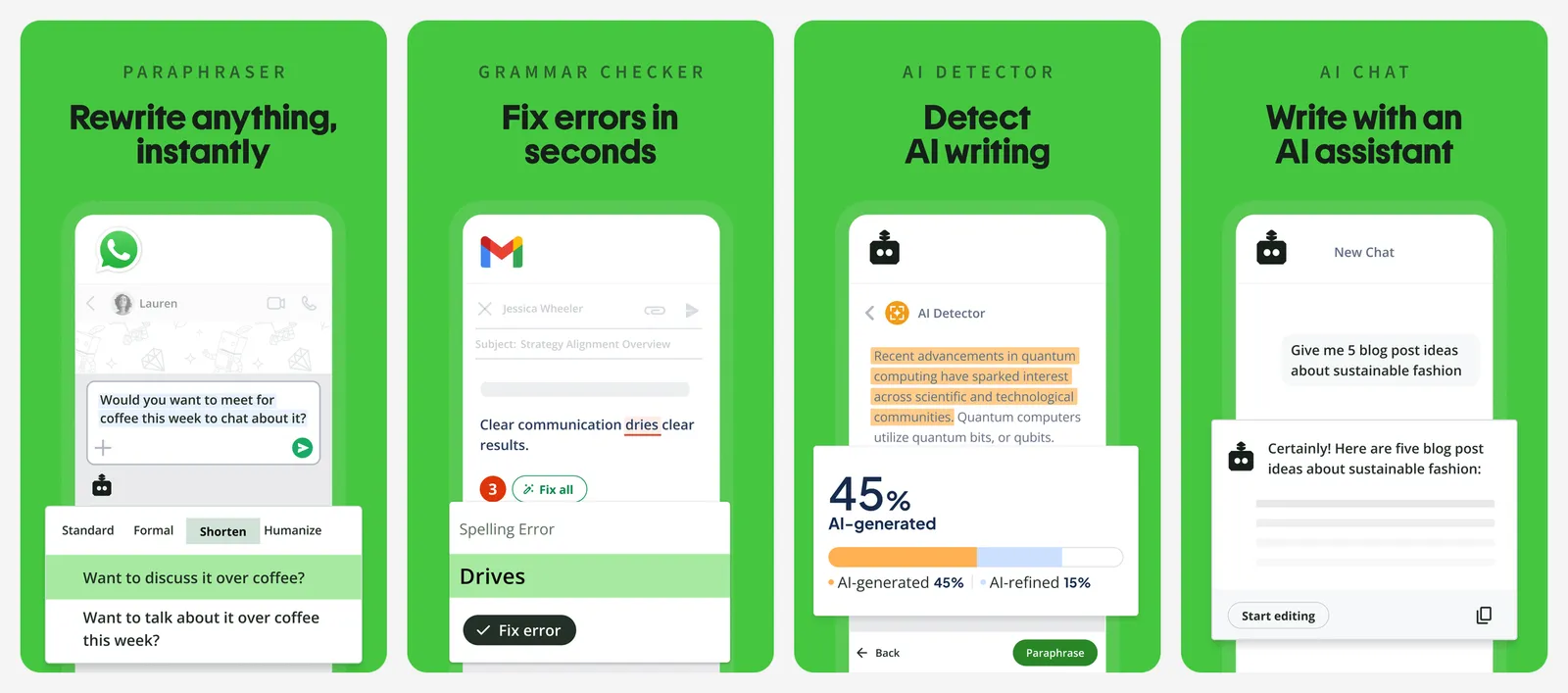
Premium unlocks 10+ paraphrase modes and faster processing. On the US App Store it costs $19.99 a month, $79.99 for six months or $99.99 a year. The iPhone app adds an AI keyboard, including a Humanizer mode, so you can rewrite text in any app.
What you lose vs Grammarly: tone detection, and checks that pop up as you type everywhere on the web.
- Replaces
- Grammarly's rewrite and AI detection features
- Runs on
- Web, Android, iPhone (iOS 16 or later)
- Licence
- Free plan, optional Premium
- Skip if
- You want a checker that sits inside every text box
- Price
- Free (Premium $19.99 a month or $99.99 a year on the US App Store)
3. Sapling: Best Free Grammarly Alternative for Work Email
Grammar checker for business apps
Sapling is a lighter grammar checker that sits inside the apps where most work writing happens: Chrome, Google Docs, Outlook and Word. The free plan gives basic writing suggestions and AI-detector checks of up to 2,000 characters per check, plus 20 saved text snippets.
There is a Chrome extension and add-ins for Google Docs, Outlook and Word. Pro costs $25 a month, or $12 a month billed yearly, and adds advanced suggestions, rephrasing, autocomplete in any app and checks of up to 100,000 characters. A free one-month Pro trial needs no card.
What you lose vs Grammarly: long-document checks and tone feedback on the free plan.
- Replaces
- Grammarly in Chrome, Docs and Outlook
- Runs on
- Chrome, Google Docs, Word, Outlook
- Licence
- Free plan, optional Pro
- Skip if
- You write long documents in one go
- Price
- Free (Pro $25 a month or $12 a month billed yearly)
4. Wordtune: Best Free Grammarly Alternative for Unlimited Grammar Checks
- iPhone and iPad
Rewrites and grammar
Wordtune, from AI21 Labs, limits its free AI features but not its grammar checks. The free Basic plan includes unlimited spelling corrections and grammar checks, 10 rewrites and AI suggestions a day and 3 AI summaries a month.
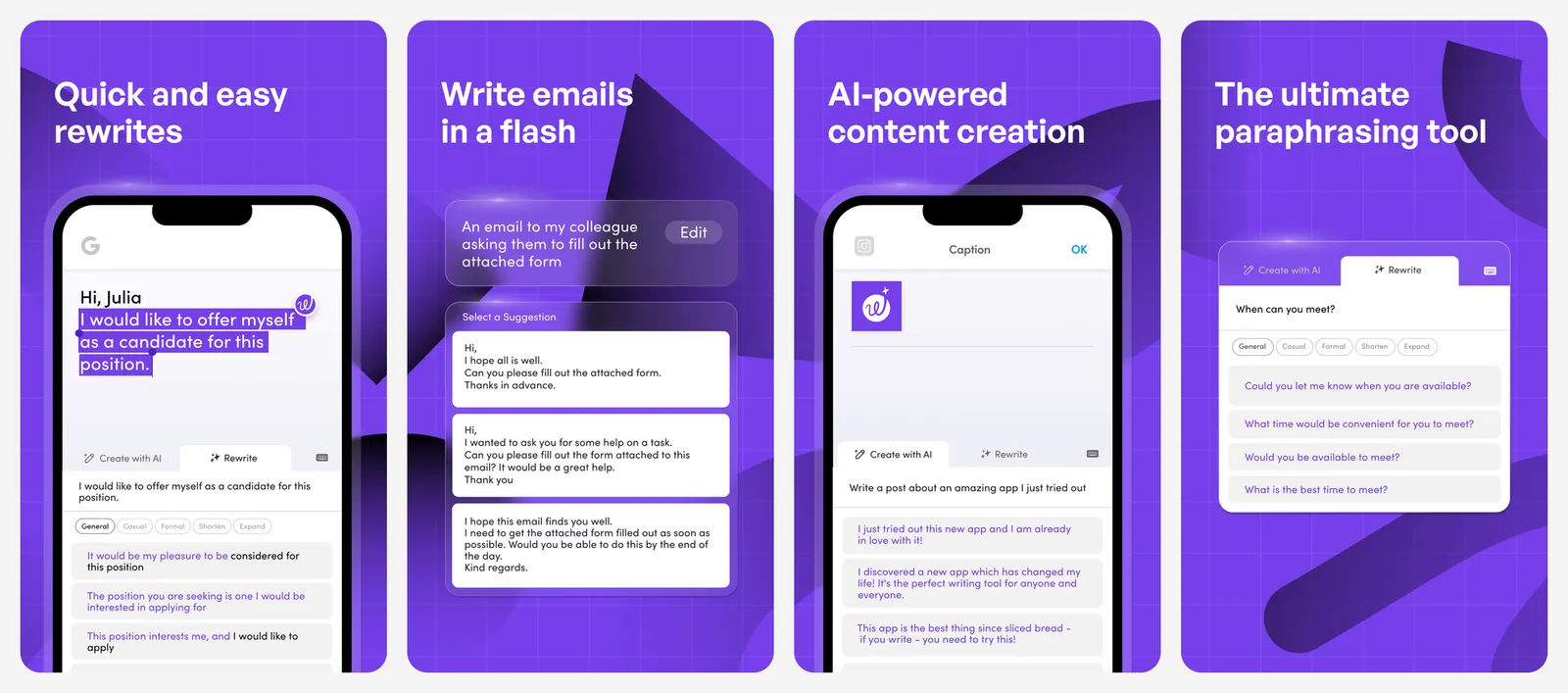
It works as a Chrome and Edge extension and as an iPhone app with an AI writing keyboard. Advanced costs $6.99 a month or $4.89 a month billed yearly. Unlimited costs $9.99 a month or $6.99 a month billed yearly.
What you lose vs Grammarly: Word, Google Docs and Firefox support, plus tone detection.
- Replaces
- Grammarly's grammar checks and rewrite suggestions
- Runs on
- Chrome, Edge, iPhone
- Licence
- Free Basic plan, optional subscription
- Skip if
- You use Firefox or Safari on a Mac
- Price
- Free (Advanced from $4.89 a month billed yearly)
Grammar checkers already built into your apps
5. Google Docs: Best Free Grammar Checker You Already Have
Built into Docs
If you write in Google Docs, you may not need an extension at all. Docs underlines misspellings in red and grammar suggestions in blue, and you can accept or ignore each one.
Google's help page says spelling and grammar suggestions work in English, Spanish, French, German, Portuguese and Italian. It costs nothing beyond a Google account. For more Docs tips, see how to strike through text in Google Docs.
What you lose vs Grammarly: style, clarity and tone feedback, and checks outside Docs.
- Replaces
- Grammarly for Google Docs
- Runs on
- Google Docs on the web and in apps
- Licence
- Free with a Google account
- Skip if
- You write in languages other than the six supported
- Price
- Free
6. Microsoft Word and Edge: Best Free Grammar Checker for Office Users
Microsoft Editor, built in
Microsoft's grammar checker, called Microsoft Editor, is built into Word, Outlook and the Edge browser. Microsoft says you can sign in to Word for the web with a free Microsoft account to get basic spelling and grammar checking, in more than 20 languages.
A Microsoft 365 subscription adds refinements beyond the basics: clarity, conciseness, formality, vocabulary suggestions and readability statistics.
One change to know: the separate Microsoft Editor extensions for Edge and Chrome were retired on October 31, 2025. Microsoft says their writing features are now built into Edge's proofing tools, so Chrome users lost the free extension.
What you lose vs Grammarly: advanced suggestions without paying for Microsoft 365, and a Chrome extension.
- Replaces
- Grammarly for Word and the browser
- Runs on
- Word for the web, Word for Windows, Outlook, Microsoft Edge
- Licence
- Free with a Microsoft account; advanced refinements need Microsoft 365
- Skip if
- You use Chrome and do not want to switch browsers
- Price
- Free basics (refinements with Microsoft 365)
Free tools for clearer and better writing
7. ProWritingAid: Best Free Grammarly Alternative for Writers
Style reports for long-form writing
ProWritingAid is built for people who write long: novelists, students and bloggers. Beyond grammar, it runs line-editing reports, and it offers story critiques and other feedback tools for fiction writers. It works on the web, in Google Docs and Microsoft Office, in a desktop editor and in browser and app integrations.
The free plan is a taster. It gives suggestions on 500 words at a time, line-editing reports up to twice a day on 500 words, and 10 rephrases a day. ProWritingAid only supports English (US, UK, Australian and Canadian).
Premium is $30 a month, or $10 a month billed yearly ($120). It is also one of the few writing tools sold as a lifetime licence: $399 for Premium or $699 for Premium Pro, a one-time cost. Yearly and lifetime plans can be refunded within three days.
What you lose vs Grammarly: a useful free plan for long documents, and other languages.
- Replaces
- Grammarly Pro for novels, essays and reports
- Runs on
- Web, Google Docs, Microsoft Office, desktop, browser
- Licence
- Free plan with word limits, optional subscription or lifetime licence
- Skip if
- You write in a language other than English
- Price
- Free (Premium $10 a month billed yearly, or $399 lifetime)
8. Hemingway Editor: Best Free Grammarly Alternative for Readability
Readability and clarity
Hemingway Editor is not a grammar checker first. It highlights wordy sentences in yellow, harder ones in red, and flags adverbs, passive voice and complex words. That makes it great for blog posts, emails and reports where clarity matters more than commas. The Hemingway site also offers free online tools, including a grammar checker and a readability checker.
The Hemingway Editor desktop app for Mac and Windows costs $19.99, works offline, and can publish straight to WordPress or export to HTML, Markdown, Word or PDF. It does not include the newer AI features. Those are in Hemingway Editor Plus, from $8.33 a month ($100 a year) for 5,000 AI sentence rewrites a month, with a free two-week trial and no card needed.
What you lose vs Grammarly: in-app checks while you type in the browser.
- Replaces
- Grammarly's clarity suggestions
- Runs on
- Web, Mac, Windows
- Licence
- Free online tools, one-time desktop app, optional Plus subscription
- Skip if
- You need a full grammar checker in every app
- Price
- Free online tools (desktop $19.99, Plus from $8.33 a month)
Which free Grammarly alternative should you pick?
- You want a Grammarly-style checker everywhere: LanguageTool.
- You write in more than one language: LanguageTool, or Google Docs for its six languages.
- You want to rephrase or shorten text: QuillBot or Wordtune.
- You live in Google Docs or Word: use their built-in checkers first.
- You write books, essays or long reports: ProWritingAid, or the Hemingway desktop app for a one-time payment.
- You mainly write work email and documents in Outlook or Word: Sapling.
Writing in the browser all day? Our list of the best Chrome extensions has more useful add-ons, and our guide to subscriptions you can replace for free covers other paid apps worth dropping.
Who should still pay for Grammarly
What is the best free alternative to Grammarly?
Is Grammarly still free?
How much does Grammarly Pro cost?
Does Google Docs have a free grammar checker?
Is Microsoft Editor free?
Is there a Grammarly alternative with a lifetime licence?

Sumit
ContributorHi, I'm Sumit, Being an introvert I have always been obsessed with technology-computers and reading dozens of posts to learn, find answers out of my curiosity. I love to write as I explore more.