On this page
- Same owner, same traffic data, very different drive
- Meet the two apps
- Waze
- Google Maps
- Feature comparison at a glance
- Navigation and routing
- Alerts: police, cameras and hazards
- Offline use and dead zones
- Multi-stop trips and planning
- Android Auto and Apple CarPlay
- Privacy and battery
- Real-world scenarios
- The daily commuter
- The road trip
- The data-limited plan
- The city dweller who does not always drive
- The rideshare or delivery driver
- What users say
- Scores
- Which should you pick?
- FAQs
- Is Waze better than Google Maps?
- Does Waze work offline?
- Can you add multiple stops in Waze?
- Does Google own Waze?
- Does Google Maps show police?
- Which uses less data, Waze or Google Maps?
- Do Waze and Google Maps work with Apple CarPlay and Android Auto?
Same owner, same traffic data, very different drive
Google has owned Waze since 2013, and both apps now share a lot of traffic data behind the scenes. So why do they still feel so different from behind the wheel? Because they are built for different drivers.
Waze is a driving app first and only. Every screen is about the car you are in right now: police ahead, a pothole in the right lane, a speed camera in half a mile. Google Maps is a full map of the world that also does turn-by-turn navigation, plus walking, transit, cycling, reviews, offline maps and multi-stop trips.
Both are free, both run on Android, iPhone, Android Auto and Apple CarPlay, and both got big Gemini AI upgrades in 2026. Every feature below was checked against Google's and Waze's own help pages and announcements on October 2, 2026.
- Pick Waze for daily commuting by car: the best police, hazard and speed camera alerts, and aggressive rerouting around jams.
- Pick Google Maps for everything else: offline maps, up to 9 stops on one route, walking and transit, lane guidance and the new 3D Immersive Navigation.
- On a road trip through areas with weak signal, Google Maps is the safer choice because Waze does not work offline.
- Plenty of drivers keep both. They are free, and Waze is the better commuter while Google Maps is the better planner.
Meet the two apps
Waze
- Android
- iPhone and iPad
Waze is built around its community. Drivers report crashes, police, road hazards, closures and stalled cars, and those reports pop up for everyone behind them. It is the app for drivers who want to know what is coming before they see it, and who do not mind being sent down a side street to save three minutes.
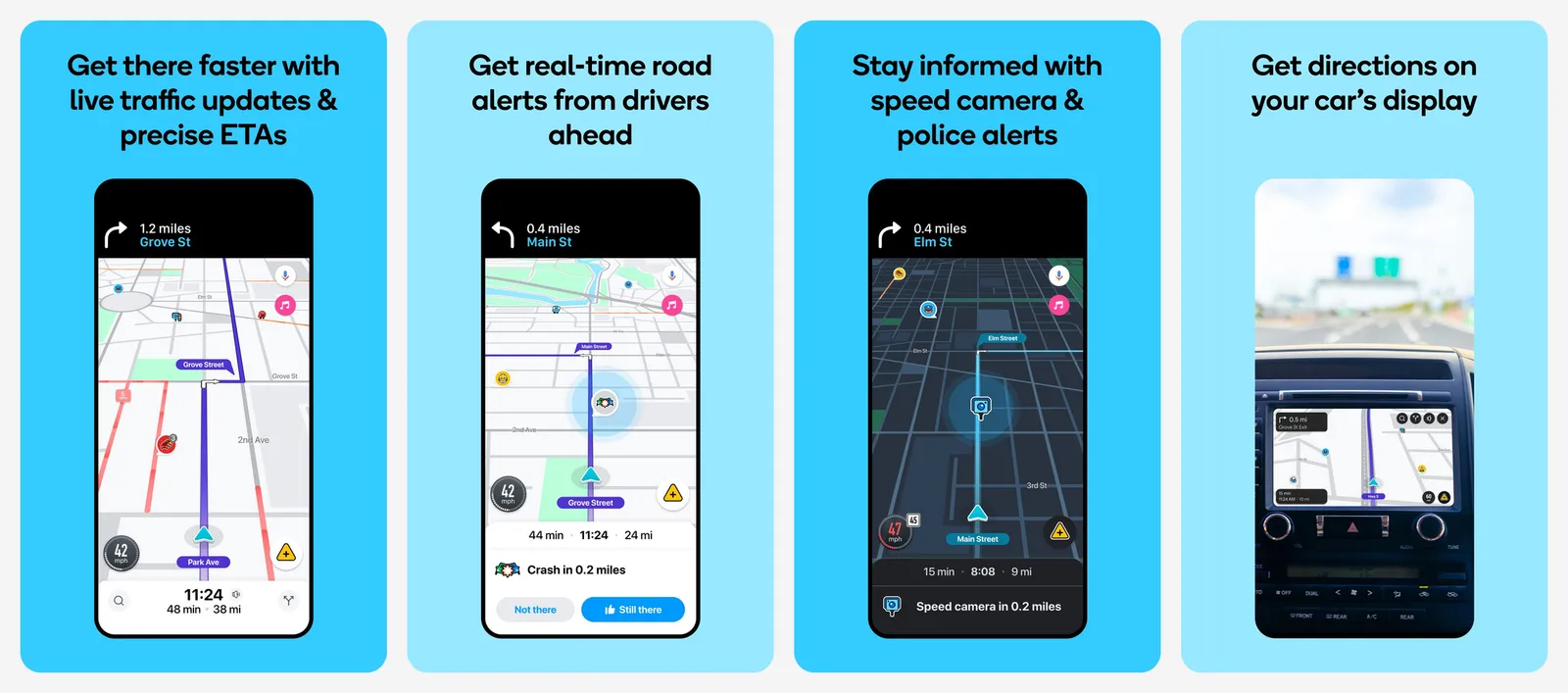
In July 2026, Waze added personalized navigation that learns your preferred routes, a "less chatty" alert setting, Gemini-powered destination search (in beta) and voice reports for map problems.
- Price
- Free
Google Maps
- Android
- iPhone and iPad
Google Maps is the default map for most of the world, with business listings, reviews, Street View, transit schedules and offline downloads all in one app. Navigation is calmer and more predictable than Waze, with excellent lane guidance.
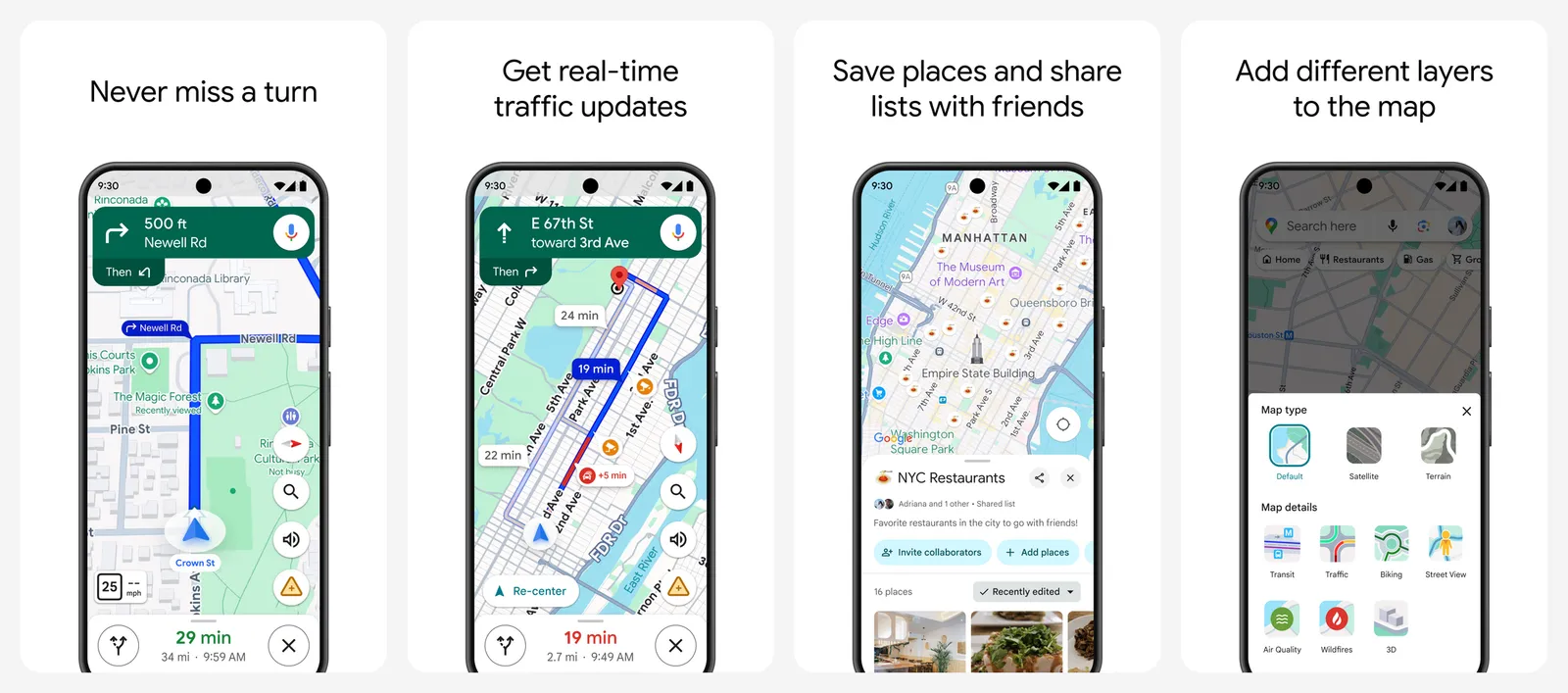
In March 2026, Google launched Immersive Navigation in the US, which it called the biggest navigation update in over a decade: a 3D view of buildings and overpasses, clearer lane guidance, more natural voice directions and a side-by-side comparison of a faster route against a toll-free one. It also added Ask Maps, a Gemini chat for questions like "where can I charge my car and grab lunch on the way?".
- Price
- Free
Feature comparison at a glance
| Feature | Waze | Google Maps |
|---|---|---|
| Price | Free | Free |
| Driving navigation | Yes | Yes |
| Walking, cycling, transit | No | Yes |
| Offline maps | No | Yes, downloadable areas |
| Stops per route | 1 stop plus destination | Up to 9 stops including destination |
| Police reports | Yes, from other drivers | Yes, but fewer and less prominent |
| Speed camera alerts | Yes | Yes, where legal |
| Crash and hazard reports | Yes, very active | Yes |
| Speed limit display | Yes | Yes, in supported areas |
| Lane guidance | Basic | Detailed, with 3D Immersive Navigation in the US |
| Toll prices and toll-free routes | Avoid tolls option | Toll estimates and toll-free comparisons |
| In-app music player | Yes, Spotify, YouTube Music, Apple Music (iPhone) and more | Media controls for Spotify, YouTube Music and Apple Music |
| Android Auto and CarPlay | Yes | Yes |
| Gemini AI | Destination search (beta), voice reports | Ask Maps, hands-free Gemini while driving |
Navigation and routing
This is where the two personalities really show.
Waze reroutes hard and often. If a faster path opens up, it will take it, even if that means four turns through a neighborhood to get past one red light. Its arrival times on heavy commuter routes are excellent, and rerouting happens automatically without asking. The downside is that routes can feel random, and the shortcut is not always worth the stress.
Google Maps prefers main roads and only suggests a faster route when the gain is meaningful, and it usually asks before switching. Routes are more consistent day to day, which matters if you do not know the area. Lane guidance is a real strength, especially on complicated highway interchanges, and the new Immersive Navigation view makes exits and lane splits much easier to read.
“
Waze tries to win every minute. Google Maps tries to never surprise you.
”New in 2026 on both sides:
- Waze personalized navigation learns which routes you actually take and stops suggesting the ones you always ignore.
- Google Maps route trade-offs show the time and cost difference between a faster toll road and a slower free one, so you can decide in a glance.
- Google Maps destination guidance points you to the right building entrance and nearby parking as you arrive.
Alerts: police, cameras and hazards
If you pick Waze, this is why.
Waze's reports come from millions of drivers tapping the screen (or, with conversational reporting, just saying "there is a crash ahead"). You get alerts for police, crashes, stopped vehicles, objects on the road, potholes, closures and weather hazards. Since July 2024, Waze also warns about speed cameras, red light cameras, and lane and seatbelt cameras, plus big traffic events like sports games and concerts.
Google Maps shows incident reports too, and in 2024 it made them bigger and easier to see. You can report incidents by voice with Gemini while driving. But across driver forums and side-by-side reviews, the consensus is that Waze still has more reports, sooner, and they are much harder to miss.
The trade-off is noise. Long-time Waze users often say the alerts are too frequent, which is exactly why Waze added a "less chatty" setting in July 2026 that cuts down on spoken alerts.
Speed camera alerts are legal in most of the US, but they are restricted in some countries. Both apps hide camera alerts where they are not allowed. Do not tap the screen while driving: both apps support voice reporting.
Offline use and dead zones
This is Google Maps' biggest advantage, and it decides the comparison for anyone who drives outside cities.
Waze needs a data connection. If you lose signal, it can keep you on a route that is already loaded, but you cannot search, reroute or get new alerts. With patchy signal, reports arrive late or not at all.
Google Maps works offline if you download the area first. Offline driving directions work as long as your whole route is inside the downloaded area. You do not get live traffic, alternate routes, or walking, cycling and transit directions offline. Downloaded maps update themselves on Wi-Fi when they are within 15 days of expiring, and Android users can save them to an SD card.
Tap your profile picture, then Offline maps > Select your own map, frame the area you will drive through, and tap Download. Do this on Wi-Fi the night before a road trip.
Multi-stop trips and planning
Waze lets you add one stop to your route. That is fine for a gas station or a coffee run, but useless for errands or deliveries.
Google Maps lets you add up to 9 stops including the destination, in any mode except transit. You can plan the trip on your computer, send it to your phone, and drag the stops into the right order.
Google Maps also wins on finding things along the way: search for gas, EV charging, food or rest stops along the route, read reviews, check opening hours, and see photos before you get there. With Ask Maps, you can now ask for all of that in one sentence.
Android Auto and Apple CarPlay
Both apps work on Android Auto and Apple CarPlay, and both got the same 2024 additions on car screens (incident reports, camera alerts on Waze, destination guidance on Maps).
| Waze | Google Maps | |
|---|---|---|
| Android Auto | Yes | Yes, plus Gemini hands-free |
| Apple CarPlay | Yes | Yes |
| Cars with Google built-in | Yes | Yes |
| Immersive Navigation on the car screen | No | Yes, in the US |
| Music controls on screen | Built-in audio player | Media controls in split screen |
On Android Auto, the split-screen Coolwalk layout lets you keep the map and music visible together, so both apps work well alongside Spotify or YouTube Music. Waze's built-in audio player is a small but real perk on CarPlay, where split screen is more limited: you can control Spotify, YouTube Music, Pandora, Audible, TIDAL, iHeartRadio, NPR and others without leaving the map.
Privacy and battery
Both apps are owned by Google and both collect location data to work. Waze also shows your approximate position to other Wazers unless you turn on invisible mode. Google Maps keeps your Timeline on your device by default now, but your account settings still decide what Google keeps.
Battery and data use are similar for driving. Both use GPS and keep the screen on, which drains your phone fast. Plug in on long drives. If you have a small data plan, an offline map in Google Maps saves you the most data.
Real-world scenarios
The daily commuter
You drive the same route at the same time every day, in heavy traffic. Waze is built for this. Its crash and police alerts are the most useful thing you will see on the drive, and its rerouting around a sudden jam often beats Google Maps.
The road trip
You are crossing several states, some of them rural. Google Maps: download offline maps for the dead zones, add stops for gas and food, and use lane guidance on unfamiliar highways. Many road trippers open Waze too while they have signal, for speed traps and hazards.
The data-limited plan
Google Maps with downloaded areas uses the least mobile data, because offline directions do not need a connection at all. Waze always needs data, though navigation alone uses relatively little.
The city dweller who does not always drive
Google Maps, without question. Waze does not do walking, transit or cycling directions at all.
The rideshare or delivery driver
Google Maps if you need more than one stop per route. Many drivers run Waze for the alerts between pickups, and Google Maps when they need to stack stops.
What users say
We read recent threads on r/waze, r/GoogleMaps, r/CarPlay and r/AndroidAuto where drivers compare the two. The same points come up again and again (paraphrased):
- Waze fans say the police, camera and hazard alerts are the killer feature, and that Waze is better at dodging rush hour jams. Many say they would not commute without it.
- Waze critics complain about odd routes through side streets and unprotected left turns, too many alerts, and the lack of offline maps and multi-stop routes.
- Google Maps fans like how predictable the routes are, the lane guidance on complicated interchanges, offline maps for remote areas, and having walking and transit in the same app.
- Google Maps critics say incident reports are slower to appear than on Waze and that it can be too cautious about rerouting around a fresh crash.
- A common middle ground: plan in Google Maps, drive with Waze on familiar commutes.
Pros
- Waze: best police, hazard and speed camera alerts
- Waze: aggressive automatic rerouting
- Waze: built-in audio player on the map
- Waze: personalized routes and less chatty mode
- Google Maps: offline maps
- Google Maps: up to 9 stops per route
- Google Maps: walking, transit and cycling
- Google Maps: lane guidance and Immersive Navigation
Cons
- Waze: no offline maps
- Waze: one stop per route
- Waze: driving only
- Waze: can pick odd side-street routes
- Google Maps: fewer and slower community reports
- Google Maps: more cautious rerouting
- Google Maps: Immersive Navigation is US only for now
Scores
- Waze: police and hazard alerts
- Waze: commuter rerouting
- Google Maps: offline maps and multi-stop trips
- Google Maps: lane guidance and places search
- Both: Android Auto and CarPlay apps
- Both: Gemini AI features
- Both: speed limit display
- Waze: no offline use
- Waze: no walking or transit
- Google Maps: incident reports lag behind Waze
Google Maps
The more complete app: offline maps, multi-stop trips, walking and transit, excellent lane guidance and a big 2026 navigation upgrade.
Waze
Still the best app for knowing what is ahead on a busy road, from police to potholes, with rerouting that fights for every minute.
Which should you pick?
Pick Waze if:
- You mostly drive the same commute in heavy traffic.
- Police, speed camera and hazard alerts matter to you.
- You want the app to reroute on its own without asking.
- You want to control music from the map on CarPlay.
Pick Google Maps if:
- You drive through areas with weak or no signal.
- You need more than one stop on a route.
- You also walk, take transit or cycle.
- You prefer calm, predictable routes and detailed lane guidance.
- You want to search for places, reviews and opening hours along the way.
Both apps are free, so the easy answer is to install both. Use Google Maps to plan and Waze to drive, and you get the best of each.
FAQs
Is Waze better than Google Maps?
For daily commuting by car, Waze is usually better thanks to its police, hazard and camera alerts and its aggressive rerouting. For everything else, including offline use, multi-stop trips, walking and transit, Google Maps is better.
Does Waze work offline?
No. Waze needs a data connection to search, reroute and show alerts. Google Maps works offline if you download the area first.
Can you add multiple stops in Waze?
Waze lets you add one stop to a route. Google Maps lets you add up to 9 stops including the destination for driving, walking and cycling routes.
Does Google own Waze?
Yes. Google bought Waze in 2013. The two apps share some traffic data, but they are still developed as separate apps with different features.
Does Google Maps show police?
Google Maps can show police and speed traps reported by drivers, plus speed cameras where they are legal. Waze has more reports and shows them more prominently.
Which uses less data, Waze or Google Maps?
Google Maps can use no mobile data at all for driving directions if you download an offline map first. Waze always needs a connection, though navigation alone uses relatively little data.
Do Waze and Google Maps work with Apple CarPlay and Android Auto?
Yes. Both apps work on Apple CarPlay, Android Auto and cars with Google built-in. Google Maps' new Immersive Navigation also runs on car screens in the US.

Amit loves new tech and apps that make life easier, he writes about apps, games and useful websites on TheTechBasket.