On this page
- Two very different music apps that look the same on paper
- Meet the two apps
- Spotify
- YouTube Music
- Pricing: every US plan side by side
- Sound quality: Spotify wins, clearly
- Catalog: official music vs everything else
- Discovery and recommendations
- Podcasts and audiobooks
- Offline downloads
- Free tiers: Spotify Free is usable, YouTube Music Free is not (on phones)
- Devices, CarPlay and Android Auto
- Real-world scenarios
- The daily commuter (subway or train)
- The road trip
- The data-limited plan
- The household
- The student
- What users say
- Scores
- Which should you pick?
- FAQs
- Is YouTube Music cheaper than Spotify?
- Does YouTube Music have lossless audio?
- Is YouTube Music included with YouTube Premium?
- Can I use YouTube Music for free in the background?
- Which is better for podcasts, Spotify or YouTube Music?
- Can I transfer my playlists from Spotify to YouTube Music?
- Does Spotify or YouTube Music use less data?
Two very different music apps that look the same on paper
Spotify and YouTube Music both give you a catalog of 100 million plus songs, offline downloads, CarPlay and Android Auto apps, and a free tier with ads. Read the spec sheets and they look like twins. Use them for a week and they feel nothing alike.
Spotify is a pure audio app built around playlists, podcasts and now audiobooks. YouTube Music sits on top of all of YouTube, so it can play the live version, the fan remix and the 2009 cover that never made it to any official store. The right pick depends less on "which is better" and more on how you listen, what you already pay for, and whether you care about lossless audio.
Every price and spec below was checked against Spotify's and Google's own pages on October 2, 2026 (US plans).
- Pick Spotify if you want the best playlists and recommendations, lossless audio, audiobooks in the same subscription, or a Duo plan for two people.
- Pick YouTube Music if you already pay for YouTube Premium (it is included), you love live versions, remixes and covers, or you want to upload your own music library.
- Cheapest solo plan: YouTube Music Premium at $11.99 vs Spotify Premium at $12.99 a month.
- Best free tier: Spotify. Free YouTube Music stops playing music when your screen turns off.
Meet the two apps
Spotify
- Android
- iPhone and iPad
Spotify has 777 million monthly users and 300 million paying subscribers, with more than 100 million tracks, 7 million podcast titles and 700,000 audiobooks, according to its company page. The app is audio first: playlists, the AI DJ, Daylist, Jam sessions with friends and the yearly Wrapped are the things people stay for.
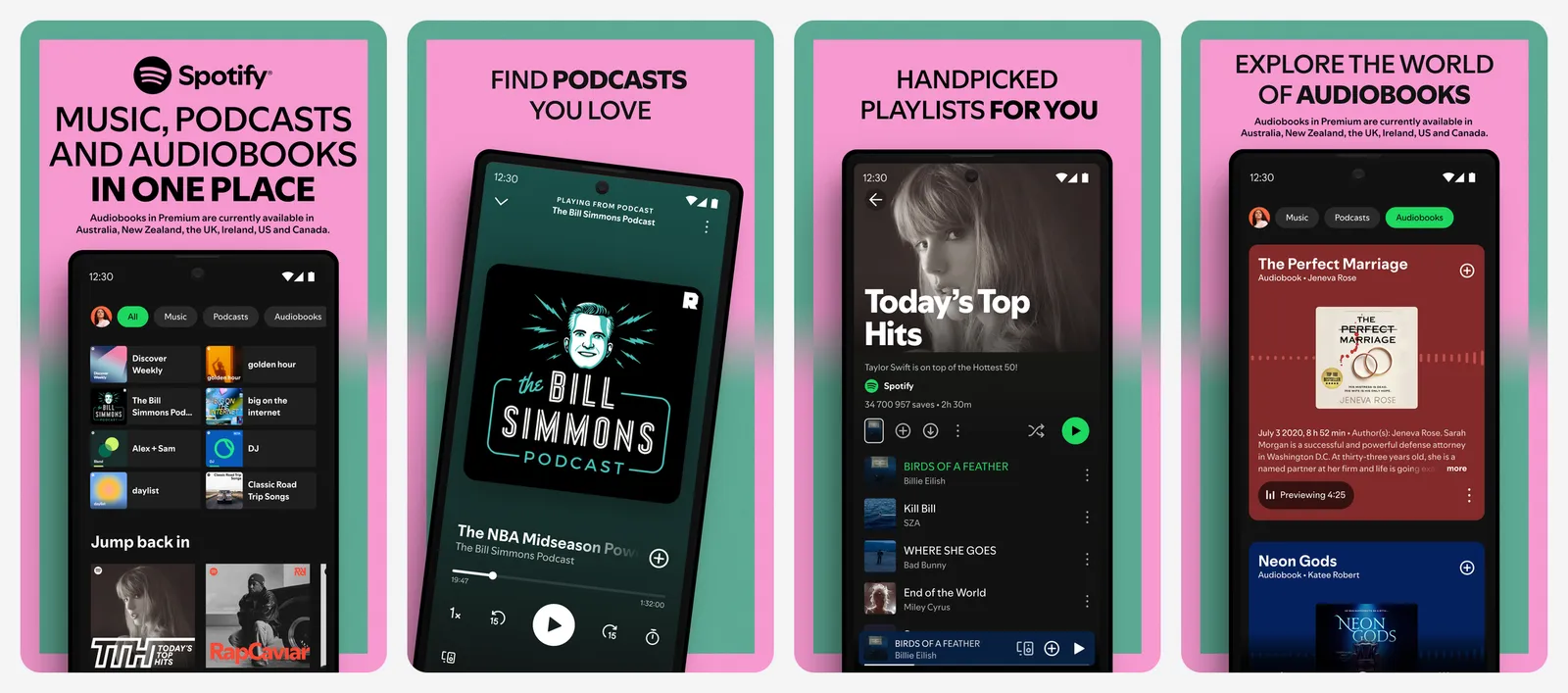
Since September 2025, Premium also streams lossless audio, and the free tier on phones lets you search for and play any song directly instead of being forced into shuffle.
- Price
- Free, or $12.99/mo
YouTube Music
- Android
- iPhone and iPad
YouTube Music is Google's music app, and it has one trick no rival can copy: it pulls from all of YouTube. Official albums sit next to live sets, remixes, covers and music videos, and you can flip any song between audio and video with one tap. Google said at its Made on YouTube event in September 2026 that the catalog now tops 300 million songs once you count that user-uploaded material.
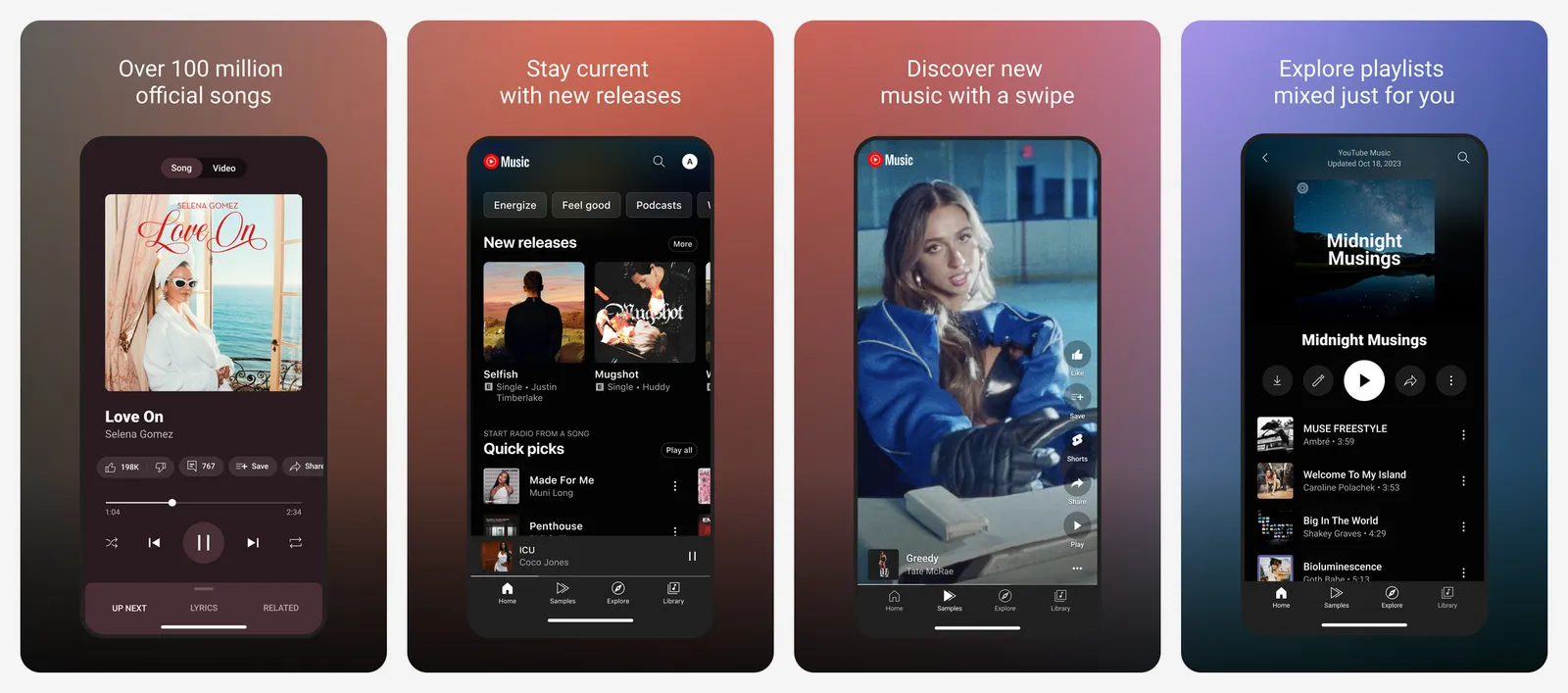
It is also the home of Google's podcasts after Google Podcasts shut down in 2024, and every YouTube Premium subscription includes YouTube Music Premium at no extra cost.
- Price
- Free, or $11.99/mo
Pricing: every US plan side by side
Prices below are monthly, before tax, for the US. Both services usually offer a free trial for new subscribers (Spotify lists one month free on Individual and Student).
| Plan | Spotify | YouTube Music Premium | YouTube Premium (includes Music) |
|---|---|---|---|
| Free | Yes, with ads | Yes, with ads, no background play | n/a |
| Individual | $12.99 | $11.99 | $15.99 ($159.99/year) |
| Student | $6.99 (includes Hulu with ads) | $5.99 | $8.99 |
| Duo (2 people) | $18.99 | No Duo plan | No Duo plan |
| Family (up to 6 accounts) | $21.99 | $18.99 | $26.99 |
| Audiobooks only | $9.99 (Audiobooks Access, 15 hours) | n/a | n/a |
| Lite tier | n/a | n/a | Premium Lite $8.99 (no ad-free music) |
A few things the table does not show:
- YouTube Premium is the real bundle. If you already pay $15.99 for ad-free YouTube, you already have YouTube Music Premium. Adding Spotify on top costs another $12.99 for a second music library. This single fact decides the comparison for a lot of households.
- Premium Lite does not cover music. YouTube's $8.99 Lite tier removes ads from most videos but not from songs and music videos, so it is not a YouTube Music substitute.
- Spotify has the only Duo plan. Two people at one address pay $18.99 on Spotify. On YouTube Music, a couple has to buy the $18.99 Family plan, which costs the same but is built for up to six people.
- Audiobooks are a Spotify-only extra. Premium Individual and Student include 15 hours of audiobook listening a month. On Duo and Family, only the plan manager gets those hours. Need more? Spotify sells Audiobooks+ as a paid add-on.
- Both raised prices recently. YouTube moved Music Premium from $10.99 to $11.99 and Family from $16.99 to $18.99 in its April 2026 update. Spotify Individual is now $12.99. Expect another bump within a year or two from both.
Streaming prices change a few times a year. We recheck this table every quarter. If you see a different price at checkout, the checkout page wins.
Sound quality: Spotify wins, clearly
This used to be a tie. It is not anymore.
| Setting | Spotify | YouTube Music |
|---|---|---|
| Free tier max (mobile/desktop) | High, about 160 kbps | 128 kbps (Normal) |
| Paid tier max | Lossless, up to 24-bit/44.1 kHz FLAC | 256 kbps AAC/Opus ("High" or "Always High") |
| High-quality lossy option | Very High, about 320 kbps | 256 kbps |
| Lossless | Yes, on Premium | No |
| Default download quality | Adjustable | 128 kbps unless you change it |
Spotify Premium added lossless audio in September 2025, and it goes up to 24-bit/44.1 kHz FLAC. YouTube Music's own help page lists 256 kbps AAC and Opus as its ceiling, with no lossless option at all as of October 2026.
How much does that matter in real life? Less than the numbers suggest:
- On AirPods, most Bluetooth earbuds and car stereos, the Bluetooth link compresses the audio again, so lossless is mostly wasted. 256 kbps Opus is genuinely good and most people cannot pick it out from 320 kbps in a blind test.
- On a wired DAC, a good pair of headphones, or a Sonos or home stereo over Wi-Fi, lossless is a real step up, and that is where Spotify pulls ahead.
- One YouTube Music catch: because it draws from YouTube, some uploads (especially old live recordings and fan uploads) were never good quality to begin with. Official album tracks sound fine. Rips of a 2011 concert video do not.
YouTube Music streams at "Normal" (128 kbps) by default. Go to Settings > Audio quality (Data saving on Android, or the audio settings on iPhone) and set mobile streaming and downloads to High or Always High. Most people never touch this and assume the app just sounds worse than it does.
Catalog: official music vs everything else
Both have the mainstream catalog covered. If a song is on Apple Music, it is almost certainly on both. The difference is at the edges.
Where YouTube Music wins:
- Live versions, remixes, covers, mashups and DJ sets. If a song exists on YouTube, it can usually go in your YouTube Music library and playlists.
- Regional and older music that labels never put on streaming stores, but someone uploaded to YouTube.
- Uploads of your own files. You can upload up to 100,000 of your own songs (MP3, FLAC, M4A, OGG, WMA) from a computer and stream them on any device. It is the closest thing left to the old Google Play Music locker.
- Audio/video toggle. Switch a playing song to its music video without leaving the app.
Where Spotify wins:
- Cleaner library. Search results are official releases, not five uploads of the same track with different titles.
- Local files still work: add music folders on the desktop app and sync them to your phone.
- Audiobooks and video podcasts in the same app, the same library and the same queue.
Discovery and recommendations
This is the main reason people stay with Spotify, and it is still its biggest advantage.
Spotify's personalized playlists (Discover Weekly, Release Radar, Daily Mixes, Daylist) are the benchmark everyone else copies. On top of that, it now has:
- AI DJ, a voice host that plays a running mix and now takes requests by voice or text in English and Spanish.
- AI Playlist, where you type a prompt ("moody indie for a rainy drive") and get a playlist.
- Taste profile controls, so a one-off kids' playlist or a sleep-sounds night does not poison your recommendations.
- Jam, a shared queue for parties and car rides, and the yearly Wrapped, which no rival has matched for buzz.
YouTube Music's discovery runs on YouTube's recommendation engine, which is very good at "more like this" and less good at "something new I will love." The highlights:
- My Supermix, Discover Mix and New Release Mix, the rough equivalents of Spotify's mixes.
- Samples, a vertical, short-video feed of song clips that works like TikTok for music discovery.
- Hum or sing to search, handy when a tune is stuck in your head.
- Ask Music, a Gemini-powered chat that builds radio mixes and playlists from a prompt and answers questions about artists. Google announced the upgraded version on September 23, 2026 and says it is rolling out to paying subscribers only.
“
Spotify is better at finding you new music. YouTube Music is better at finding the exact version of a song you already have in your head.
”Podcasts and audiobooks
| Spotify | YouTube Music | |
|---|---|---|
| Podcast catalog | 7 million titles, many with video | YouTube's podcast catalog, plus RSS feeds you add |
| Free background play for podcasts | Yes | Most podcasts, yes |
| Ads in podcasts on paid plans | Host-read ads still play | Ads may still play on podcasts |
| Audiobooks | 700,000+ titles, 15 hours/month on Premium | None |
For podcasts, it is close to a draw. Spotify has the bigger dedicated podcast experience and exclusive deals with big shows. YouTube Music has almost every video podcast on YouTube and lets you add any public RSS feed, which is a nice touch for independent shows that are not on YouTube.
For audiobooks, it is not close. Spotify includes 15 hours a month in Premium Individual and Student, which covers one or two average books. YouTube Music has no audiobooks at all. If you also pay for Audible, Spotify might let you cancel it.
Offline downloads
| Spotify Premium | YouTube Music Premium | |
|---|---|---|
| Download limit | 10,000 tracks per device, up to 5 devices | Limited by free storage on your device |
| Reconnect to keep downloads | Every 30 days | Every 30 days |
| Automatic downloads | No equivalent | Smart Downloads, based on your history |
| Free tier downloads | Podcasts only | No music downloads |
YouTube Music's Smart Downloads is the underrated feature here. Turn it on, pick how many songs, and it quietly fills your phone with music you actually play while you are on Wi-Fi. For a subway commuter or anyone with spotty signal, it means there is always something good offline without planning.
Spotify's approach is manual: download the playlists you want. The 10,000-songs-per-device cap only matters to people with huge libraries.
Free tiers: Spotify Free is usable, YouTube Music Free is not (on phones)
If you never plan to pay, this section is the whole decision.
- Spotify Free on mobile now lets you search for any song and play it, pick any track in a playlist, and share songs with friends. You get ads and lower quality, but the app works like a music app.
- YouTube Music Free on mobile plays with ads and stops music when you lock your screen or switch apps. Background play is a paid feature, apart from most podcasts. For anything other than listening with the app open on screen, it is not practical.
Devices, CarPlay and Android Auto
| Spotify | YouTube Music | |
|---|---|---|
| CarPlay and Android Auto | Yes | Yes |
| Smart speakers and TVs | Spotify Connect on most speakers, TVs, consoles, Sonos, Alexa and Google devices | Google and Nest speakers, Chromecast, plus the YouTube app on TVs and consoles |
| Apple Watch | Yes, with downloads | Controller only, needs your iPhone |
| Wear OS | Yes, with downloads | Yes, with downloads |
| Desktop | Windows and Mac apps, web player | Web player (music.youtube.com) |
Spotify Connect is the quiet killer feature. Your phone becomes a remote for almost any speaker, TV or game console, and playback hands off between devices without a hiccup. YouTube Music casting works well on Google and Chromecast devices, and less smoothly everywhere else.
In the car, both apps are polished on CarPlay and Android Auto. Spotify's car view leans on big recent-playlist tiles; YouTube Music's leans on mixes and downloads. Both work fine with voice: "Hey Google, play Taylor Swift on YouTube Music" works on Android Auto, and Siri can play Spotify on CarPlay. If you use Waze, both apps also show up in its built-in audio player.
Real-world scenarios
The daily commuter (subway or train)
You want music ready offline, with no planning. YouTube Music with Smart Downloads is great here. If you also listen to audiobooks on the commute, Spotify wins because 15 hours a month covers a lot of train rides.
The road trip
Long drives need a good queue for a car full of people. Spotify Jam lets every passenger add songs from their own phone, and its playlists are easier to share with someone who does not use the app. Download the playlists before you lose signal in the mountains.
The data-limited plan
Both let you cap streaming quality. YouTube Music's audio-only mode stops video loading, and its Low setting tops out at 48 kbps. Spotify's Low setting is about 24 kbps. The real saver is downloading over Wi-Fi: Smart Downloads on YouTube Music, or downloaded playlists on Spotify.
The household
Two people? Spotify Duo at $18.99. Three to six people? YouTube Music Family at $18.99 is $3 cheaper than Spotify Family, and YouTube Premium Family at $26.99 also removes ads from YouTube for everyone, which is often the better deal if the kids watch YouTube anyway.
The student
Both have student pricing. Spotify Student at $6.99 includes Hulu with ads. YouTube Premium Student at $8.99 gets you ad-free YouTube plus YouTube Music. Pick by which second service you would actually use.
What users say
We read through recent threads on r/YoutubeMusic, r/spotify and r/truespotify where people compare the two. The same themes come up again and again (paraphrased):
- People who switched to YouTube Music usually did it because they already paid for YouTube Premium and could not justify two subscriptions. Many say the catalog of live versions and remixes was a pleasant surprise.
- People who switched back to Spotify most often blame recommendations that get stuck in a loop of the same songs, a cluttered home screen that mixes in videos, and a library that fills up with duplicate uploads.
- Long-time Spotify users complain mostly about price increases and the push into audiobooks and video, but say Discover Weekly, Wrapped and Spotify Connect keep them from leaving.
- Audiophiles who once dismissed Spotify now point to its lossless tier, while YouTube Music's lack of lossless is a frequent complaint.
Pros
- Spotify: best recommendations and playlists
- Spotify: lossless audio on Premium
- Spotify: 15 hours of audiobooks included
- Spotify: Duo plan and Spotify Connect
- YouTube Music: included with YouTube Premium
- YouTube Music: live versions, remixes, covers and music videos
- YouTube Music: upload up to 100,000 of your own songs
- YouTube Music: Smart Downloads
Cons
- Spotify: $1 more per month for an individual plan
- Spotify: no way to add your own uploads to the cloud
- YouTube Music: no lossless, 256 kbps max
- YouTube Music: free tier stops when the screen is off
- YouTube Music: library fills with duplicate uploads
- YouTube Music: no audiobooks
Scores
- Spotify: discovery, playlists and Wrapped
- Spotify: lossless sound quality
- YouTube Music: value if you already pay for YouTube Premium
- YouTube Music: rare tracks, live versions and uploads
- Both: podcasts
- Both: CarPlay and Android Auto apps
- YouTube Music: recommendations
- YouTube Music: free tier on phones
- YouTube Music: no audiobooks
- Spotify: no cheaper bundle with video
Spotify
The better music app on its own: smarter discovery, lossless audio, audiobooks included, a usable free tier and Spotify Connect everywhere.
YouTube Music
The obvious pick if you already pay for YouTube Premium, and the only choice for live versions, remixes and your own uploaded library.
Which should you pick?
Pick Spotify if:
- You want the best playlists and recommendations, and you care about Wrapped.
- You have good headphones or a home stereo and want lossless audio.
- You listen to audiobooks and want them in the same app.
- You share with exactly one other person (Duo plan).
- You plan to stay on the free tier.
Pick YouTube Music if:
- You already pay for YouTube Premium (you already have it, so try it first).
- You listen to live sets, remixes, covers or music that is not on official stores.
- You want to upload your own music collection.
- You want the cheapest family plan for three or more people.
If you are on the fence, both offer a free trial. Spend a week on each with the same playlists. Spotify and YouTube Music both support importing playlists from other services, so moving your library is no longer a weekend project.
FAQs
Is YouTube Music cheaper than Spotify?
Yes, by a little. YouTube Music Premium is $11.99 a month in the US, and Spotify Premium Individual is $12.99. Family plans are $18.99 on YouTube Music and $21.99 on Spotify. If you already pay for YouTube Premium ($15.99), YouTube Music Premium is included at no extra cost.
Does YouTube Music have lossless audio?
No. As of October 2026, YouTube Music tops out at 256 kbps AAC/Opus on its High and Always High settings. Spotify Premium offers lossless up to 24-bit/44.1 kHz.
Is YouTube Music included with YouTube Premium?
Yes. Every YouTube Premium plan (Individual, Family and Student) includes YouTube Music Premium. YouTube Premium Lite does not include ad-free music.
Can I use YouTube Music for free in the background?
Not for music on phones. Free YouTube Music stops music playback when you lock the screen or leave the app. Most podcasts still play in the background for free.
Which is better for podcasts, Spotify or YouTube Music?
Spotify has the larger dedicated podcast catalog, video podcasts and exclusives. YouTube Music has most podcasts that are on YouTube and lets you add RSS feeds. For audiobooks, only Spotify includes them, with 15 hours a month on Premium.
Can I transfer my playlists from Spotify to YouTube Music?
Yes. Both services now support importing playlists from other music apps through built-in or partner tools, and third-party services such as TuneMyMusic and Soundiiz handle large libraries.
Does Spotify or YouTube Music use less data?
On the lowest settings, Spotify uses less (about 24 kbps vs YouTube Music's 48 kbps). On YouTube Music, keep audio-only mode on so videos do not load. On both, downloading over Wi-Fi is the best way to save mobile data.

Amit loves new tech and apps that make life easier, he writes about apps, games and useful websites on TheTechBasket.