Scammers often fake the caller ID of someone you know, such as a family member or your bank, so the call looks safe. Android now checks for this. Google calls the feature fake call detection: when a call shows up as one of your saved contacts, your phone quietly confirms that the contact's real phone is actually making the call. If it is not, you see a warning to hang up. Google describes it as "an industry-first protection that can detect and flag suspected spoofed calls."
The feature launched on Pixel in June and is reaching more Android phones now. Samsung is also expanding its own AI Scam Detection with the stable One UI 9 update, so it helps to know which protection does what.
How fake call detection works
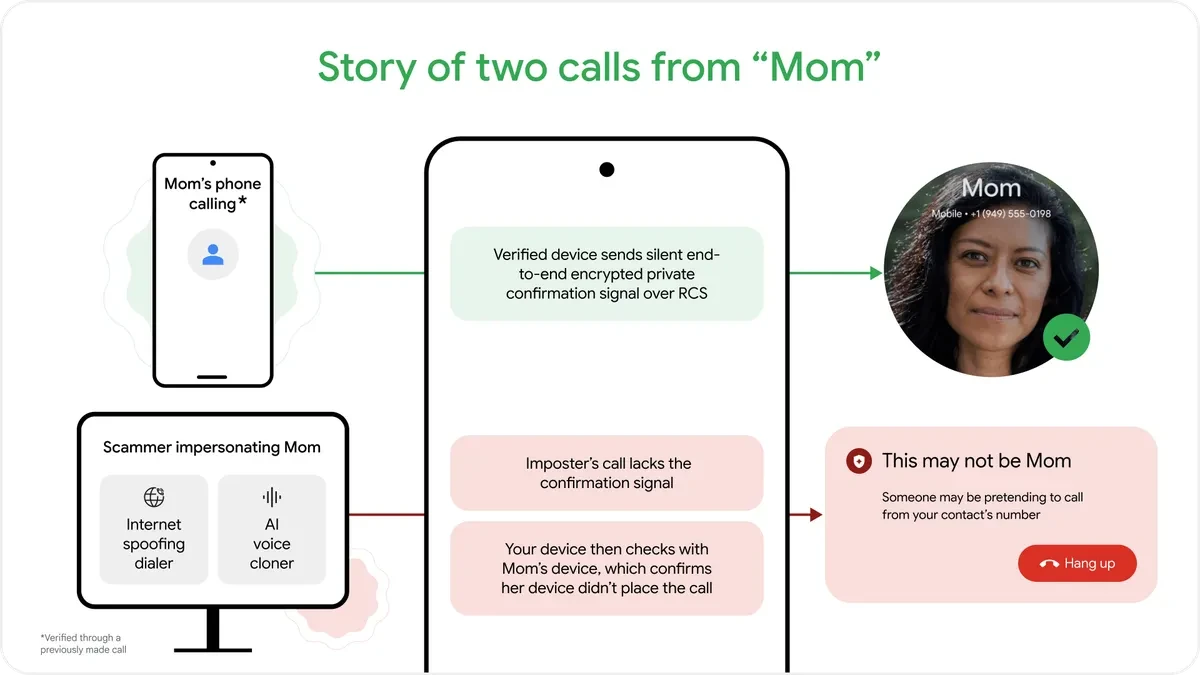
- When a contact calls you, their phone sends a silent confirmation signal to yours over RCS, which is end-to-end encrypted.
- If your phone does not get that signal, it pings the contact's real phone to ask whether it is calling you.
- If the real phone says no, your screen shows a warning that the call may be fake.
None of this needs your input, and the call content is never checked. Google says the feature "works automatically behind the scenes."
What you need
Both you and the person calling need:
- Android 12 or newer
- The Phone by Google, Contacts and Google Messages apps installed
- RCS chats turned on in Google Messages
The check works only when the spoofed number belongs to someone in your contacts who also meets these requirements. A scammer who fakes an unknown number or a business line will not trigger it, so the usual caution still applies.
How to turn it on or off
Fake call detection is on by default on supported phones, starting with Pixel and rolling out to other Android phones worldwide. To turn it off, open Phone by Google, tap the three-dot menu, go to Settings, and switch off the fake call detection option. We recommend leaving it on: it only steps in when a call that claims to be a saved contact cannot be confirmed.
Fake call detection vs Scam Detection
| Fake call detection | Scam Detection | |
|---|---|---|
| What it checks | Whether a call from a saved contact is real | What an unknown caller says during the call |
| How | Silent confirmation with the contact's phone over RCS | On-device AI listens for common scam patterns |
| Who it protects against | Spoofed numbers of people you know | Strangers posing as banks, delivery firms, support |
| Default | On | Varies by phone and country |
The two work together. Fake call detection stops a scammer who pretends to be your sister. Scam Detection catches a stranger who claims to be your bank and asks you to move money. Samsung is bringing Scam Detection to more Galaxy phones and more countries, including India, Canada and Japan, as part of the stable One UI 9 rollout. For other ways scammers target your devices, see our guide to fake GTA 6 download scams, and if you want a dedicated spam blocker on top, see these Truecaller alternatives.
FAQs
What is fake call detection on Android?
Do I need to turn fake call detection on?
Does fake call detection work on Samsung phones?
Does Google listen to my calls for fake call detection?
Will it stop every scam call?

Amit loves new tech and apps that make life easier, he writes about apps, games and useful websites on TheTechBasket.