On this page
- What Google Officially Rolled Out
- The new long-press menu
- Partial text copying
- Earlier this fall: Keep lists and chat themes
- How to Copy Part of a Text in Google Messages
- How to Get the Update
- What Is Coming Next (Beta Code, Not Announced)
- The games list
- Why This Matters
- FAQs
- How do I copy only part of a text message in Google Messages?
- Why don't I have the new long-press menu yet?
- Can you play games in Google Messages?
- Does Google Messages support video calls over RCS?
- What changed with swipe gestures in Google Messages?
- Is the new Google Messages menu on iPhone?
Google Messages finally lets you copy just part of a text. Google confirmed on its Messages Help Community on September 30, 2026 that a redesigned long-press menu "has officially launched," and it has been rolling out widely since early October. On October 7, a teardown of the latest beta also turned up a list of in-chat games Google is building.
Here is what changed, how to use the new menu, how to get the update, and what is still only in beta code.
- Official: a new floating long-press menu in Google Messages, with partial text copying, light and dark theme support and a landscape layout.
- How to copy part of a text: long press the message, long press the text again, drag the handles, then tap Copy, Translate or Select All.
- Also new in the last few weeks: Google Keep lists inside chats and per-chat themes (official, September Android Drop), plus swipe gestures for timestamps and replies.
- Beta code only: in-chat games (Chess, Pool, Darts, Cup Pong and more) and RCS video calls. Google has not announced either.
What Google Officially Rolled Out
The new long-press menu
Long press a message and you no longer get the old toolbar across the top of the screen. Instead, a floating menu appears right above the bubble you picked. Google's announcement lists quick access to Reply, Star, Forward and Info, plus editing a recently sent message and deleting it from the same menu. 9to5Google also spotted Copy and Select more for text, and Remix and Save for photos.
The redesign has full light and dark theme support that follows your system setting, and Google says the menu is now "optimized for landscape mode," so it stays usable on tablets, foldables and phones turned sideways.
Partial text copying
This is the part most people have wanted for years. Until now, Copy grabbed the whole message, so pulling a tracking number or an address out of a long text meant pasting everything and deleting the rest. Google calls partial copying "one of the most requested features."
Earlier this fall: Keep lists and chat themes
Two more official features arrived with Google's September Android Drop:
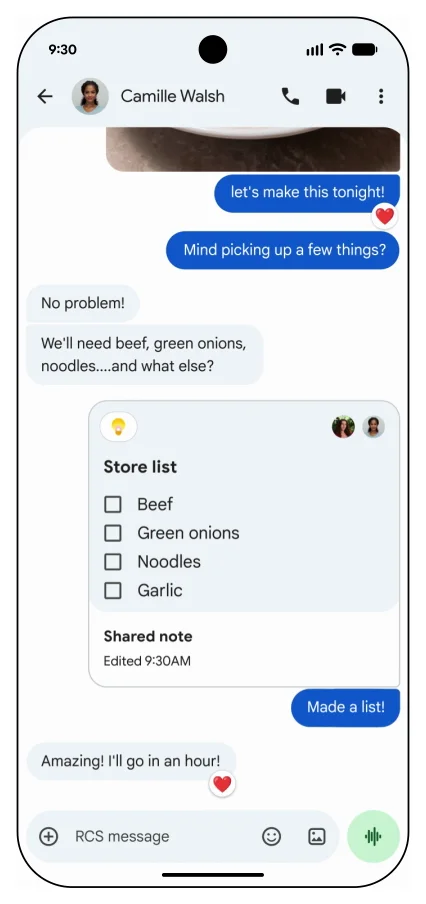
- Google Keep in Messages: share a Keep note or checklist in a chat, and everyone in the conversation can view, edit and tick off items.
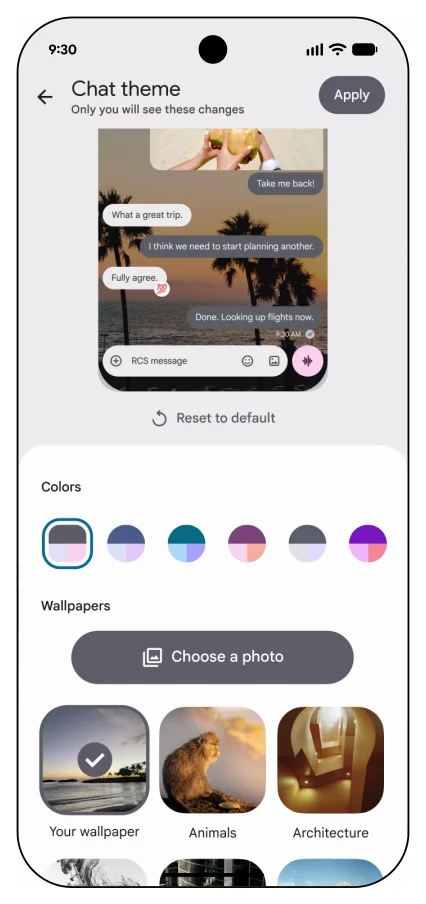
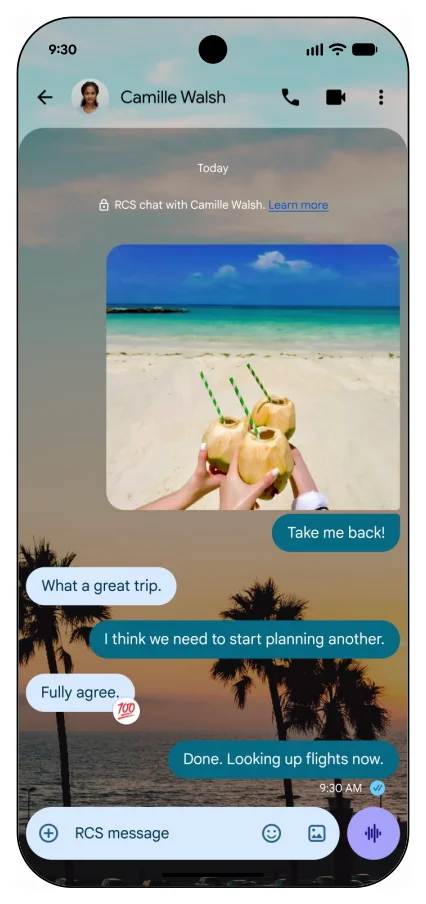
- Chat themes: give each conversation its own background (a Google wallpaper or your own photo) and bubble colors that match it.
How to Copy Part of a Text in Google Messages
These are the steps from Google's own announcement:
- Open a conversation and long press the message you want.
- When the new menu appears, long press again directly on the text inside the bubble.
- Drag the selection handles to cover only the words you need.
- In the second pop-up, tap Copy, Translate or Select All.
Since late September, 9to5Google reports that swiping left anywhere in a chat shows the timestamps (and RCS encryption status) for every message at once, and swiping right on a bubble starts a reply. Reply used to be a left swipe, so expect some muscle-memory mix-ups. We could not find a Google announcement for this change, so it may not be on every phone yet.
How to Get the Update
The long-press menu ships in the stable app (version 20260910_03_RC02, per 9to5Google), but Google also switches it on from its servers. If you do not see it yet:
- Open the Google Messages listing on Google Play and tap Update if it shows. The listing was last updated on October 5, 2026.
- Force stop the app: go to Settings > Apps > Messages > Force stop, then open Messages again. 9to5Google recommends this when a server-side feature has not appeared.
- Still nothing? Wait a few days. Server-side rollouts reach phones in waves, and there is no way to force them.
If your phone still uses another texting app by default (for example Samsung Messages on an older Galaxy), set Google Messages as your default SMS app to get any of this.
What Is Coming Next (Beta Code, Not Announced)
Everything in this section comes from app teardowns, where researchers dig through unreleased code in beta builds. It tells you what Google is working on, not what will ship or when.
| Feature | Where it was found | What we know |
|---|---|---|
| In-chat games (codename "Midnight") | Beta 20261002_00_RC00, reported by Droid Life and Android Headlines on October 7, 2026 | Nine games named in the code. No release date, and it is unclear how multiplayer would work. |
| RCS video calls | Beta 20260924_00_RC00, reported by Android Headlines on September 29, 2026 | Prompts to start a video call from a chat. No interface shown yet. |
| Per-contact RCS switch removed | Recent beta, reported by Android Authority | The option to turn off RCS for a single contact may go away, leaving only the global RCS toggle. |
Beta versions and dates as reported by each outlet. Status checked October 8, 2026.
The games list
Security researcher Abhishek Yadav found these names in the beta code, per Droid Life:
- Chess
- Checkers
- Pool
- Darts
- Cup Pong
- Basketball
- Crazy 8s
- Four in a Row
- Word Scramble
If it ships the way the names suggest, it would look a lot like the GamePigeon games iPhone users play inside iMessage. Until then, our list of the best free Android games has plenty to play with friends.
- Official (Google announced it): the long-press menu, partial text copying, light and dark theme support, landscape layout, Google Keep lists in chats, chat themes.
- Rolling out, no Google announcement found: swipe left for timestamps, swipe right to reply.
- Beta code only (may change or never ship): in-chat games, RCS video calls, removal of the per-contact RCS toggle.
Why This Matters
Google Messages is the default texting app on Pixel phones and many other Android phones, so small changes reach a lot of people at once. Partial copying closes one of the oldest gaps with iMessage, and games and video calls would close two more. If you want to see where Android itself is heading, our guide to every Android 17 feature covers the system side, and our roundup of Android customization apps pairs well with the new chat themes.
FAQs
How do I copy only part of a text message in Google Messages?
Long press the message to open the new menu, then long press again on the text itself. Drag the handles to select the words you want and tap Copy. The same pop-up also offers Translate and Select All.
Why don't I have the new long-press menu yet?
Google turns it on from its servers, so it reaches phones in stages. Update Google Messages from the Play Store, force stop the app in Settings, and reopen it. If it still does not show, wait a few days.
Can you play games in Google Messages?
Not yet. Code for nine games, including Chess, Pool and Cup Pong, was found in a beta version on October 7, 2026. Google has not announced the feature or a release date.
Does Google Messages support video calls over RCS?
Not today. A beta build contains prompts for RCS video calls, but Google has not announced the feature.
What changed with swipe gestures in Google Messages?
Swipe left anywhere in a conversation to see timestamps for all messages, and swipe right on a single message to reply. Replies used to use a left swipe.
Is the new Google Messages menu on iPhone?
No. Google Messages is an Android app. iPhone users still text Android users over RCS through Apple's Messages app, which has its own long-press menu.
Cover background: Kristin Hardwick via Negative Space, CC0.

Sumit
ContributorHi, I'm Sumit, Being an introvert I have always been obsessed with technology-computers and reading dozens of posts to learn, find answers out of my curiosity. I love to write as I explore more.